EasyManua.ls Logo

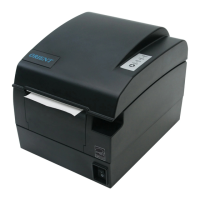
ORIENT Technologies BTP-R580 - User Manual

ORIENT Technologies BTP-R580
50 pages
Print Icon
To Next Page IconTo Next Page
Loading...





BTP-R580

Questions and Answers

  • E
    Edward Reid MDJul 31, 2025
    Why is my ORIENT Technologies BTP-R580 beeping and showing an alarm LED?
    • P
      Patrick FarrellJul 31, 2025
      The alarm LED and buzzer sound on your ORIENT Technologies Printer can indicate several issues: * **Paper end or near end**: Replace the paper roll. * **Abnormal input voltage**: Turn off the printer and check the input voltage. * **Overheated print head**: Turn off the printer and wait for the print head temperature to recover. * **Open cover**: Ensure the cover is properly closed. * **Serious fault**: Contact your distributor or the manufacturer.

Summary

General Safety Instruction

Main Specification

Technical Specification

Details the printer's performance, resolution, speed, paper handling, interfaces, and power requirements.

Outline and Parts

Error Indicators and Buzzers

Explains the meaning of LED indicators and buzzer sounds for error status.

Installation

Printer Routine Maintenance

Interface Signal

Troubleshooting

Printer Not Working

Offers solutions for common issues where the printer does not operate.

Alarm LED and Buzzer Issues

Provides troubleshooting steps for specific LED and buzzer error conditions.

Printing Problems and Cutter Reset

Addresses issues with print quality and how to reset the cutter.

Appendix A: FEED Button Configuration

ORIENT Technologies BTP-R580 Specifications

General IconGeneral
Media TypeThermal Paper
Media Width58 mm
Paper Width58 mm
Print TechnologyThermal
Print Resolution203 dpi
InterfaceSerial
Resolution203 dpi