EasyManua.ls Logo

Orisec W-CP-40E - User Manual

Orisec W-CP-40E
44 pages
Print Icon
To Next Page IconTo Next Page
Loading...
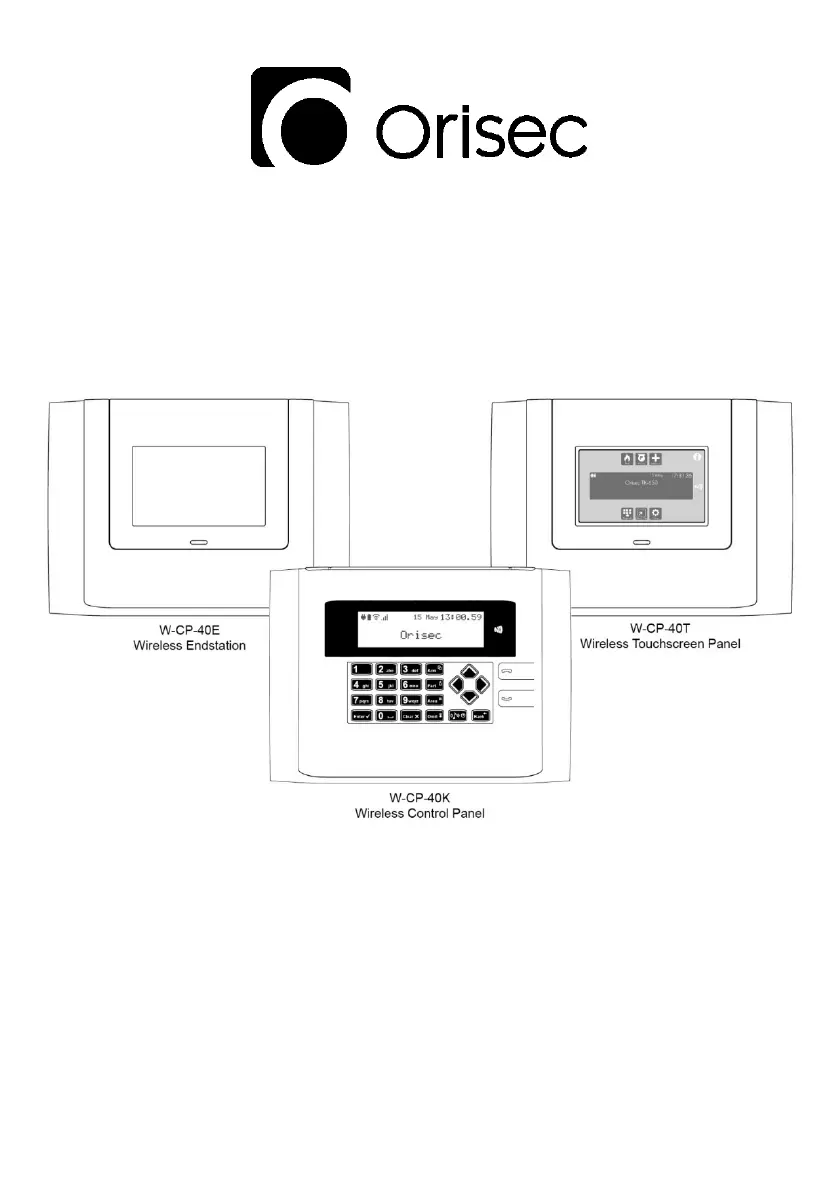
W-CP-40E, W-CP-40K & W-CP-40T
User Guide
Designed and Manufactured
in the United Kingdom
www.orisec.co.uk

Questions and Answers

  • W
    wchambersAug 15, 2025
    What to do if my Orisec Control Panel shows 'AC Fail'?
    • J
      Jason YoungAug 15, 2025
      If your Orisec Control Panel displays an 'AC Fail' message, it indicates that the main power supply to the control panel has been disconnected or lost. First, check to ensure there is not a power cut. If the power is on, contact the installation company.
  • T
    Tyler DiazAug 18, 2025
    What to do if my Orisec Control Panel shows 'Battery Fault'?
    • P
      Patrick PenaAug 19, 2025
      If your Orisec Control Panel displays a 'Battery Fault' message, it means the main panel battery has low voltage or has been removed. The internal battery should be replaced every 2-3 years.
  • M
    Melanie MackAug 21, 2025
    What to do if my Orisec Control Panel shows 'Zone 01 Alarm'?
    • J
      John MccoyAug 21, 2025
      If your Orisec Control Panel shows 'Zone 01 Alarm', it means that the zone has recently been alarmed and is awaiting a reset. To resolve this, enter your user code and select ‘Reset Alarms’.
  • J
    Joshua McgeeAug 25, 2025
    What does 'Zone 01 Active' mean on my Orisec Control Panel, and how to fix it?
    • T
      toddmurphyAug 26, 2025
      If your Orisec Control Panel displays 'Zone 01 Active', it indicates that the zone is reporting an open state to the main control panel. Check the device to ensure it is not a door or window that has been left open.
  • V
    Vanessa CarterAug 28, 2025
    What does 'Tamper (Bell/ Panel Lid/ Aux/ Keypad/ Expander)' mean on my Orisec Control Panel, and how can I fix it?
    • C
      Carla LeeAug 28, 2025
      If your Orisec Control Panel displays a 'Tamper (Bell/ Panel Lid/ Aux/ Keypad/ Expander)' message, it indicates that the device's lid is not making proper contact. Check the lid of the device to ensure it is securely fastened.
  • J
    Jesse GlassSep 1, 2025
    What does 'Zone 01 Masked' mean on my Orisec Control Panel, and how do I resolve it?
    • D
      Diana BerrySep 1, 2025
      If your Orisec Control Panel displays 'Zone 01 Masked', it indicates that an object is potentially obstructing its view. Check the area where the detector is located for anything that may be causing an obstruction.
  • T
    Tammy BaldwinSep 4, 2025
    What does 'Zone 01 Tamper' mean on my Orisec Control Panel, and how do I fix it?
    • J
      John SmithSep 4, 2025
      If your Orisec Control Panel displays 'Zone 01 Tamper', it indicates that the zone's lid is not making a tight connection. Check the lid of the device to ensure it is securely fastened.
  • W
    wendyramosSep 7, 2025
    What does 'Confirm Devices' mean on my Orisec Control Panel, and what should I do?
    • M
      Mary BradleySep 7, 2025
      If your Orisec Control Panel displays 'Confirm Devices', it indicates that a networked device on the security system has been removed. Contact the installation company.
  • S
    Sandra GonzalezSep 12, 2025
    Why are some zones 'Omitted' on my Orisec Control Panel?
    • C
      Colleen BarnesSep 12, 2025
      If zones are 'Omitted' on your Orisec Control Panel, it means that a user has manually disabled certain zones from operating on the system. Ask an installer or master user to help reinstate the zones if required.

Orisec W-CP-40E Specifications

General IconGeneral
Zones40
Partitions4
Users50
Keypads8
Event Log1000 events
Operating Temperature-10°C to +55°C
Humidity95% non-condensing
Weight1.5 kg
Communication InterfaceRS-485, USB
CommunicationEthernet, GSM, PSTN

Related product manuals