22
Omitting Zones
Zones can be omitted to temporarily prevent them from causing an alarm either during the
disarmed mode (24hr zones) or prior to arming the system. Only the ‘Master’ and ‘Manager’
user types can omit zones. To omit one or more zones, please proceed as follows:
1. Enter code or present tag to select the user menu.
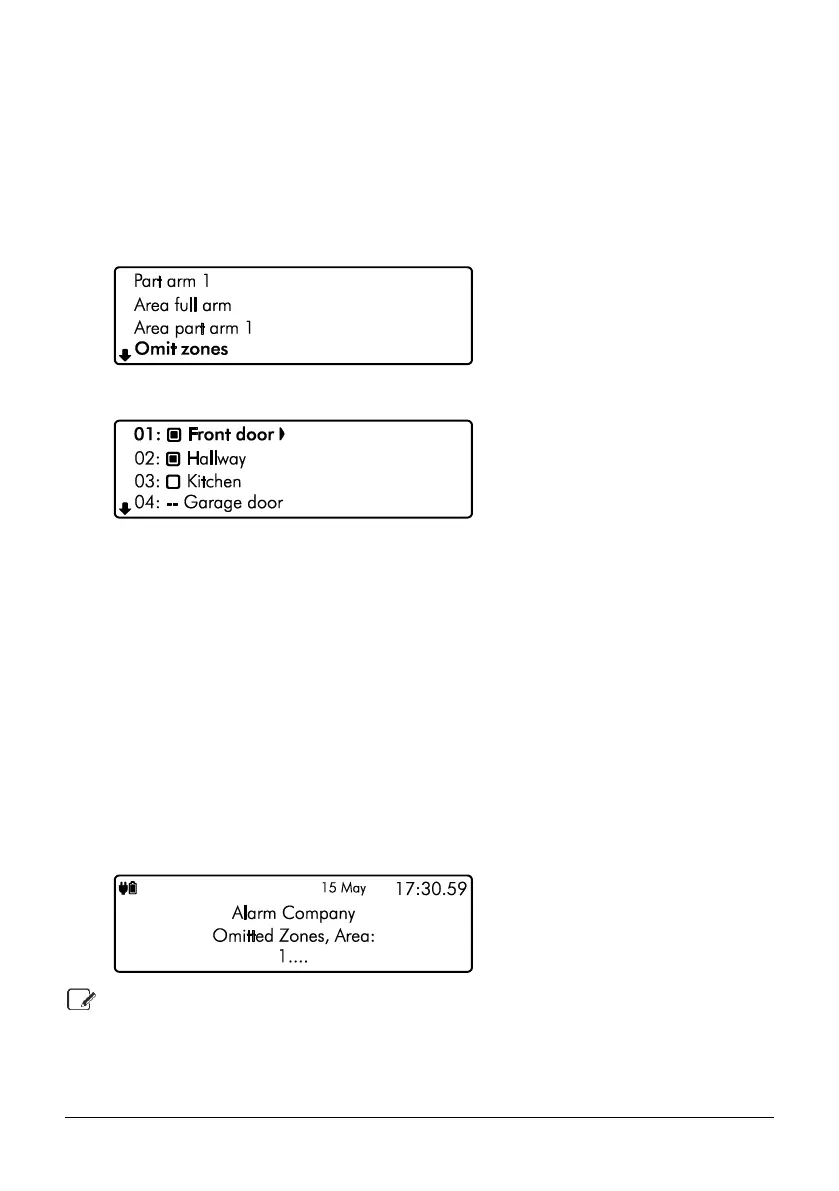
2. From the user menu, use the U and D keys to scroll to ‘Omit zones’:
3. Press E or k to select, the ‘Omit zones’ menu is now displayed:
` Zone will be omitted
a Zone will continue to be monitored
-- Zone cannot be omitted
4. Use the U and D keys to select the required zone then use the L and R keys
to turn omit on or off.
5. When you’ve finished omitting the zone(s), press the B or @ key to return to the
user menu. If required, the system can be armed or part armed with selected zone(s)
omitted by selecting the relevant arming menu.
6. If the system is not going to be armed now, then use the U and D keys to scroll to
‘Exit menu’ option then press E or k to return to the home screen. The keypad will
display a reminder that zones are omitted:
If the “Reinstate on Disarm” option is enabled by your installer, the selected zones are
automatically reinstated when the system is disarmed.
To reinstate a bypassed zone simply select the zone at step 3 in the above procedure.


 To Next Page