57
REV. 00 - Cod.: 1500154
Operation and maintenance manual / Ed. 10 - 2005
VACUUM CHAMBER
PACKAGING MACHINES
GB
GB
GB
6.2.2 MACHINES WITH DIGITAL CONTROLS
PRELIMINARY CALIBRATION OF MODELS WITH VACUUM SENSOR
USING THE APPLIANCE
DIGITAL CONTROLS
MULTIPLE VM12/VM16
In models with sensor, with vacuum setting in percentage, when the machine is used for the first time, the vacuum sensor must be
calibrated according to the atmospheric pressure (depending on altitude), as follows:
• Switch the machine On keeping the PROG key pressed simultaneously. The display shows TAR.
• Lower the lid with both hands, exerting slight pressure at the corners. The machine will start calibration which ends automatically
after about two minutes with air returning to the chamber and consequent opening of the lid.
• The procedure is repeated automatically if the machine is moved to a place at a different altitude.
OPERATION AND PROGRAMMING OF MODELS: MULTIPLE 315-P4/P8 - VM12 - VM16
WARNING! the appliance has two basic programs (models without gas option) or three basic programs (models with gas
option) that are factory-set. The user must proceed with programming the remaining programs according to his operating
requirements, depending on the type and wquantity of product to be packed.
PROGRAMMING THE VAC, GAS, SEAL AND SOFTAIR
FUNCTIONS OF MODELS MULTIPLE 315-P4/P8 - VM12 - VM16
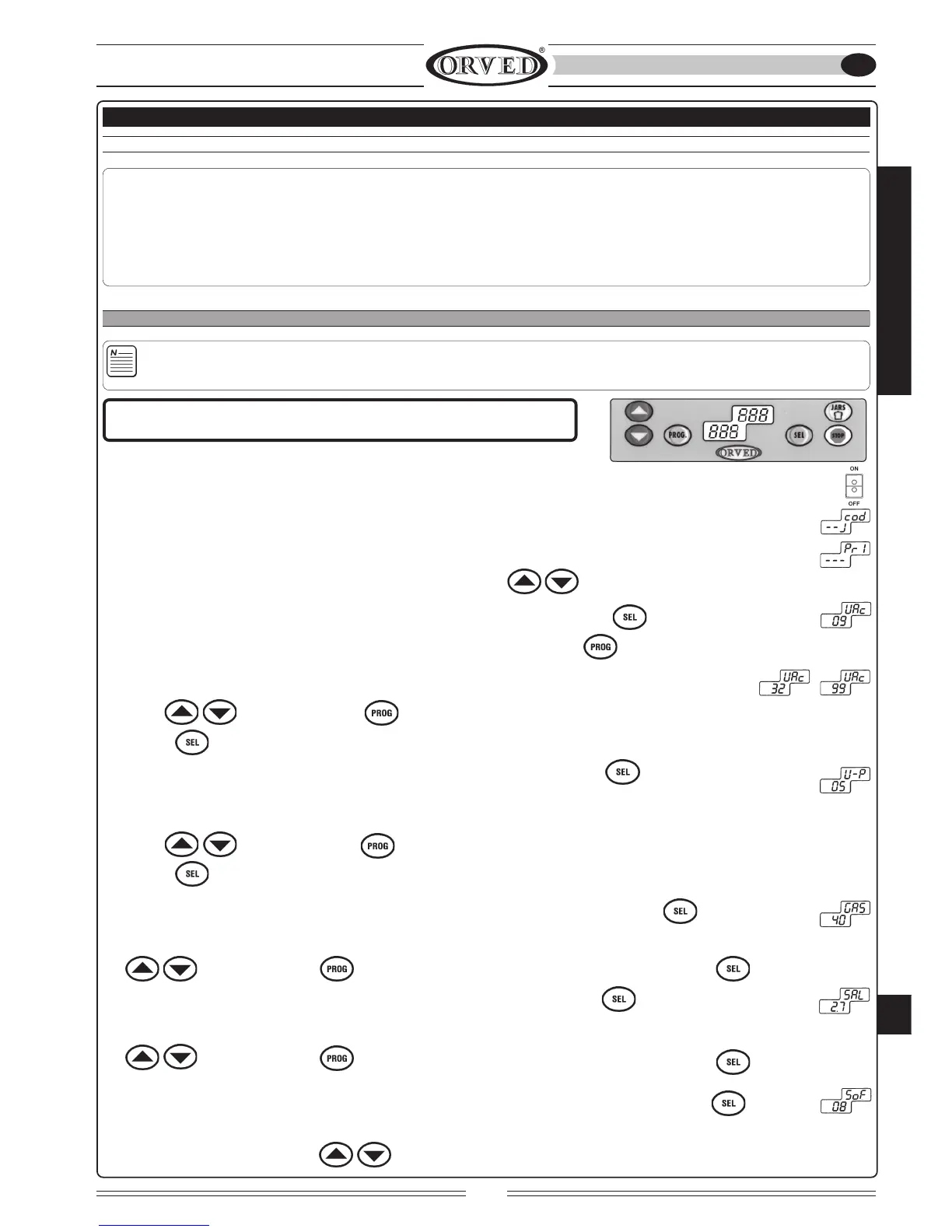
1) SWITCHING ON
Turn On the main switch on the control panel; the LED in the switch lights up; the display shows the initials of the options available
for three seconds; this is followed by display of the program number set in the top quadrant
and eventual functions activated in the bottom quadrant
(V=JARS; G=GAS; S=SOFTAIR).
2) PROGRAM SELECTION: Select the program (from 0 to 9) using arrows .
3) SELECTING THE VAC FUNCTION (See page 49): Select the VAC function by means of key
4) PROGRAMMING THE VAC FUNCTION (See page 49): Enter the program by pressing : the digits on the display start flashing.
Set the required value expressed in seconds or percentage (in machines provided with vacuum sensor) using
arrows . Confirm by means of or proceed with programming the successive functions by
pressing .
5) SELECTING THE VAC+ FUNCTION (See page 49): Select the VAC+ function by means of . The function is active and visible
only in machines with vacuum sensor.
6) PROGRAMMING THE VAC+ FUNCTION (See page 49): The digits on the display start flashing. Set the required value using
arrows . Confirm by means of or proceed with programming the successive functions by
pressing .
7) SELECTING THE GAS FUNCTION (OPTIONAL) (See page 49): Select the GAS function by means of
8) PROGRAMMING THE GAS FUNCTION (See page 49): The digits on the display start flashing. Set the required value using arrows
. Confirm by means of or proceed with programming the successive functions by pressing .
9) SELECTING THE SEAL FUNCTION (See page 49): Select the SEAL function by means of
10) PROGRAMMING THE SEAL FUNCTION (See page 49): The digits on the display start flashing. Set the required value using arrows
. Confirm by means of or proceed with programming the successive functions by pressing For bags with
basic weight 90/100, set the value as 2.2 - 3 seconds.
11) SELECTING THE SOFTAIR FUNCTION (OPTIONAL) (See page 49): Select the SOFTAIR function by means of
12) PROGRAMMING THE SOFTAIR FUNCTION (See page 49): The digits on the display start flashing.
Set the required value using arrows .



 To Next Page