H07401<2>
3
1. Preface
The power supply has a serial interface in conformity with RS232C. It operates the power
supply and monitors operational information through the upper host computer. In all operation
modes, all commands are effective except START and STOP.
1) Operations
Start/stop the pump
2) Monitor of operational information
Status (Standby / Acceleration / Normal / Brake / Reacceleration /Failure)
Details of failure
Total operational time of the power supply
Output frequency(Rotating speed)
2. Operation mode
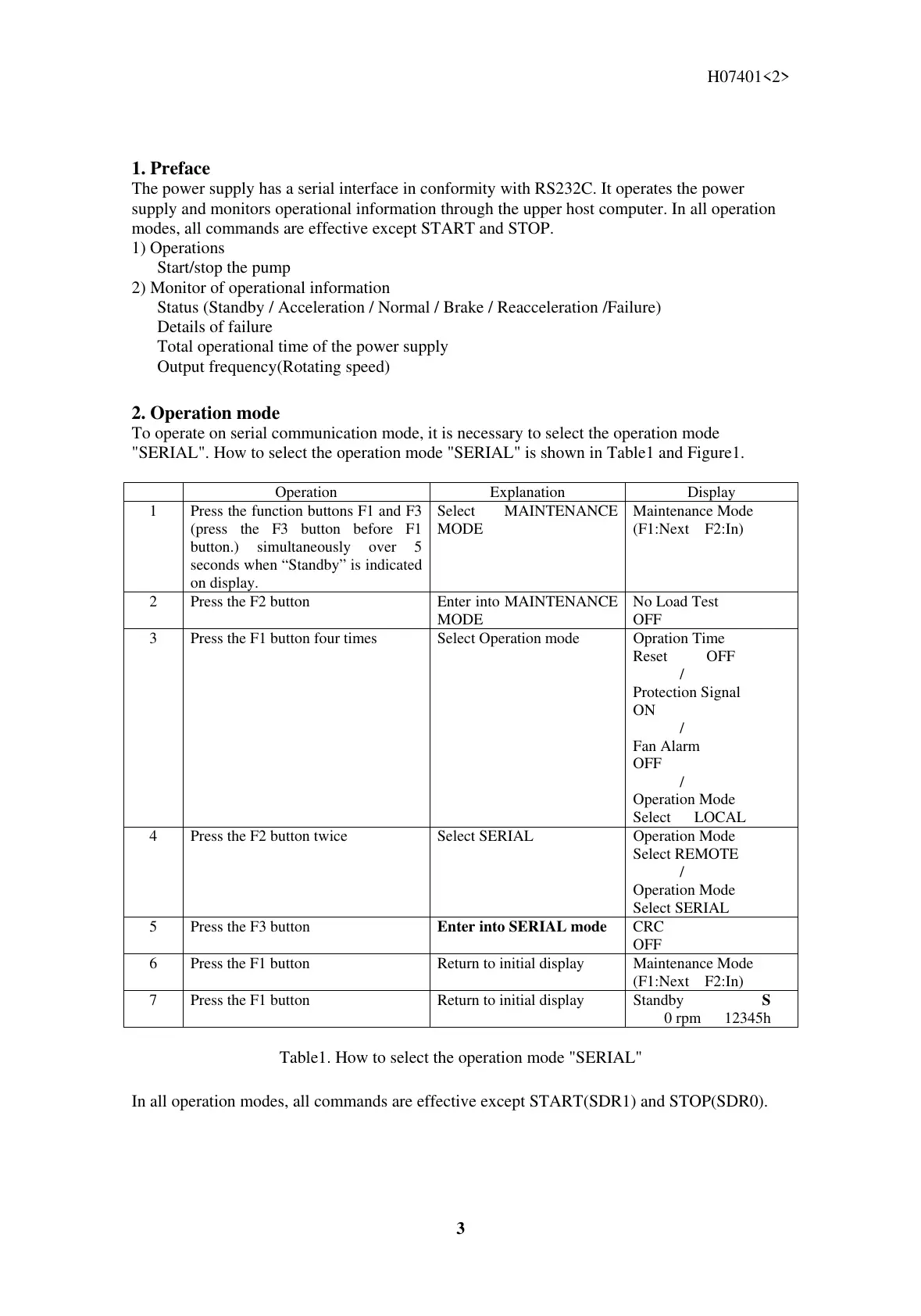
To operate on serial communication mode, it is necessary to select the operation mode
"SERIAL". How to select the operation mode "SERIAL" is shown in Table1 and Figure1.
Operation Explanation Display
1 Press the function buttons F1 and F3
(press the F3 button before F1
button.) simultaneously over 5
seconds when “Standby” is indicated
on display.
Select MAINTENANCE
MODE
Maintenance Mode
(F1:Next F2:In)
2 Press the F2 button Enter into MAINTENANCE
MODE
No Load Test
OFF
3 Press the F1 button four times Select Operation mode Opration Time
Reset OFF
/
Protection Signal
ON
/
Fan Alarm
OFF
/
Operation Mode
Select LOCAL
4 Press the F2 button twice Select SERIAL Operation Mode
Select REMOTE
/
Operation Mode
Select SERIAL
5 Press the F3 button
Enter into SERIAL mode
CRC
OFF
6 Press the F1 button Return to initial display Maintenance Mode
(F1:Next F2:In)
7 Press the F1 button Return to initial display Standby S
0 rpm 12345h
Table1. How to select the operation mode "SERIAL"
In all operation modes, all commands are effective except START(SDR1) and STOP(SDR0).



 To Next Page