OSAKA – USER MANUAL – F 500 / F 500-RS – V.1 – Page 1
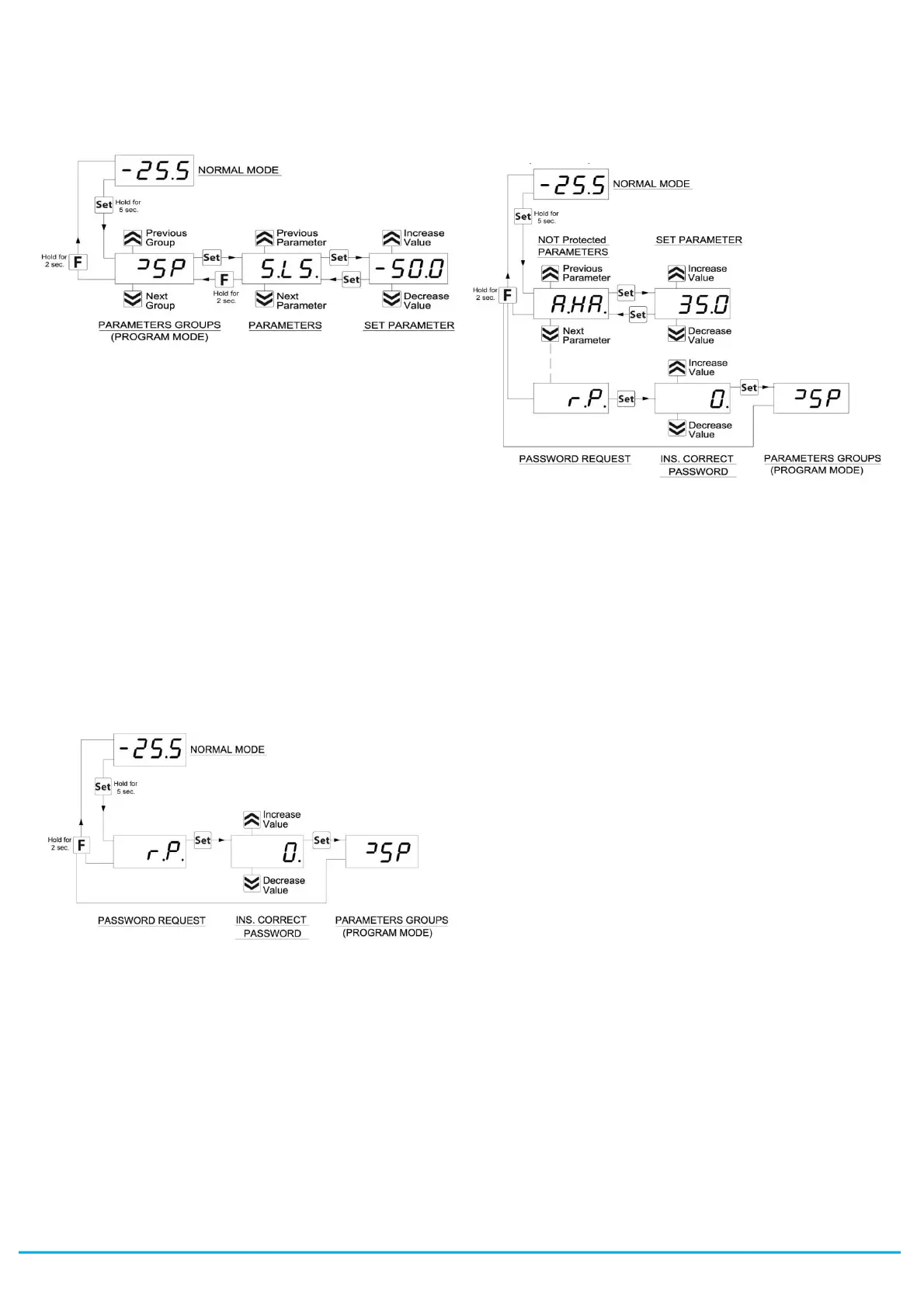
Pressing the UP and DOWN keys, it is possible to select another
group of parameters, another parameter and change it as
described.
To exit the programming mode, do not press any key for about 30
seconds, or keep the STAND-BY key pressed for 2 sec. until it exits
the programming mode.
2.3 - PARAMETER PROTECTION USING THE PASSWORD
The instrument has a parameter protection function using a
password that can be personalised, through the “t.PP” parameter.
If one wishes to have this protection, set the password number
desired in the parameter “t.PP”. When the protection is activate,
press the SET key to access the parameters and keep it press for
about 5 seconds, after which the display will show “r.P” .
At this point press SET, the display show “0”, using the UP and
DOWN keys, set the password number programmed and press the
Key SET.
If the password is correct, the display will visualise the code that
identifies the first group of parameters and it will be possible to
program the instrument in the same ways described in the previous
section.
Protection using a password can be disabled by setting the
parameter “t.PP” = oF.
Note: If the Password gets lost, just swith off and on the instrument
supply, push SET key during the initial test and keeping the key
pressed for 5 seconds.
In this way it’s possible to have access to all the parameters, verify
and modify the par. “t.PP”.
2.4 - CUSTOMIZED MODE PARAMETER PROGRAMMING
(PARAMETERS PROGRAMMING LEVEL)
The password protection hides all the configuration parameters
behind a factory set password to avoid unwanted changes being
made to the programming of the controller.
To make a parameter accessible without having to enter the
password when “t.PP” password protection is activate follows this
procedure.
Enter the programming using the Password “t.PP” and select the
parameter which is desired to be accessible with no password
protection.
Once the parameter has been selected, if the SET led is blinking,
this means that the parameter is programmable by entering the
password (it’s then “protected”) if it’s instead on, this means the
parameter is programmable without password (not protected).
If you want to change the accessibility of the parameter push SET
key, keep it pressed and press together also the key UP.
The led SET will change its state indicating the new access level of
the parameter (on = not protected; blinking = protected by
password).
In case some parameters are not protected, when one tries to have
access at the programming, the display will show all the parameters
not protected and the par. “r.P” (through which will be possible to
have access to the “protected” parameters).
With regard to setting unprotected parameters, an exception is
HACCP alarm-related parameters (“H.01”, “H.02”, etc. which are
visible only when there are alarms stored in memory) whose display
level can be set via the “t.HA” parameter.
If “t.HA” = 1, parameters relating to stored HACCP alarms are
visible only within the
]
HA group (which can be displayed like all
other groups without a password if t.PP=oF or by entering the set
t.PP password).
If “t.HA” = 2, parameters relating to stored HACCP alarms are
visible both within the "
]
HA" group (which can be displayed like all
other groups without a password if t.PP=oF or by entering the set
t.PP password) and as unprotected parameters if the t.PP
parameter is given a password.
2.5 - RESET PARAMETERS TO DEFAULT VALUE/LEVEL
The instrument allows the reset of the parameters to values
programmed in factory as default.
To restore to the values of default the parameters set the value -48
to “r.P” password request.
Once confirmed the password with the Key SET the display it
shows "---" for 2 sec. therefore the instrument effects the
parameters reset.
2.6 - KEYBOARD LOCK FUNCTION
On the instrument it’s possibile to lock completely the keyboard.
This function is particularly useful when the regulator is reachable
by the users and it’s desired to avoid any modification.
To activate the keyboard lock it’s enough program the par. “t.Lo” to
a different value to oF.
The value program to this parameter it is the time of inactivity of the
keys afterwhich the keyboard will be locked.
Insofar not pressing any key for the time "t.Lo" the instrument
automatically disable the normal functions of the keys.
When the keyboard is lock, if any of the key is pushed, on the
display will appear “Ln” to indicate the active lock.
To unlock the keyboard it’s enough to contemporarily push Key
SET and UP and keep them pushed for 5 sec., afterwhich the label
“LF” will appear on the display and all the keys functions will be
available again .
2.7 - SETTING THE CURRENT TIME AND DATE
If the instrument is supplied with the internal calendar/clock, this
must be enabled and programmed to the current time and day of
the week using the “c.CL” parameter, and to the current date using
the “c.dt” parameter.


 To Next Page
 Loading...