OSAKA – USER MANUAL – F 500 / F 500-RS – V.1 – Page 1
The 4 temperature probe inputs can be used to regulate cell
temperature, measure evaporator temperature, and measure two
auxiliary temperatures (e.g. product temperature, condenser
temperature, temperature of a second evaporator, etc.).
Two digital inputs are always available and, as an alternative to the
Pr3 and Pr4 temperature probe inputs, two other digital inputs can
be configured.
The 4 digital inputs can be configured to execute various functions
such as cell door signal, defrost commands, selecting a different
temperature-regulating set point, reporting an external alarm,
activating a continuous cycle, activating the auxiliary output, etc.
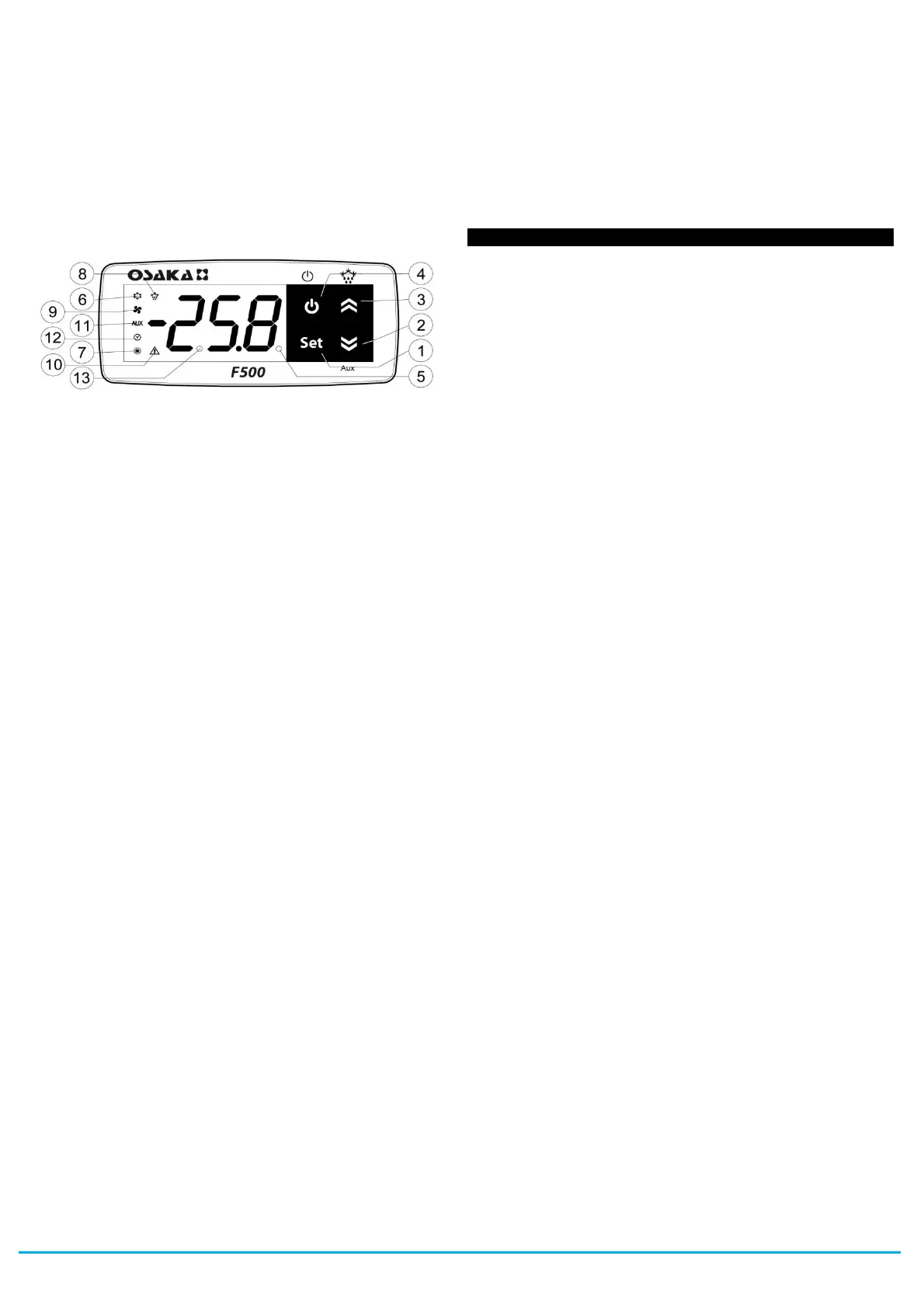
1.2 - FRONT PANEL DESCRIPTION
1 - Key SET : Used for setting the Set point (press and release) and
for programming the function parameters (hold pressed for 5 sec.)
In programming mode is used to enter in parameters edit mode and
confirm the values. In programming mode it can be used together
with the UP key to change the programming level of the
parameters.
When the keyboard is locked it can be used together with the UP
(hold pressed for 5 sec.) key to unlock the keyboard.
2 - Key DOWN/Aux : In programming mode is used for decreasing
the values to be set and for selecting the parameters. In normal
mode it can also be programmed via the parameter “t.Fb” to carry
out other functions (hold pressed for 1 sec.) such as activating the
Aux output, starting up the continuous cycle, etc. (see functions of
keys STAND-BY and Down).
3 - Key UP/DEFROST : In normal mode can be used to start/stop
manual defrosting (hold pressed for 5 sec.). In programming mode
is used for increasing the values to be set and for selecting the
parameters. In programming mode can be used togetherwith Key
SET to change parameters level. Pressed together with the Key
SET for 5 sec. allow the keyboard unlock
4 - Key STAND-BY : Used (press and release) for visualising the
instrument variables (measured temperatures etc.). In programming
mode can be used to come back in normal mode (hold for 2 sec.).
In normal mode it can also be programmed via the parameter “t.UF”
to carry out other functions (hold pressed for 1 sec.) such as
turning on and off (stand-by) the device, activating the Aux output,
starting up the continuous cycle, etc. (see functions of keys STAND-
BY and Down).
5 - Led SET : In normal mode it serves to indicate when a key is
pressed. In programming mode indicates the programming level of
the parameters.
6 - Led OUT - COOL : Indicates the output status (compressor or
temperature control device) when the istrument is programmed for
cooling operation; on (on), off (off) or inhibited (flashing).
7 - Led OUT - HEAT : Indicates the output status (compressor or
temperature control device) when the istrument is programmed for
heating operation; on (on), off (off) or inhibited (flashing).
8 - Led DEFROST : Indicates defrosting in progress (on) or
drainage time in progress (flashing)
9 - Led FAN : Indicates fan output status on (on), off (off) or
delayed after defrosting (flashing)
10 - Led ALARM : Indicates the alarm status (on), off (off) and
silenced or memorized (flashing)
11 - Led AUX : Indicates AUX output status on (on), off (off) or
inhibited (flashing)
12 - CLOCK LED : Indicates that the internal clock is running. If
flashing slowly, it means that there is a clock error (clock chip not
working). If flashing rapidly, it means the clock battery is drained.
13 - Led Stand-By: Indicate the Stand-by status.
2.1 -FAST PROGRAMMING OF SET POINT
Press the Key SET then release it and the display will show “SP”
(or “SPE”) alternating with the set value.
To change it press the UP key to increase the value or DOWN to
decrease it.
These keys increase or decrease the value one digit at a time, but if
the button is pressed for more than one second the value increase
or decreases rapidly, and after two seconds pressed, the speed
increases even more to all the desired valued to be reached rapidly.
However, through par. "t.Ed” is possible to determine whether and
which Sets are set with the fast mode by button SET.
The parameter is programmable with a value between oF and 4
which means that:
oF = Nothing is set with the Key SET (the SET pressed and
released has no effect)
1 = can be adjusted only SP (normal)
2 = can be adjusted only SPE (economic)
3 = can be adjusted both SP and SPE
4 = can be adjusted the active set (SP or or SPE)
5 = can be adjusted SP and SPH (“Turbo” or ind. “Heating”)
6 = can be adjusted SP, SPE and SPH
For example, if the parameter "t.Ed" = 1 or 3, the procedure is as
follows:
Press Key SET then release it and the display will show "SP"
alternate value.
To modify press key UP or DOWN to increase the value to
decrease.
If there is only the Set Point 1 ("t.Ed" = 1) once the desired value by
pressing the SET button to exit the Set programming mode.
If is also programmable the EconomicSet Point ("t.Ed" = 3) by
pressing and releasing the SET key again the display will show
"SPE" alternate to the set value.
To modify press key UP or DOWN like Set “SP”.
When the desired value is set press the Key SET to exit from Set
Point programming mode.
Exiting the Set mode is achieved by pressing the SET key or
automatically if no key is pressed for 10 seconds. After that time the
display returns to the normal function mode.
2.2 - STANDARD MODE PARAMETERS PROGRAMMING
To access the instrument’s function parameters when password
protection is disable, press the Key SET and keep it pressed for
about 5 seconds, after which the display will visualised the code
that identifies the first group of parameters (“
]
SP “).
Using the UP and DOWN keys, the desired group of parameters
can be selected and pressing the SET key, the display will show the
first parameter code of the group.
Using the UP and DOWN keys, the desired parameter can be
selected and pressing the SET key, the display will alternately show
the parameter code and its setting that can be changed with the UP
and DOWN keys.
Once the desired value has been set, press the Key SET again: the
new value will be memorised and the display will show only the
code of the selected parameter.
Pressing the UP and DOWN keys, it is possible to select another
parameter and change it as described.
To come back at the group selection mode keep the STAND-BY
key pressed for 1 sec. until will show the code group.


 To Next Page
 Loading...