6
Names of parts and functions
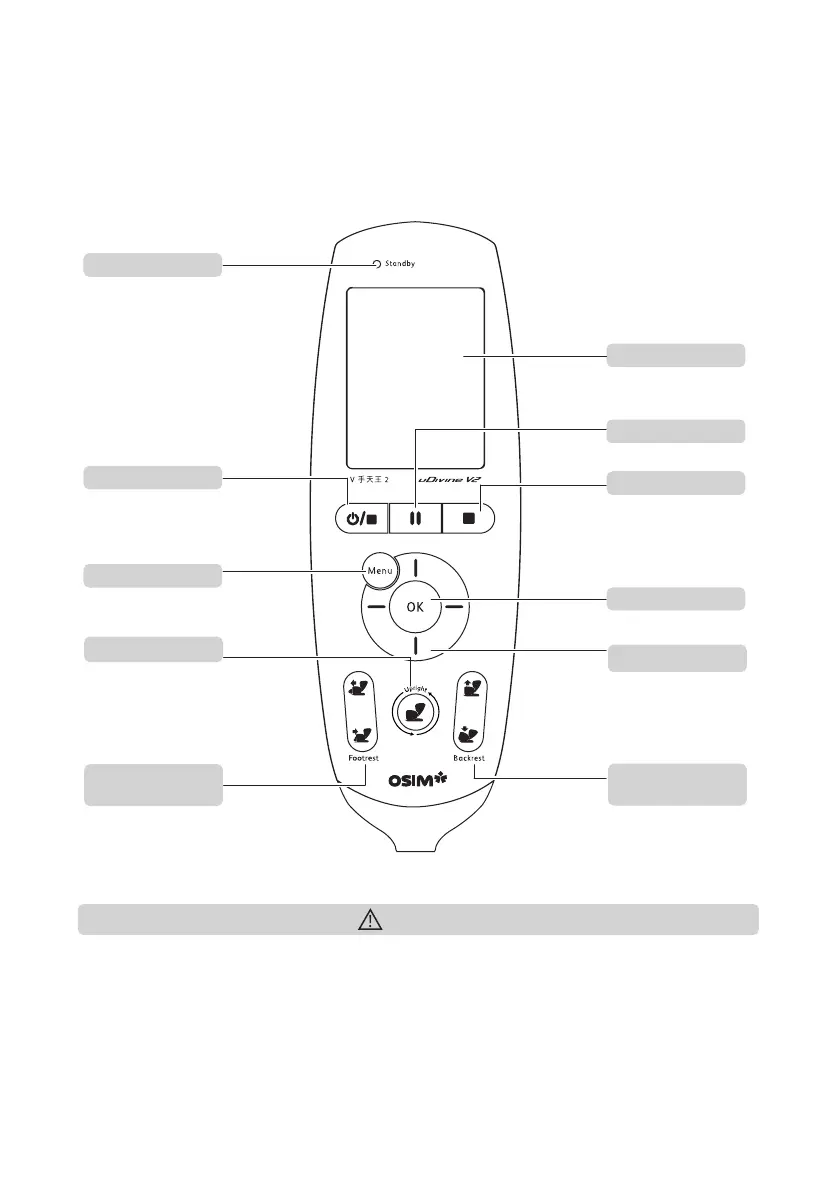
Controller
To power On/Off the
uDivine V2. To end
massage sequence and
return rollers to default
position.
To stop chair operation
immediately.
To raise/extend or
lower/retract the footrest
to desired height/length.
To pause massage program.
Power/Stop button
Main menu button
Safety stop button
Pause button
LCD display
Footrest adjustment
buttons
Backrest adjustment
buttons
OK button
To raise or recline the
backrest to desired angle.
To make selection in the
menu.
To return the controller
display back to main menu.
• Do not sit, step or place heavy objects on the controller.
• Refrain from dropping the controller. It is recommended that the controller be placed in the
side pocket when not in use.
• Do not exert excessive force on the controller.
• Do not handle the controller with wet hands.
• Do not operate the controller using sharp-edged or hard objects. It may result in damage.
Caution
Navigation buttons
Buttons for navigation in
the menu.
Standby LED
To raise/extend or
lower/retract the backrest
and footrest to default
upright position.
Upright button



 To Next Page