15
TT TV BOX
16
TT
TV BOX
7.1 Please unzip the upgrade package to the SD card .There will be three
files in the root of the SD card as follow,
factory_update_param.aml (Some upgrade packages don’t have this file)
xxx.zip (the upgrade package zip file)
recovery
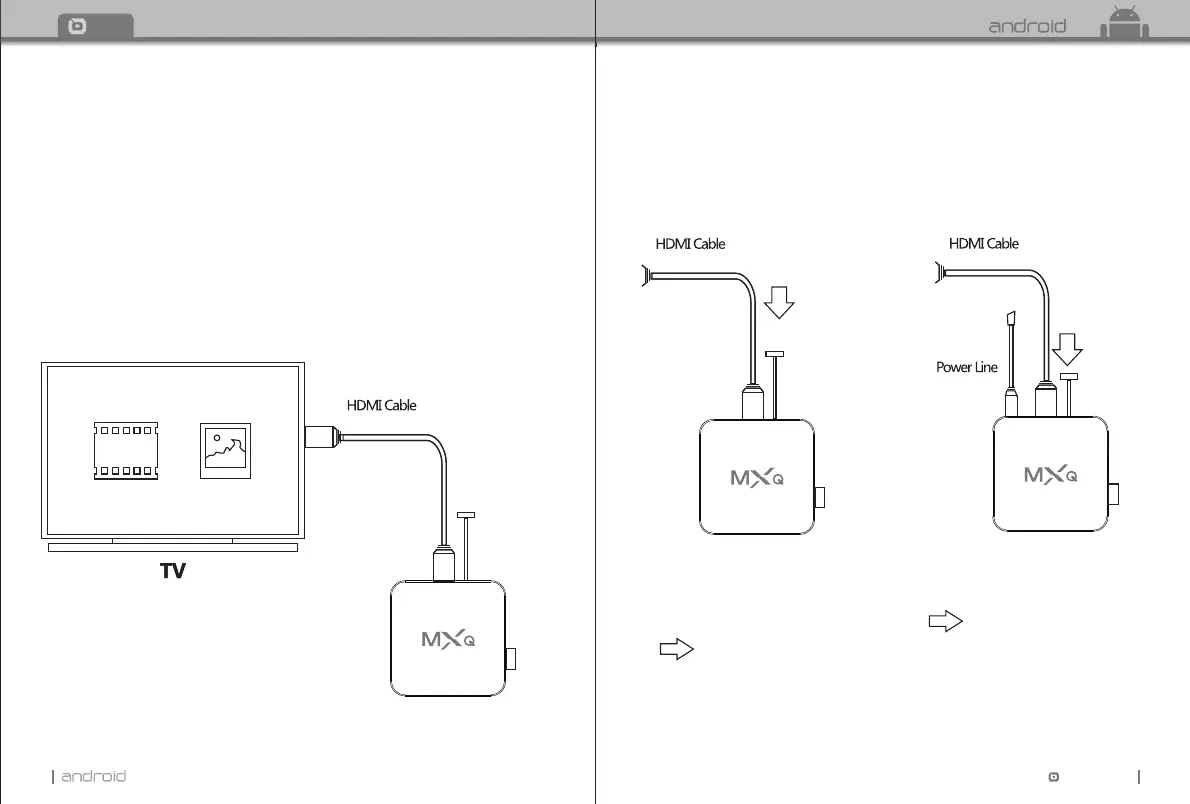
7.2 Insert HDMI cable and SD card with the box.
(connect the other side of the HDMI cable to the TV HDMI port.
7.3 Insert a stick into AV port.
There is a reset button inside AV port.
7.4 Insert power adaptor.
7.5 You can stop pressing the reset button until you see the android robot. And use
Press
Press
And keep pressing the button.
(still pressing the button)
the remote to choose apply update from EXT" "
choose Update from sdcard" "
choose xxx.zip (the upgrade package file) and press OK. " "
Chapter 7 Upgrade Steps
Stick
SD card
SD card
Stick
SD card


 To Next Page