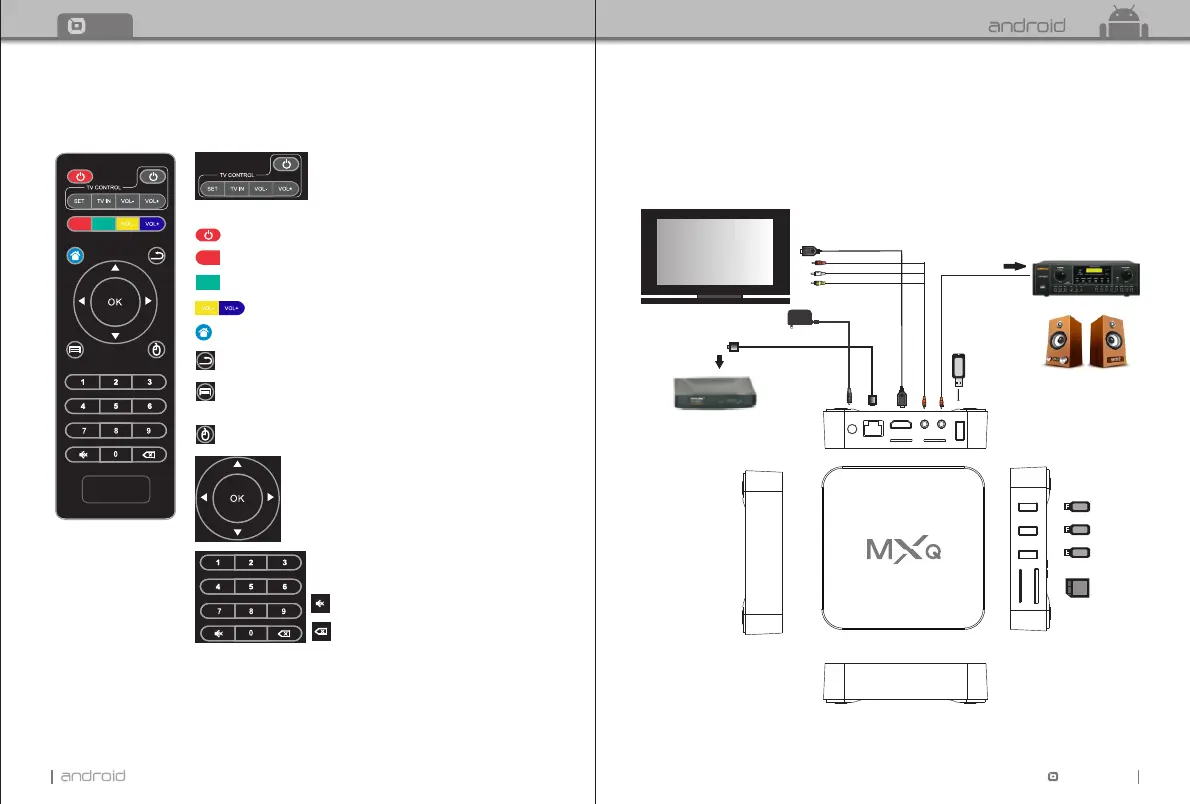
MUTE:Press to turn down the volume.
SETUP: Fast key to go to system setup.
POWER: Press to standby.
APP: Fast key to go to android application.
MENU: Press to choose function menu of corresponding
application in video, music, photo and website.
Navigation:Press to navigate left/right/up/down.
Press OK to confirm your choice.
Number keypad 0-9:Press to input Arabic number.
RETURN: Press to return back to previous menu.
HOME: Fast key to go back to main menu.
VOL: Press to increase/decrease the volume.
Cursor:Press to use the navigation button as cursor.
Backspace:Press to backspace the input.
TT TV BOX
03
Chapter 2 Remote Controller
2. 1 Introduction of Remote
04
TT
TV BOX
Chapter 3 System Connection
3. 1 AV Connection
3. 2 HDMI Connection
USB -4
AV cable
Router
Adaptor cable
Amplifier
USB-3
USB-2
USB-1
SD/MMC
Network cable
Television
SD/MMC
USB-1 USB-2
USB-3
USB-4
SPDIF
AV
HDMI ETHERNET
5V DC
Spdif
Coaxial cable
HDMI cable
Home Theater Speaker 5.1 Channel
SETUP
APP
SETUP
APP
TV CONTROL AREA: Press to learn from the TV IR remote to control TV.


 To Next Page