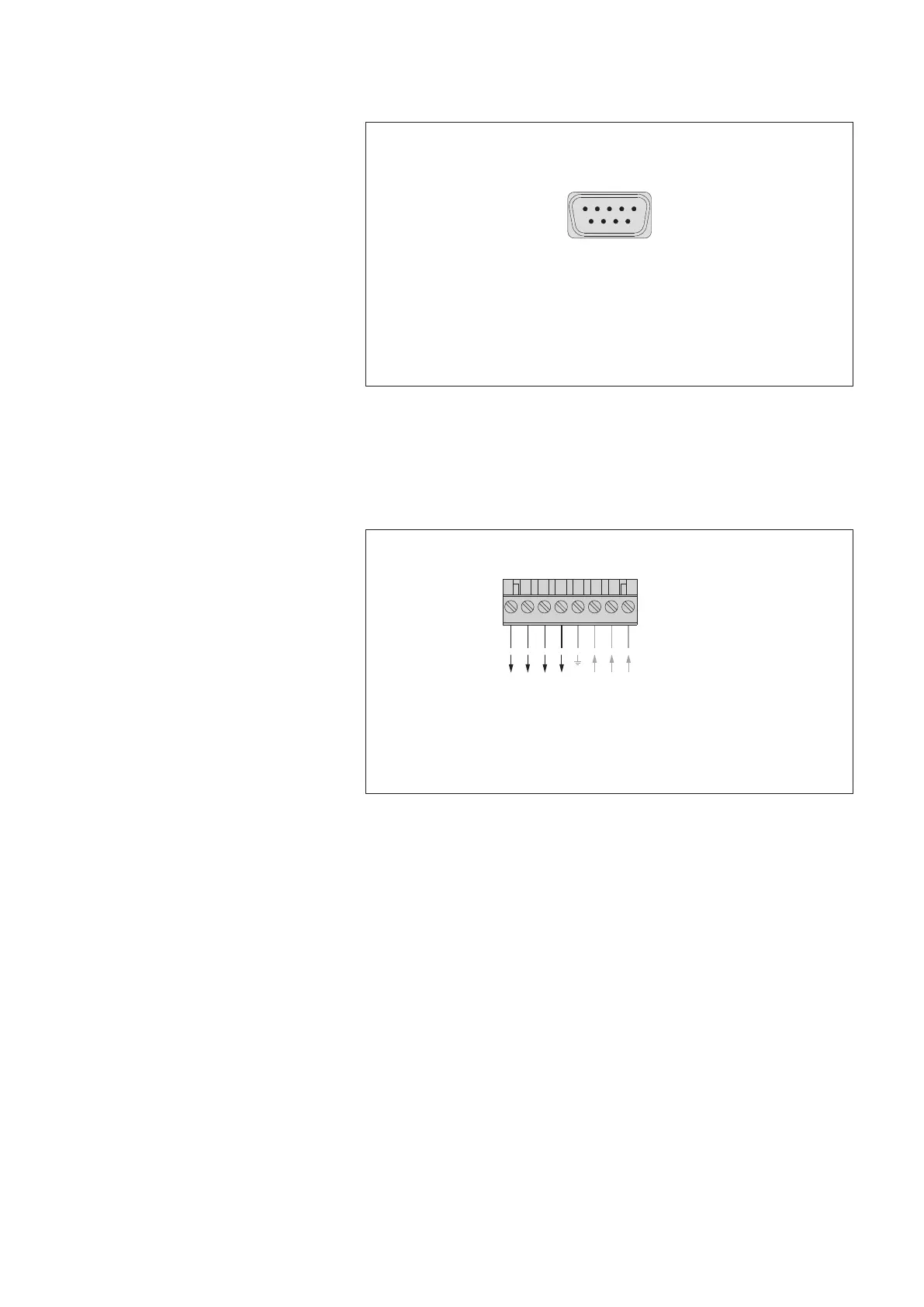
7.11 Connecting sensors having an RS-232 interface *
7.12 Connecting switching contacts
* OTT netDL with expansion RS-232 input card
(refer to Chapter 2 "Ordering numbers and version code")
1 5
9
6
RS-232 interface G-H, J-K, L-M
1)
6
(DSR)
7 (RTS)
8
(CTS)
9 (RI)
1
(DCD)
2 RXD
3
TXD
4 (DTR)
5 GND
1)
OTT netDL 1000 only
Fig. 18: Connecting sensors with RS-232
interface to the OTT netDL unit (e. g.
OTT Nimbus bubble sensor).
A variety of sensors with RS-232
interface require a connection using
only pins 2, 3, and 5.
Further information can be found in the
operating instructions of the respective sensor.
Screw terminal strip N
S
witching contacts 1 + 2: max. 5 A
(
switched battery voltage)
0 V
U
Bat
U
Bat
0 V
431 2 875 6
Switching contact
Switching contact
Switching contact
Switching contact
2
2
1
1
U
Bat
0 V (GND)
U
Bat
(typ. +12 V)
U
Bat
0 V (GND)
Fig. 19: Connecting the OTT netDL
switching contacts.
Please note the maximum current capacity!
23


 To Next Page