"Hydrocontrol MTR" (lead-free) Installation & Initial Operation
17
5.3 Initial Operation
Settingtheowvolume
using calculated preset values
Turn the handwheel to a preset
value toregulatetheowvolume
requiredfortheline.
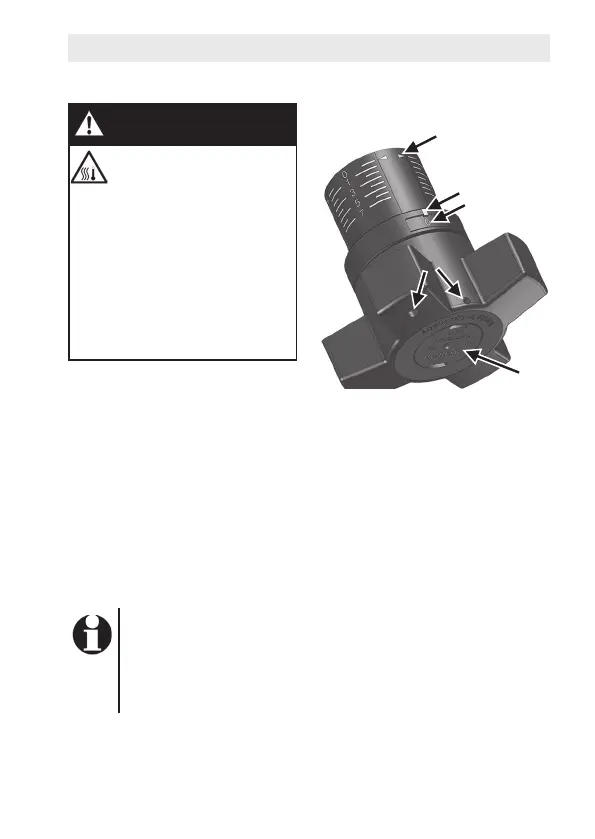
Fig. 10: Handwheel details
Legend
1 Slidingindicator
2 Longitudinalscale
(basicsetting)
3 Marking
4 Peripheralscale(nesetting)
5 Boresforleadsealingortag
6 Cover plug
The preset values depend on the parameters of the sys-
teminwhichthevalveisinstalled.Ifthevolumeowand
pressure loss areknown,youcandeterminethepreset
valuesbyusingtheowratediagramsintheappendixto
theseinstructions.
Before initial operation, the sys-
temmustbelledanddeaera-
ted.
WARNING
Danger from overpressure
and leaking medium!
Overpressureinthesystem
can result in injuries from
parts suddenly coming
loose and media escaping
inanuncontrolledfashion.
Maintaintheadmissible
operatingpressures.
Performaleakagetest.
{
1
2
4
5
6
3


 To Next Page