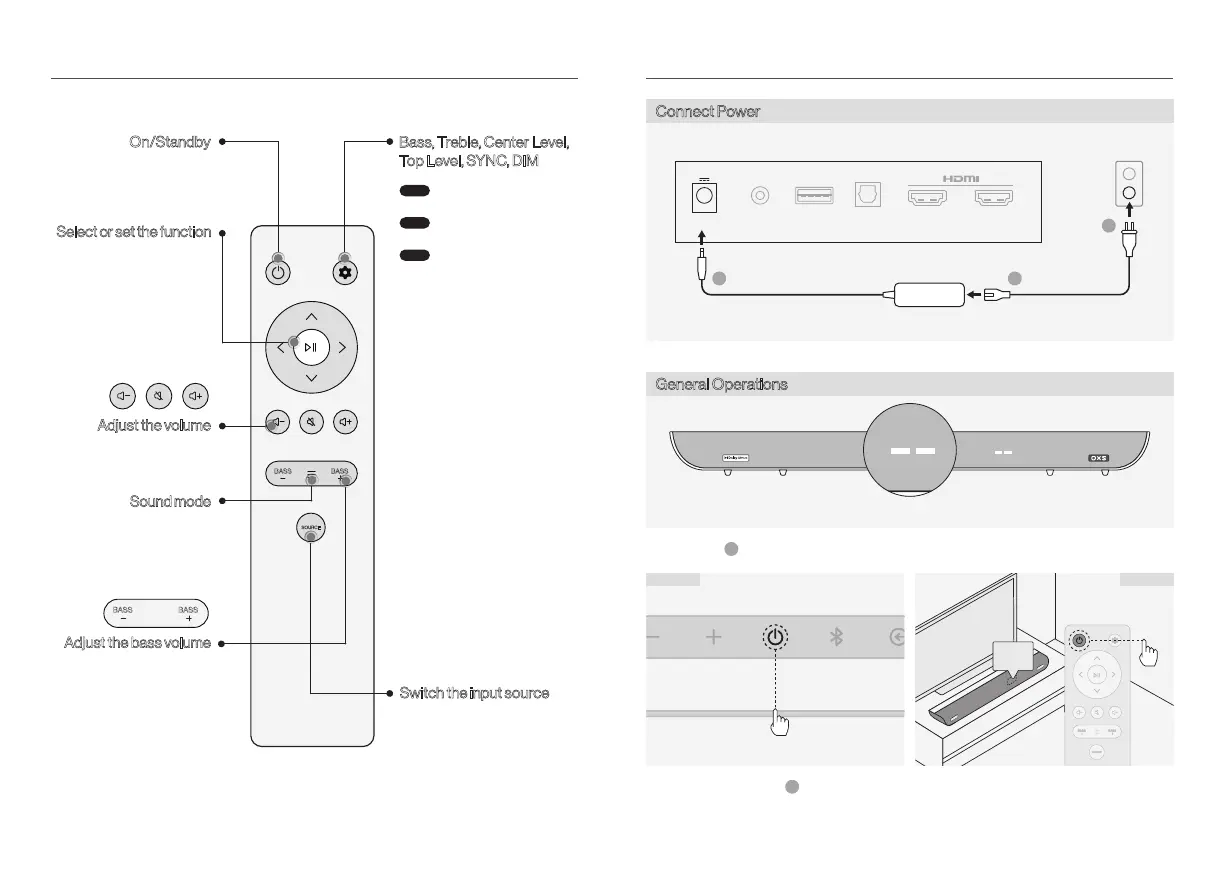
REMOTE
SOURCE
BASS BASS
On/Standby
Bass, Treble, Center Level,
Top Level, SYNC, DIM
Select or set the function
Sound mode
• Skip the music
right/left
BASS BASS
HOW TO USE
Connect Power
General Operations
DC AUX USB OPT IN
OUT
eARC/ARC
1
3
2
ON
ON
Method A Method B
After connecting the power, the device enters standby mode.
1
Power on by a short press of the button.
2
• Standard->Voice->Music
->Movie->Night
• between -6 and +6
Switch the input source
enter the selection
Use the left/right keys to
choose the item
Use the up/down keys to
Step1
Step3
Step2
• BASS->TREBLE->
CENTER LEVEL->
TOP LEVEL->SYNC->DIM
• BASS/TREBLE/
CENTER LEVEL/TOP LEVEL
Between -6 to +6 level
• SYNC(Audio latency correction
of the soundbar)
Between 0 to 200 ms
Only for HDMI functionality
• DIM(LED screen brightness of
the soundbar)
• TV->HDMI->OPT->USB
->BT->AUX
OXS USER MANUALENG-07 OXS USER MANUAL ENG-08


 To Next Page