TV->HDMI->OPT->USB->BT->AUX
TV->HDMI->OPT->USB->BT->AUX
TV->HDMI->OPT->USB->BT->AUX
TV->HDMI->OPT->USB->BT->AUX
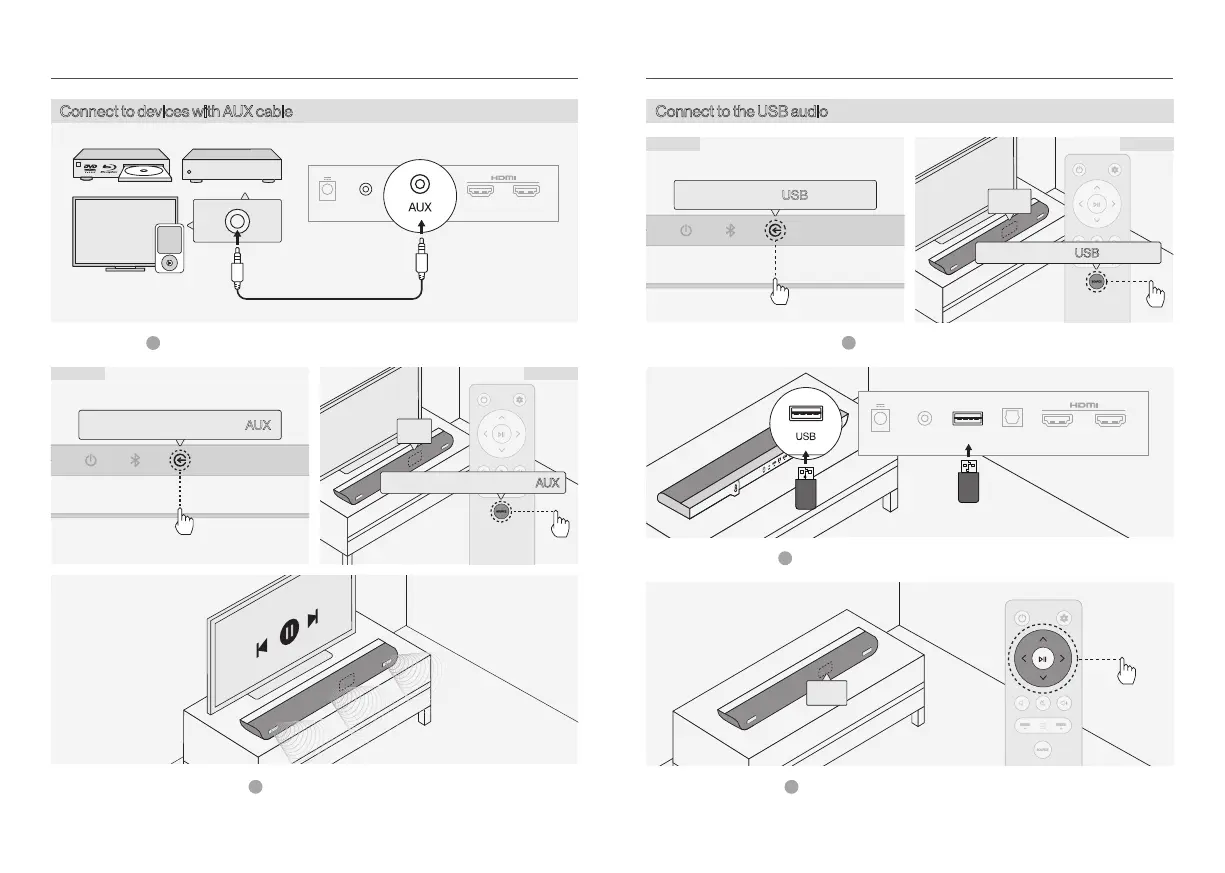
Connect the USB drive with the soundbar.2
Control more functions with the remote.
3
DC AUX USB OPT IN
OUT
eARC/ARC
Connect to the USB audio
Method B
Select “USB” mode.1
Connect to devices with AUX cable
Method B
AUX
Connect devices and the soundbar using the TV cable.1
Select “AUX”mode.
2
DC AUX USB OPT IN
OUT
eARC/ARC
IPTV
Method A
Method A
OXS USER MANUALENG-13 OXS USER MANUAL ENG-14


 To Next Page