WALL MOUNTING GUIDE
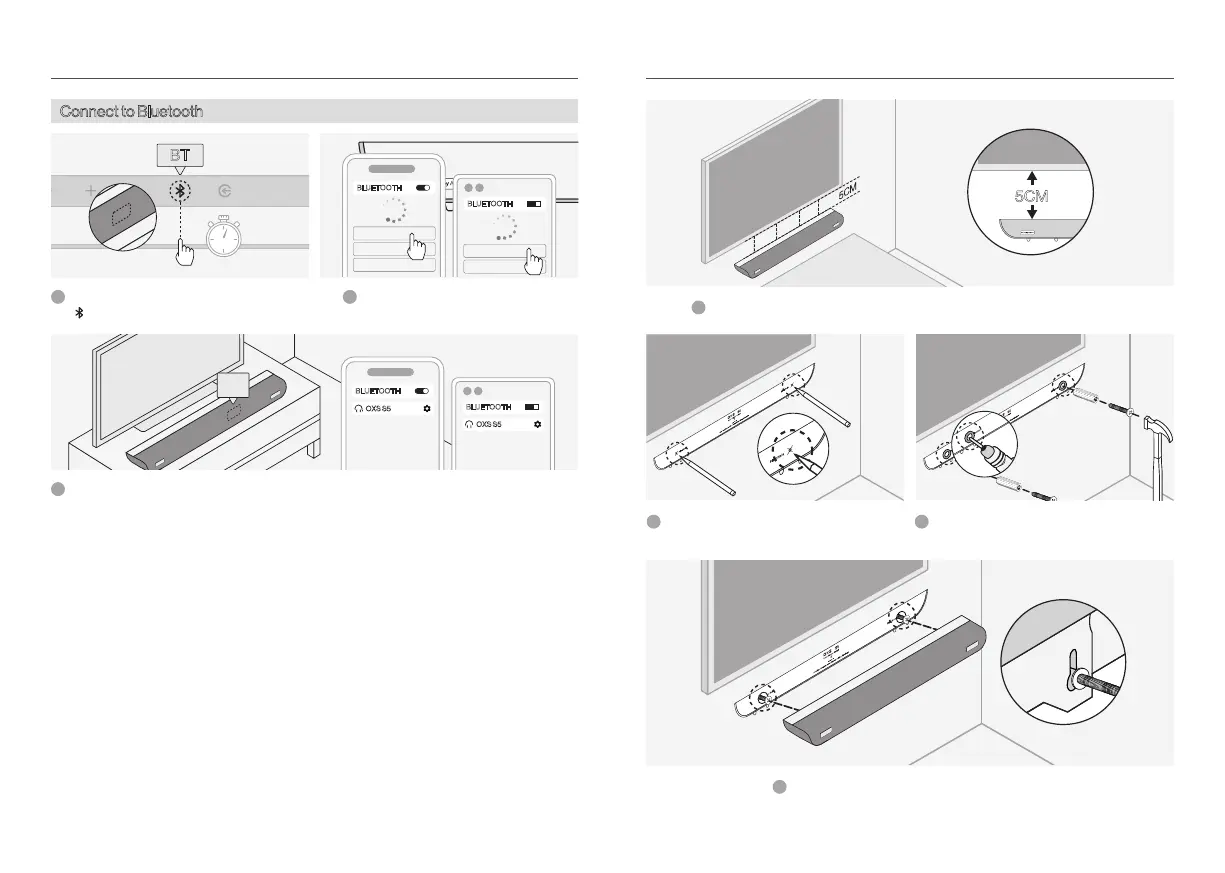
Connect to Bluetooth
BLUETOOTH
OXS S5
BLUETOOTH
OXS S5
BLUETOOTH
OXS S5
XXXXXX
BLUETOOTH
OXS S5
XXXXXX
XXXXXX
Select Bluetooth mode on your device.
Select "OXS S5" on the device screen.
2
Switch to 'BT' mode, press and hold the
button for 3 seconds to enter pairing.' '
1
Once the connection is successful, the "BT" indicator on the soundbar will remain steady.3
Hang the soundbar on the wall mount screws.
4
If the TV is wall-mounted, place the soundbar at least 5 cm below the TV.
1
Mark the drilling positions using the wall
mount template.
2
Drill holes and install the wall mount expansion
screws.
3
BT
3s
OXS USER MANUALENG-15 OXS USER MANUAL ENG-16


 To Next Page