22
5. Extension User Guide
1.1 Making a Call
This system provides 3 dialing modes to meet the different need of customers.
1.1.1 Dial ‘9’ for an outside
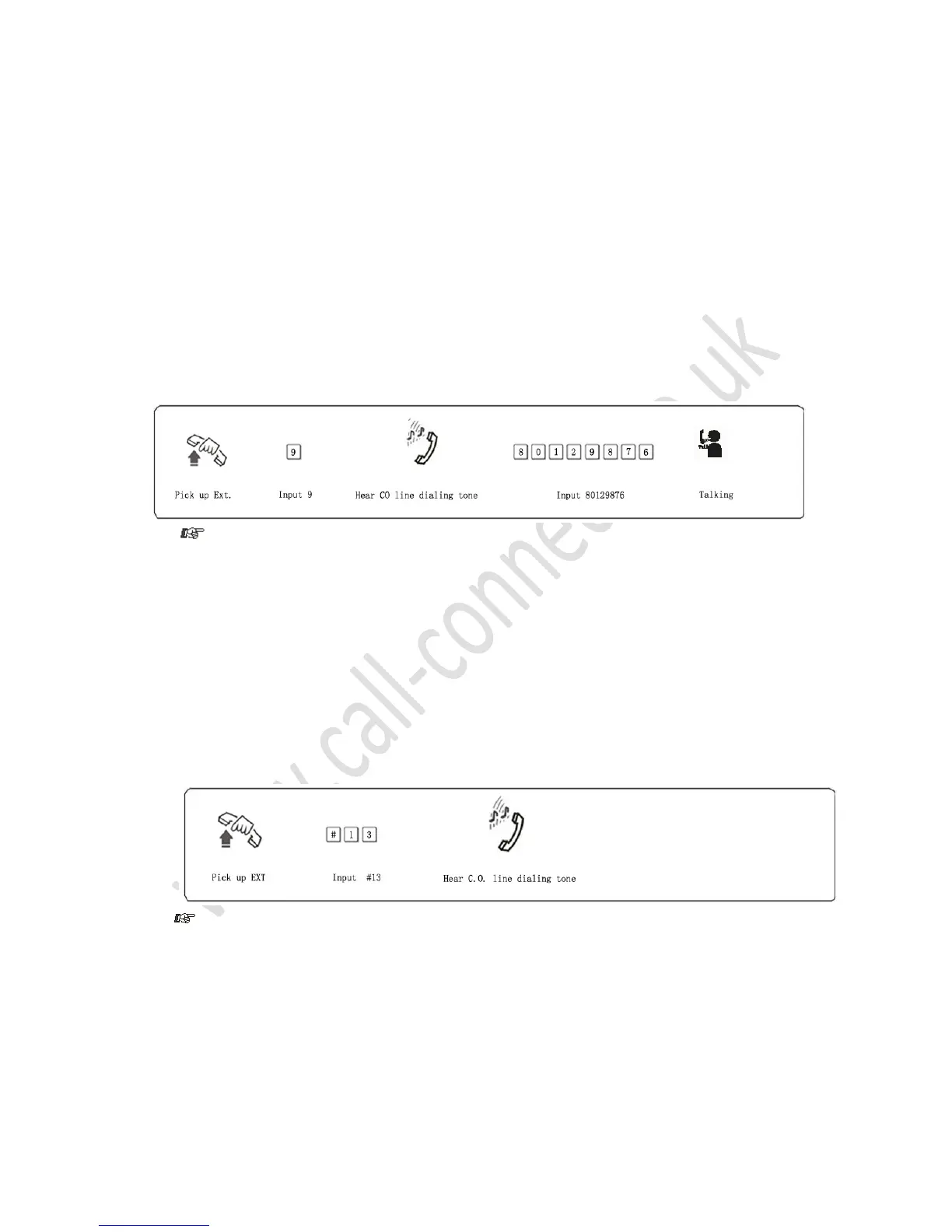
Format: Pick up the handset and on hearing the internal dialing tone dial 9 for an outside line, then dial the
desired number.
Example: You want to call the number 80129876
1. You must dial ‘9’ within 15 seconds after hearing the internal dialing tone
2. If the extension is in Direct-Dialing-Out mode there is no need to dial ‘9’ for an outside line.
In default all extensions are in Indirect-Dialing-Out mode
1.1.2 Choosing a Specific Line for the outgoing call
Format: # 1 M
Explanation: Where M = The C.O. line number (either 1, 2, 3 or 4)
Example: Dial a number using C.O. line 3 (your extension is in Indirect-Dialing-Out mode)
In the example above, if the extension is in Direct-Dialing-Out mode, you should dial * # 13
1.1.3 Automatic Callback when All Lines are Busy
Format: # 0 then hang up.
Description: In Indirect-Dialing-Out mode your extension will ring back automatically when any C.O.
line becomes free



 To Next Page