© 2017 AAMP Global. All rights reserved. PAC is a Power Brand of AAMP Global.
PAC-audio.com
Page 4
Rev. 111317
$GYDQFHG$PSOL¿HU,QWHUIDFH
IRU6HOHFW7R\RWD/H[XV9HKLFOHV
AP4-TY12
AmpPRO App (cont.)
3/($6(127(7KHVHVHWWLQJVFDQEHDGMXVWHGZLWKWKHPRGXOHLQVWDOOHGLQWKHYHKLFOHRURQWKHEHQFK+RZHYHULW
LVUHFRPPHQGHGWRPDNHWKHDGMXVWPHQWVZLWKWKHPRGXOHLQVWDOOHGDQGWKHIDFWRU\UDGLRRQVRWKDWWKHFKDQJHVFDQ
EHKHDUG
0LQLPXP9ROXPH/HYHOThis allows you to set the minimum volume level of the factory radio (factory radio volume level 1).
&KLPH9ROXPH/HYHOThis allows you to set the volume of the radio beeps that are heard through the AP4.
&KLPHV(QDEOHGThis allows you to enable / disable AP4 radio beeps (ie: tone that is heard when pressing radio buttons).
This is used when mixing factory and aftermarket speakers. It is also possible to turn the beeps off altogether using the radio's
factory settings menu.
%DQG(4(QDEOHG This allows you to enable / disable the 3 band factory EQ.
%DVV0LG7UHEOH)UHT4)DFWRU This allows you to set the center frequency that will be adjusted when setting the 3 band
factory EQ, as well as the Q Factor for each frequency. The Q Factor determines how many of the adjacent frequencies will be
affected when adjusting the selected frequency. The lower the Q Factor, the more frequencies will be affected.
60HZ 500HZ 7.5KHZ
80HZ 1KHZ 10KHZ
100HZ 1.5KHZ 12.5KHZ
120HZ 2.5KHZ 15KHZ
0.50 0.75
1.00 1.00
1.50 1.25
2.00 1.50
Bass Frequency Mid Frequency Treble Frequency
Available Frequencies and Q Factors
Bass Q Factor Mid Q Factor Treble Q Factor
0.75
1.25
)LUPZDUH8SGDWHV
7KH$PS352DSSZLOODOVRDOORZ\RXWRXSGDWHWKHLQWHUIDFHZLWKQHZ¿UPZDUHDVLWEHFRPHVDYDLODEOH3OHDVHYLVLW
ZZZSDFDXGLRFRPRUFRQWDFWRXUWHFKVXSSRUWGHSDUWPHQWWRVHHLIWKHUHLVD¿UPZDUHXSGDWHIRU\RXULQWHUIDFH
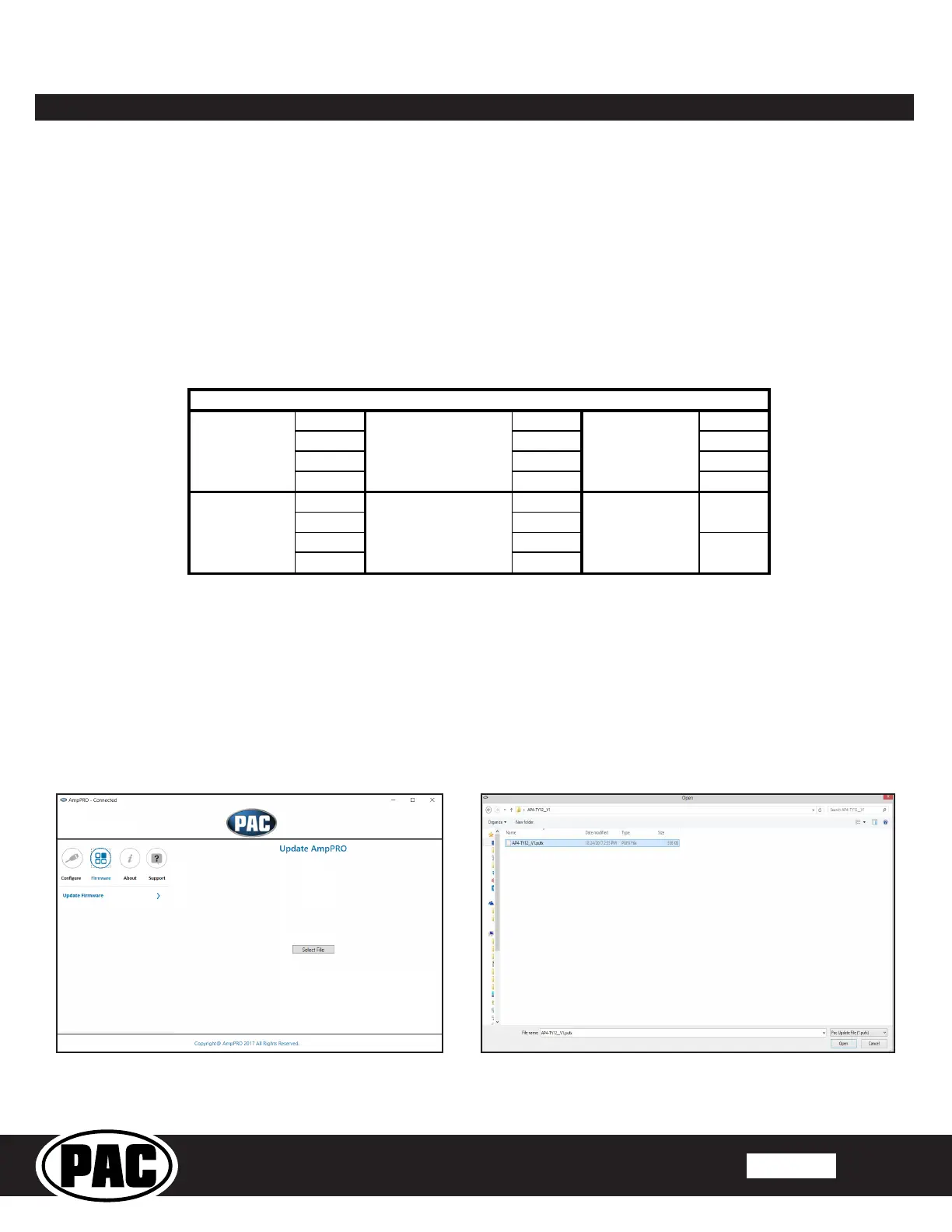
Connect the interface to your PC and select "Firmware", then “Update Firmware”. Now select “Select File”. Finally, browse to
WKHSODFHZKHUH\RXVDYHGWKH¿OHDQGVHOHFWLW7KLVZLOOEHJLQWKHXSGDWLQJSURFHVV2QFH¿QLVKHGGLVFRQQHFWWKHLQWHUIDFH
from the PC and resume normal operation.


 To Next Page