EasyManua.ls Logo

PAC AP4-TY12 - User Manual

PAC AP4-TY12
15 pages
Print Icon
To Next Page IconTo Next Page
Loading...
© 2017 AAMP Global. All rights reserved. PAC is a Power Brand of AAMP Global.
PAC-audio.com
P ifi A C ti
Page 1
Rev. 111317
$GYDQFHG$PSOL¿HU,QWHUIDFH
IRU6HOHFW7R\RWD/H[XV9HKLFOHV
AP4-TY12
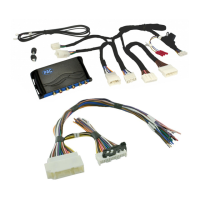
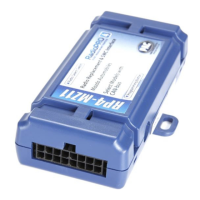
The AP4-TY12 provides a 6-channel pre-amp output for use with aftermarket audio equipment. Using the full range,
¿[HGOHYHOKHDGXQLWRXWSXWLQFRQMXQFWLRQZLWKGDWDEXVPHVVDJHVWKH$37<GHOLYHUVDYDULDEOHY506SUH
DPSRXWSXWZLWKIDGLQJEDODQFHHTXDOL]DWLRQDQGOHYHOFRQWUROFDSDELOLWLHV7KHPRGXOHDOVRUHWDLQVDXGLRIURP
other vehicle features such as factory navigation prompts, Bluetooth and Voice Activation.
An accessory controlled
UHPRWHDPSOL¿HUWXUQRQZLUHLVDOVRSURYLGHGE\WKH$37<:KHQXVHGLQFRQMXQFWLRQZLWKWKH$3$726VROG
VHSDUDWHO\WKHPRGXOHFDQSURYLGHDYDULDEOHFKDQQHO¿EHURSWLFGLJLWDODXGLRRXWSXW726/,1.
Introduction and Features
Important Notes
1. Only compatible in vehicles equipped with a data bus controlled premium sound system. To verify compatibility in Toyota,
look for a JBL logo on the radio. In Lexus, compatible applications will have a center channel or factory subwoofer.
2. The AP4-TY12 does not support retention of the Easy Speak function.
3. Toyota Safety Connect and Lexus Enform (SOS) can easily be retained. See the Tech Brief "AP4-TY12 SOS Retention" at
PAC-audio.com for detailed instructions.
4. The factory radio's speed controlled volume, DSP, and surround sound mode are not supported by the AP4 outputs.
5. 7KHIDFWRU\DPSOL¿HUPXVWUHPDLQFRQQHFWHGDQGLQWKHYHKLFOHDIWHUWKH$PS352KDVEHHQLQVWDOOHG
6. Prior to testing, cycle the ignition off and back on again to properly initilize the AP4-TY12.
7. The radio's beep setting must be enabled on the factory radio in order to hear the audible tones when making selections
through the radio.
8. Initially, if the beep through the AP4-TY12 does not match the on / off selection through the radio, cycle the beep to the
opposite setting and back, then test again.
9. The radio's beep volume and minimum volume levels are set to 0 dB by default. If you are happy with this level in your
SDUWLFXODUDSSOLFDWLRQDGGLWLRQDODGMXVWPHQWLVQRWUHTXLUHG3OHDVHUHIHUWRWKH6HWXSDQG&RQ¿JXUDWLRQVHFWLRQRQSDJH
for more details.
10. The Radio's Nav / VR Voice, incoming E-mail tone, Ringtone, In-Call, Incoming SMS / MMS tone and Incoming SMS Voice
volumes can be adjusted through the radio's settings menu as they were prior to installation of the AP4-TY12.
11. The remote output is rated at 2A of current. If more current is needed, an external relay must be used.
12. Channels 5 and 6 are non-fading outputs. The output level of channels 5 and 6 can be controlled using the supplied level
control knob.
13. The level control knob must be connected in order to manually adjust the beep volume and minimum volume settings.
14. No adjustments can be made manually using the programming button when the module is connected to a PC.
15. Due to variations between various OEM radios and even between radio modes, the radio output voltage may vary slightly
from the selected 5 volt (or 4 volt when DIP switch 2 is down) output.
Wiring Connection Chart
To Aftermarket
Amplier
Non-FadingRearFront
1(L) 2(R) 4(R) 5(L) 6(R)3(L)
Remote Turn On Output
2A Max Output
To Radio
Non-Fading
Level Control
Knob
To Vehicle
Harness
28 - Pin
6 - Pin
10 - Pin
AP4-TY12-HAR
Remote Turn On Output (2A Max)
Mute Input From Navigation *
Mute Input From Telematics *
* See Page 2 Installation Notes 11 and 12 for further details regarding the Mute Input leads.

Question and Answer IconNeed help?

Do you have a question about the PAC AP4-TY12 and is the answer not in the manual?

Summary

Introduction and Features

Important Notes

Wiring Connection Chart

Module Layout

Installation

Setup and Configuration

Manually Setting the Radios Beep Volume

Guide to manually adjust factory radio beep volume using the programming button on the interface.

Manually Setting the Minimum Volume

Procedure to manually adjust the radio's minimum volume level using the programming button or SWC.

AmpPRO App

Firmware Updates

Restoring Factory Settings

Troubleshooting

Overview

SOS Retention Methods

Method 1 (ex: Subwoofer Only Install)

Method for retaining SOS when using aftermarket amplifiers and factory front speakers are powered by the factory amp.

Method 2 (Amplifying Cabin Speakers)

Method for retaining SOS when aftermarket amp powers front speakers via factory SOS module, respecting amp power limits.

Method 3 (using a separate speaker)

Method to bypass the Safety Connect Module and use an external speaker for SOS audio.

Vehicle Connections

Summary

Introduction and Features

Important Notes

Wiring Connection Chart

Module Layout

Installation

Setup and Configuration

Manually Setting the Radios Beep Volume

Guide to manually adjust factory radio beep volume using the programming button on the interface.

Manually Setting the Minimum Volume

Procedure to manually adjust the radio's minimum volume level using the programming button or SWC.

AmpPRO App

Firmware Updates

Restoring Factory Settings

Troubleshooting

Overview

SOS Retention Methods

Method 1 (ex: Subwoofer Only Install)

Method for retaining SOS when using aftermarket amplifiers and factory front speakers are powered by the factory amp.

Method 2 (Amplifying Cabin Speakers)

Method for retaining SOS when aftermarket amp powers front speakers via factory SOS module, respecting amp power limits.

Method 3 (using a separate speaker)

Method to bypass the Safety Connect Module and use an external speaker for SOS audio.

Vehicle Connections

Overview

The PAC AP4-TY12 is an Advanced Amplifier Interface designed for Toyota and Lexus vehicles, specifically models with 28-pin, 10-pin, and 6-pin connectors (IE Bus). This device simplifies amplifier installation in data-bus controlled factory sound systems, allowing users to upgrade their audio performance while retaining the original radio's fit, finish, and features.

Function Description:

The AP4-TY12 acts as a bridge between the factory radio and aftermarket amplifiers, providing a clean, variable audio signal. It decodes the factory digital audio bus to generate 6-channel pre-amp outputs (front, rear, and sub) with a 5-volt output, suitable for connecting to aftermarket amplifiers. Key features include:

  • Variable Volume, Fade, Balance, Bass, Mid, and Treble Audio Settings: The interface allows for precise control over these audio parameters, ensuring a customized listening experience.
  • Retention of Factory Features: It retains essential vehicle functions such as warning chimes, navigation prompts, Bluetooth®, and telematic audio (if equipped), including the Safety Connect (SOS) / Lexus Enform system.
  • Plug-and-Play Installation: The device is designed for straightforward installation with included plug-and-play harnesses, connecting directly to the vehicle's factory radio and harnesses.
  • Sub Level Controller: A sub-level controller is included, allowing for convenient adjustment of subwoofer output.
  • Optional Optical Output: An optional TOSLINK output (APA-TOS1, sold separately) is available for connecting to DSP processors or amplifiers with digital inputs, providing a pure digital audio signal.
  • Firmware Updatability: The interface supports firmware updates via a PC application, ensuring compatibility with future vehicle models and software enhancements.

Important Technical Specifications:

  • Output Channels: 6-channel pre-amp outputs (front, rear, sub).
  • Output Voltage: 5-volt RCA outputs (can be lowered to 4v via DIP switch).
  • Connectors: 28-pin, 10-pin, and 6-pin connectors for Toyota/Lexus IE Bus.
  • Control: Sub-level controller included, programming button for manual settings, and PC application for advanced configuration.
  • SOS Retention: Specific methods (Method 1, 2, and 3) are detailed for retaining the Safety Connect / Lexus Enform SOS system, accommodating various amplifier configurations and speaker setups. This includes provisions for muting aftermarket audio during SOS activation and routing SOS audio through specific speakers or an external speaker.
  • Power: +12v remote output for turning on aftermarket amplifiers.

Usage Features:

The AP4-TY12 offers flexible usage and configuration options:

  • Manual Configuration:
    • Setting Radio's Beep Volume: The level control knob and programming button can be used to adjust the volume of factory radio beeps. The process involves turning the knob counter-clockwise, pressing the button, adjusting the knob, and then pressing the button twice or waiting ten seconds to exit.
    • Setting Minimum Volume: Similar to beep volume, the minimum volume level of the factory radio (volume level 1) can be adjusted using the level control knob and programming button. This involves setting amp gains, setting radio volume to 1, pressing the programming button twice, adjusting the knob, and then pressing the button once or waiting ten seconds to exit.
  • AmpPRO App Configuration:
    • The AmpPRO app (downloadable from aampglobal.com/appdownloads) provides a comprehensive interface for configuring user interface options.
    • Minimum Volume Level: Adjust the lowest volume level of the factory radio.
    • Chime (Radio Beeps) Volume Level: Control the volume of radio beeps.
    • Enable/Disable AP4 Chimes (Radio Beeps): Turn AP4 radio beeps on or off.
    • Enable/Disable Factory EQ: Activate or deactivate the 3-band factory EQ.
    • Bass/Mid/Treble Boost Frequencies and Q Factor: Fine-tune the center frequency and Q factor for each band of the 3-band EQ. The Q factor determines the range of adjacent frequencies affected by the adjustment.
    • Update Product Firmware: The app facilitates updating the device firmware, ensuring the interface is always up-to-date.
    • Read Firmware/Hardware Versions: View current firmware and hardware information.
  • DIP Switch Settings:
    • DIP switch 1: Activates two-channel mode, making TOSLINK and front RCA outputs non-fading.
    • DIP switch 2: Lowers RCA output voltage to 4v (ON position) or keeps it at 5v (OFF position).
    • DIP switches 3 and 4: Not used and should remain OFF.
  • LED Indicators:
    • LED 1 (Solid Red): Module Active.
    • LED 1 (Solid Green): Chime Volume Adjustment Mode.
    • LED 1 (Solid Amber): Minimum Volume Adjustment Mode.
    • LED 1 (Rapid Blink Any Color): DSP Activity.
    • LED 2 (Blink Amber): USB Connection Detected.
    • Both LEDs (Alternate Blinking Red): Performing Memory Reset.

Maintenance Features:

  • Firmware Updates: The AmpPRO app allows users to update the interface with new firmware as it becomes available. This ensures the device remains compatible with new vehicle models and software, and can address any potential bugs or enhance performance. Updates are performed by connecting the interface to a PC, selecting "Firmware" in the app, choosing "Update Firmware," and then browsing for the firmware file.
  • Restoring Factory Settings: The interface can be restored to its factory default settings by pressing and holding the programming button until the status LEDs start blinking red. This resets all audio settings, including radio beeps volume, EQ settings, and minimum volume level.
  • Troubleshooting Guide: The manual provides a troubleshooting section for common issues such as no audio, hiss at high amp gain, inability to hear beeps, low volume settings, and drastic volume differences between radio sources. Solutions often involve checking LED indicators, adjusting DIP switches, verifying radio settings, or using the AmpPRO app for adjustments.

PAC AP4-TY12 Specifications

General IconGeneral
BrandPAC
ModelAP4-TY12
CategoryRecording Equipment
LanguageEnglish

Related product manuals