©2018 PACE Inc., Vass, North Carolina, All Rights Reserved Page 5
Digital LED Display - Normal Operation
The Digital LED Display provides a 3-digit display of information. The LED Display can show:
1. "888" on initial power up to ensure that all sections of the display are working.
2. The software version of the installed microprocessor (e.g., "1-9") for 2 seconds on initial power up after
the "888" is displayed.
3. Actual temperature of the connected handpiece, during normal operation.
4. The temperature displayed will flash and the LED indicator will be off when the system is in
Temperature SetBack mode.
5. "OFF" with stable display when the Set Temperature has been set below the minimum lower
temperature limit.
6. "OFF" with flashing display when the unit has entered AutoOff mode. Refer to page 8 for more
information.
7. Error messages ("CHP", "SSE" or "OCE") if a system fault is detected. Refer to the "Corrective
Maintenance" portion of this manual.
Digital Display - Temperature Adjust Mode
The LED Display will show the following when adjusting the desired Set Tip Temperature.
1. The Set Tip Temperature.
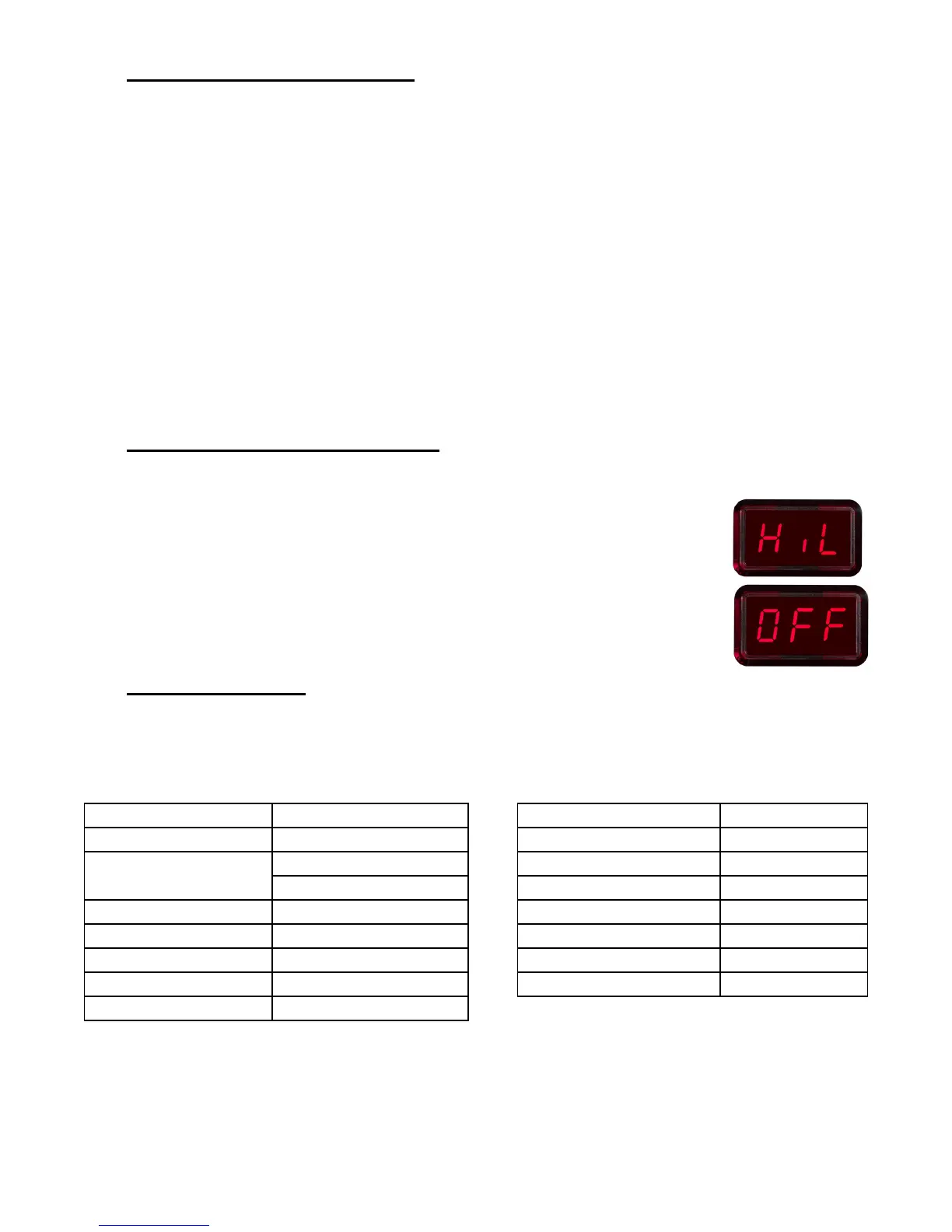
2. "HiL" (High Temperature Limit) when adjusting the set tip temperature and the
maximum allowable temperature is exceeded. Refer to the "Set-Up Mode" portion
of this manual.
3. "OFF" (Low Temperature Limit) when adjusting the set tip temperature and the
minimum allowable temperature is exceeded. Refer to the "Set-Up Mode" portion
of this manual.
Default Factory Settings
The ADS200 system comes equipped with a number of features, which may be adjusted by the user. Listed
below are the default settings of each. To change and/or learn about any of these features, refer to the
applicable part of the “Customizing Your System” section of this manual.
Feature Factory Setting Feature Factory Setting
Password None Entered Preset 1 343°C (650°F)
°F for 115 VAC Systems Preset 2 371°C (700°F)
Default Temperature
Scale (°C/°F)
°C for 230 VAC Systems Preset 3 399°C (750°F)
“HI” Temperature Limit 427 °C (800 °F) SetBack Temperature 176°C (350°F)
“LO” Temperature Limit 260 °C (500 °F) Temperature Match Mode “0C0”
SetBack Timer Enabled, 30 minutes Set Temperature 371°C (700°F)
Auto Off Enabled, 60 minutes Temperature Match Value “0”
Instant SetBack Timer Enabled, 30 seconds







 To Next Page