YOUR REMOTE CONTROL
USING YOUR REMOTE
CONTROL
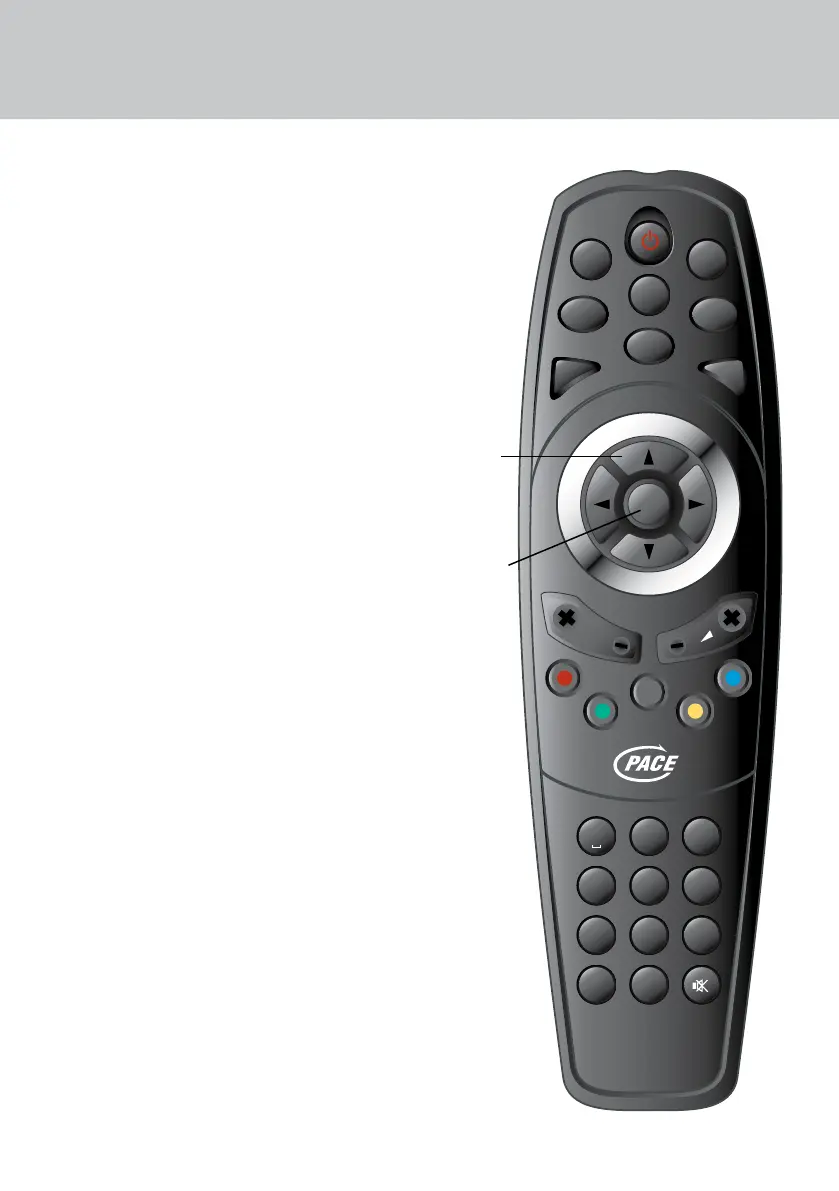
This page shows the buttons on your remote
control that you need to set up your set-top
box. All the other buttons are described on
page 15.
After you have set up your set-top box, you
use your remote control as follows:
DAILY USE
• switching on and o;
• changing channel;
• adjusting the volume;
• displaying the Channel List;
• displaying the Zapping Window to see
what’s on now and next;
• displaying the Information Window to
see information about a programme;
• displaying the EPG (Electronic
Programme Guide) to see what’s on for
the next few days.
OCCASIONAL USE
• organising your Favourite Channels;
• using the Main menu and Setup
menu to view information about your
set-top box and change its settings;
• displaying help text to assist you when
you use menus;
• updating the software.
1 2 3
4 5 6
7 8 9
0
OK
P
MENU
EXIT
V-FORMAT
OPT
TEXT
EPG
LIST
TV / RADIO
i
ABC
GHI
DEF
JKL
PQRS
MNO
TUV WXYZ
TIMERS
Use the U D and
L R buttons to
highlight/
choose a setting
Press the OK button
to save your chosen
setting


 To Next Page