CONNECTING YOUR SETTOP
BOX
Before starting, choose a suitable position for your
set-top box, observing the ventilation requirements
set out on page 3.
WARNING: Before you connect or disconnect
your set-top box to/from any other equipment,
make sure you disconnect all the equipment
from the mains supply.
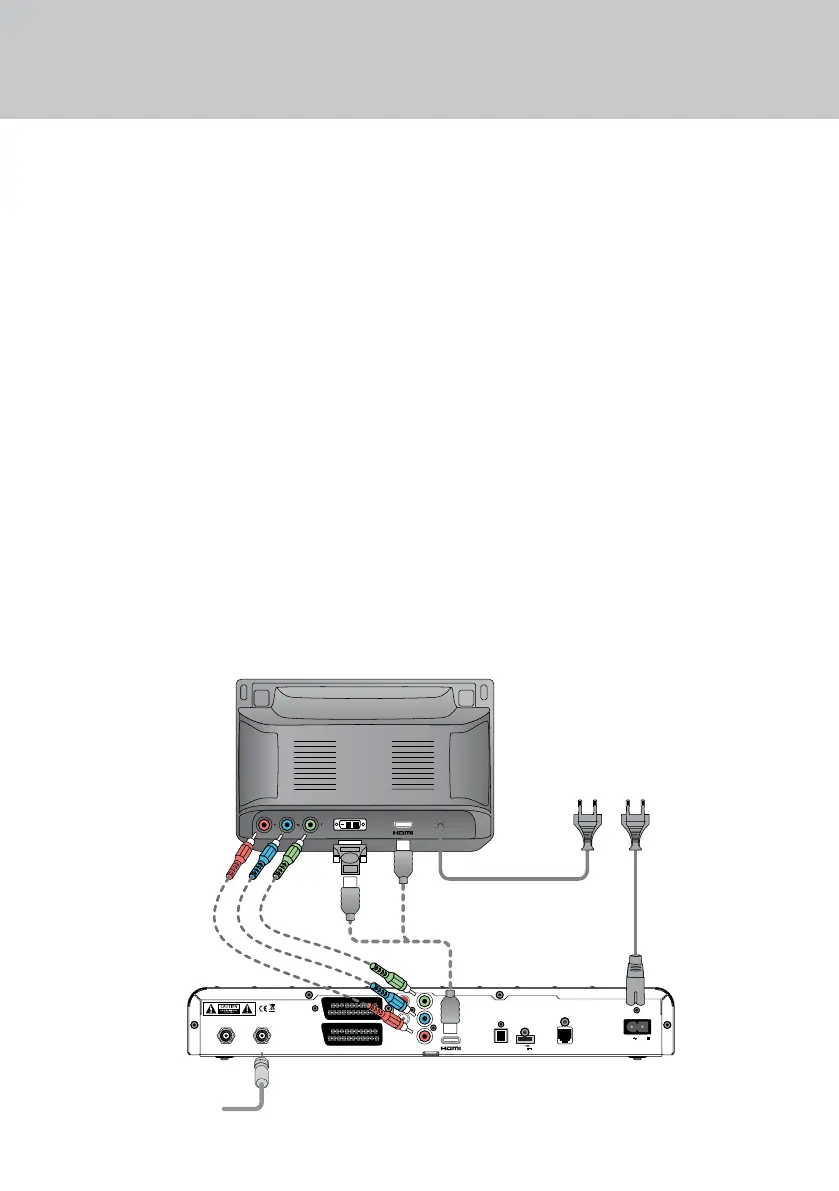
HIGHDEFINITION HD VIDEO
CONNECTIONS
If you have a high-denition TV (HDTV), use
only one of the following HD-video connection
methods. The methods are listed in order of
preference.
A Connect the supplied HDMI lead between
the HDMI socket on your set-top box and the
HDMI socket on your HDTV.
or:
B Connect the supplied HDMI lead to the HDMI
socket on your set-top box, then use an HDMI-
DVI adapter (not supplied) between the HDMI
lead and the DVI socket on your HDTV.
or:
C Connect component video leads (not
supplied) between the connectors marked
COMPONENT VIDEO-OUT
(YPbPr) and the component video connectors
on your HDTV.
NOTE: If you use method B or C, you must also
make additional audio connections between
your set-top box and your HDTV or audio
equipment. See page 8.
If you also want to connect a VCR or DVD
recorder to your set top box, use the
connection method shown on page 7.
COMPONENT
VIDEO-OUT
USB
+5V DC
500mA Max.
OPTICAL
AUDIO OUT
SATELLITE OUT SATELLITE IN
TV SCART
VCR SCART
TELEPHONE
LINE
230V 50Hz
Pr
Pb
Y
R
L
AUDIO
13/18V DC
400mA max.
HDTV
Set-top box
LNB lead
Mains lead
ABC
Mains lead
CONNECTING UP


 To Next Page