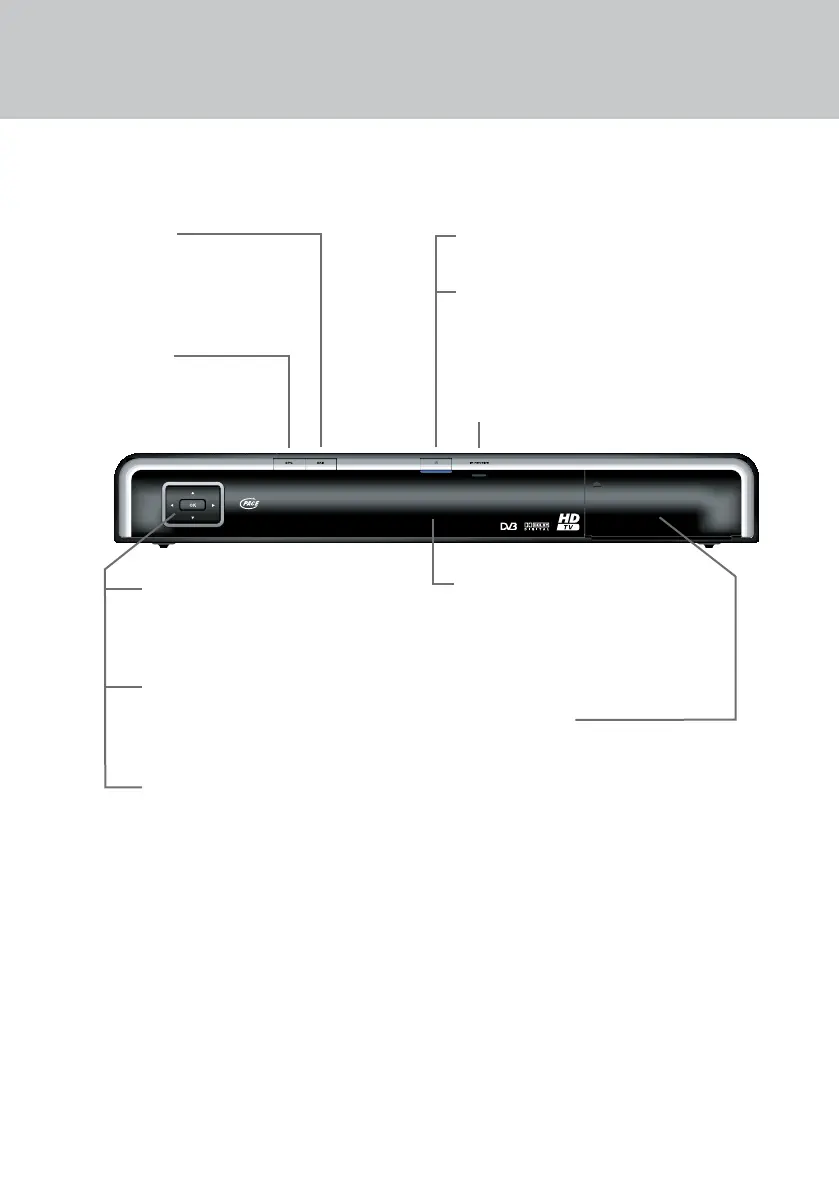
YOUR SETTOP BOX’S FRONT PANEL
U D (arrow buttons)
To display the Zapping Window
To highlight the previous or next item in a
list or on-screen menu
L R (arrow buttons)
To move to the left and the right through
on-screen menus, lists or items
To change settings on the screens
OK
To display the on-screen channel list
To conrm a choice
To save settings
EPG button
To display the EPG
(Electronic Programme Guide)
EXIT button
To remove the EPG or channel list
from the screen
LED display
- shows the current time when your
set-top box is in standby
- shows the channel number when
tuned to a TV or radio channel
Standby button (S)
To switch your set-top box on and o
Indicator light
Red = in standby
Blue = switched on and out of standby
CI-module door
Push to open door to access the
CI-module slot.
See page 10 for details
Before you start installing your set-top box, please
check you have the following items:
Your Pace set-top box;
Your remote control;
1 SCART lead;
1 HDMI lead;
1 mains lead;
2 ‘AA’ batteries for the remote control.
NOTE: The front panel of your set-top box is
covered with a protective clear plastic lm.
You should carefully remove this lm before
using your set-top box.
IR RECEIVE light
Red - ashes when your set-top box is receiving a
signal from your remote control
YOUR PACE SETTOP BOX


 To Next Page