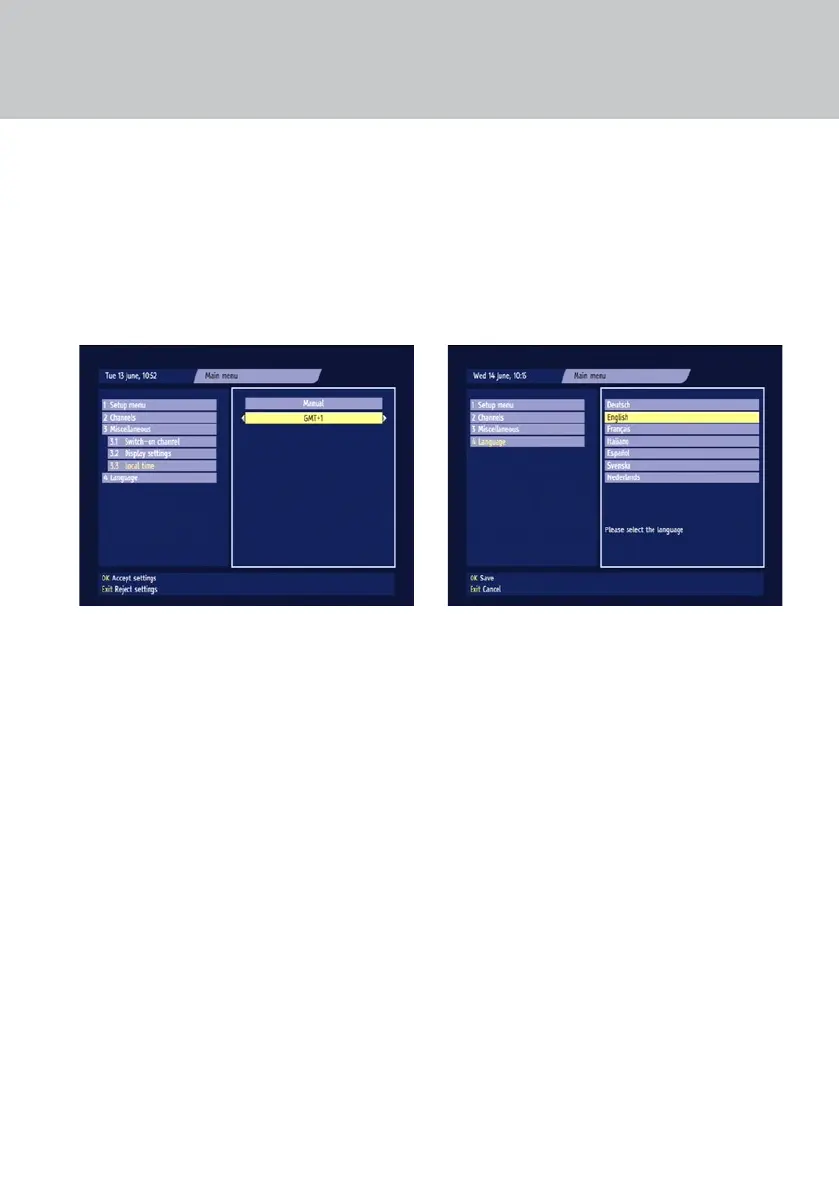
CHANGING THE LOCAL TIME SETTING
This is the local time for the country where you live.
Press the MENU button to display the Main menu
(see page 23). Use D to highlight ‘Miscellaneous’
then press OK. The Miscellaneous sub-menu
appears. Highlight ‘Local time’ then press OK. The
Local time screen appears.
Use D to highlight the local time setting, then use
the L R buttons to change it.
You can set the local time between GMT–12 and
GMT+12 at various intervals.
You must alter the setting twice a year to take
account of winter- and summer-time.
When you have made the changes you wish to
make, press OK.
If you do not want to save your changes, press the
EXIT button.
USING THE OTHER MENUS
CHOOSING A LANGUAGE
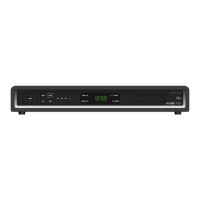
You can change the display language for menus and
on-screen displays such as the Zapping Window
and EPG Grid.
Press the MENU button to display the Main menu
(see page 23). Use D to highlight ‘Language’ then
press OK. The Language screen appears.
Use U D to choose a language.
Saving your changes
To save the change, press OK. The menus display in
the new language.
If you do not want to save the change, press the
EXIT button.


 To Next Page