8
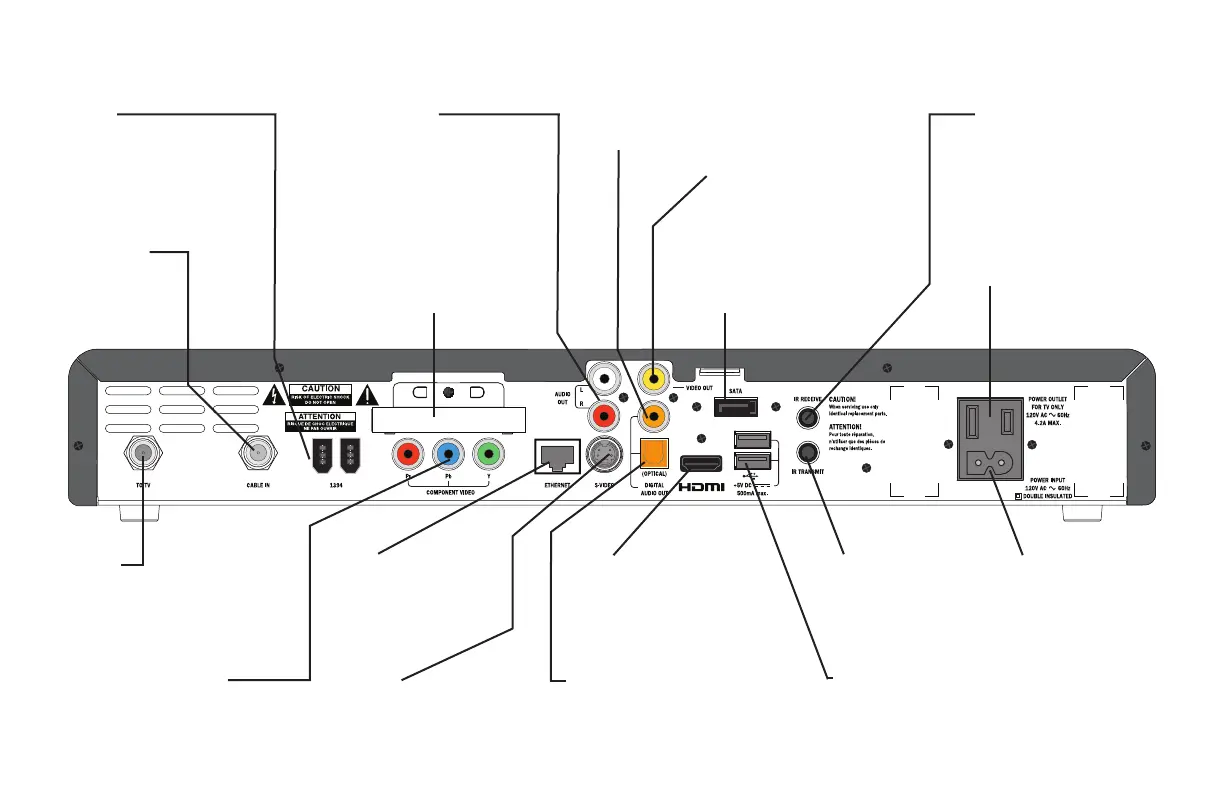
REAR PANEL
COMPONENT VIDEO
Component video output for
analog HDTV
AUDIO OUT
Audio outputs
(stereo, L and R)
CABLE IN
From cable
service-provider
TO TV
RF output to the
TV or VCR
S-VIDEO
S-video output
VIDEO OUT
Composite video
output
1394
For connection to
1394-compatible devices
SATA
For connection to an
optional external hard disk
POWER OUTLET
For TV only (500 W max.)
POWER INPUT
(Make this
connection
last of all)
DIGITAL AUDIO OUT (OPTICAL)
Optical S/PDIF audio output
ETHERNET
For future use
HDMI
TM
Video and audio
output for digital
HDTV
USB (Universal Serial Bus) port
For future use
IR TRANSMIT
Infra-red output to
control a VCR (for
future use)
IR RECEIVE
Infra-red input from
a remote “eye”
Separable security module
(behind cover)
Removal will interrupt your service
DIGITAL AUDIO OUT
Electrical S/PDIF audio output



 To Next Page