28
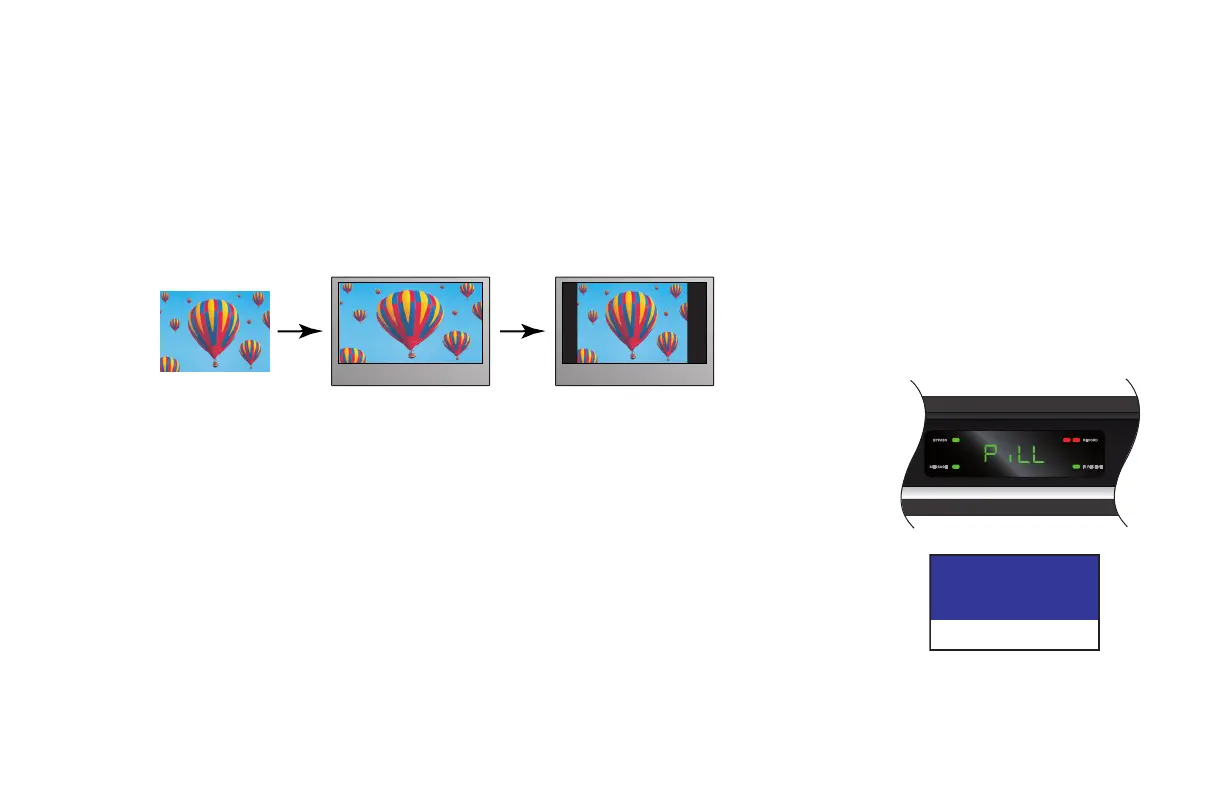
4:3 transmission 16:9 TV with no automatic
detection of 4:3,
Auto-pillarbox switched off
16:9 TV with no automatic
detection of 4:3,
Auto-pillarbox switched on
Setting Auto Pillarbox
If your TV is a 16:9 TV that does not automatically detect 4:3 transmissions (and therefore does not add black bars
to the sides of the picture), then 4:3 transmissions may display “stretched” to fit the 16:9 screen. If you do not
want this effect, you can set your set-top to add black bars to the 4:3 picture, so that it is transmitted to your TV at
a 16:9 aspect ratio. See the example below.
Changing the Auto Pillarbox setting
If you have not done so already, put your set-top into User Settings mode, as described on page 23.
1. Press the U or D button until the front panel shows “PiLL”.
On the PACE USER SETTINGS menu, Auto Pillarbox is highlighted when “PiLL” is on the front panel.
2. Press the R button.
The Auto Pillarbox menu appears on your TV screen. The current Auto Pillarbox setting (“YeS” = switched on,
or “no” = switched off) is displayed on the front panel.
Auto Pillarbox
YES
>NO
> shows current setting, as does a
lighted MESSAGE light
MAKING USER SETTINGS (cont.)



 To Next Page