6
SAFETY INFORMATION (cont.)
Safety aspects of connections
Full details of the rear panel are on page 8.
Connecting
Do not connect your set-top (or any other equipment such as a TV or VCR)
to the power supply until you have properly connected all the other cables.
Your set-top operates with a 120 V AC, 60 Hz power supply.
Do not connect your set-top to any supply other than this.
This set-top is equipped with a two-wire power cord, with a polarized plug
at one end. The other end of the cord is fitted with a polarized connector,
which is shaped such that it can be fitted only one way into the power
input connector of your set-top. Connect this end first, before inserting the
polarized plug into the wall AC outlet.
Disconnecting
Disconnect your set-top from the power supply before you disconnect any
other equipment from its rear panel.
The only way to disconnect your set-top from the power supply is to remove
the power cord from the wall AC outlet. Therefore, you must install your set-
top near to the wall AC outlet, which should be easily accessible.
If you are in any doubt about the power cord, its plug, or its connection,
consult a qualified electrician.
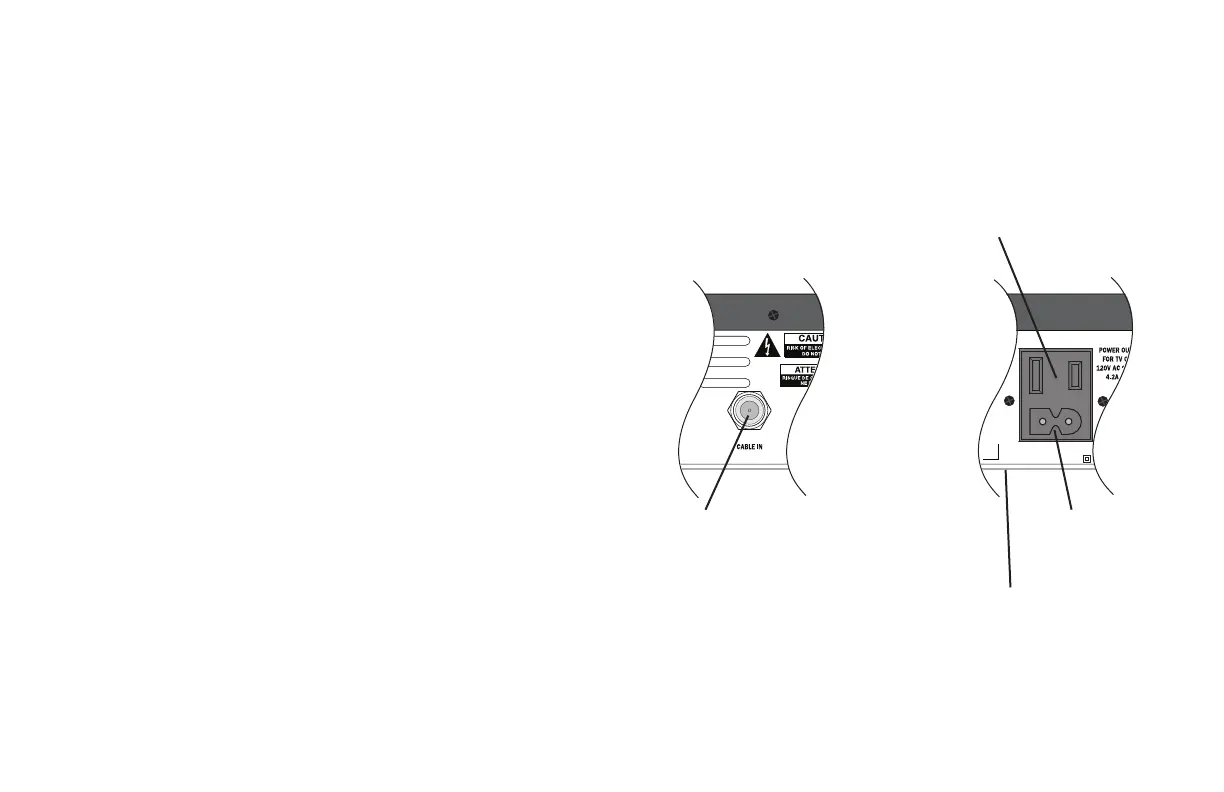
The CABLE IN connector is designed for
connection to a cable network only.
You must not connect any other equipment,
such as a VCR, to this input.
POWER INPUT
The model number, serial
number and electrical
rating of this set-top are
on a label on its base.
The POWER OUTLET plug is designed only for connection to the AC
power cord for a TV. The maximum power it can supply is 500 watts.
Do not connect any equipment that uses more than 500 watts, or any non-
TV equipment such as a toaster or hair dryer.



 To Next Page