SECTION 3 INSTALLATION
25
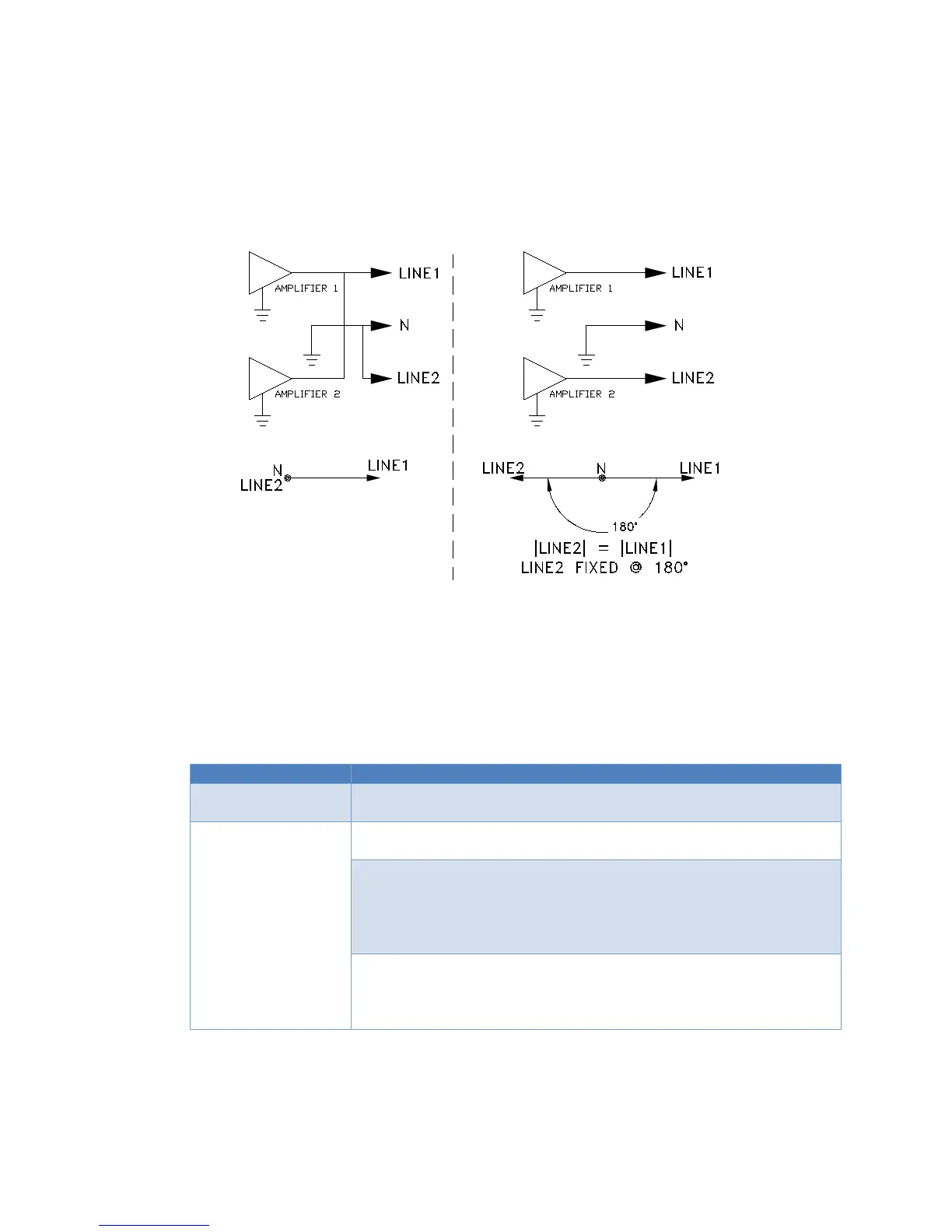
3.4 OUTPUT POWER CONNECTION (continued)
SINGLE PHASE, LOW RANGE
SINGLE PHASE, HIGH RANGE
OR
FIGURE 3.4 ACX-SERIES SYSTEM ARCHITECTURE
3.5 REMOTE INTERFACE
The ACX with the UPC Series programmable controller is supplied with one of two remote
interfaces.
General Purpose Interface Bus. Standard GPIB Connector located on
the rear panel.
RS-232 Interface. D-Sub 9 Pin connector located on rear panel.
(Depicted in Figure 3.6)
Pin 1: Receive Data
Pin 2: Transmit Data
Pin 5: Signal Ground
Older units may have been equipped with a DB25 RS232 Connector
instead of a DB9. In that case, use Cable PPS #778018 (Belkin
F2L088-06 cable) to adapt to a DB9 PC Serial port or USB to RS232
Connection and communication information relative to these interfaces can also be found in the
UPC Series Operation Manual.


 To Next Page