INTRODUCTION
Congratulations on your purchase of an Unication NP88 POCSAG pager. Your
NP88 POCSAG pager utilizes the latest in paging technology − POCSAG
TECHNOLOGY. This technological advancement extends battery life up to five times
longer than ordinary pagers, saving you time and money. As a
NP88 POCSAG
pager user, you can feel more confident in receiving your pages because POCSAG
technology improves the ability to receive pages.
Along with POCSAG technology, this compact pager uses many advances in
electronic and wireless technology which allow you to receive numeric messages
instantly and affordably.
CONTROLS
Buttons
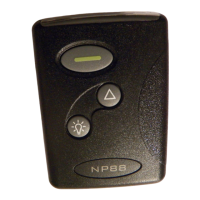
On/Read/Select − turn pager on, read incoming messages, and select the
function displayed.
Backlight/Reset − turn the display light on and reset the pager to the standby
screen, which shows time, date, alarm status, and alert status. Press
twice to reset to the standby screen.
Menu - scroll through the menu.
After performing any pager function described in this user’s guide (setting the time,
date, alarm, and so on), your
NP88 POCSAG pager automatically returns to the
standby screen and activates the selections you made.


 To Next Page