EasyManua.ls Logo

Panasonic AG-8700E - Page 19

Panasonic AG-8700E
66 pages
Print Icon
To Next Page IconTo Next Page
To Previous Page IconTo Previous Page
Loading...
awe
CooGcooo
FAH
12
3
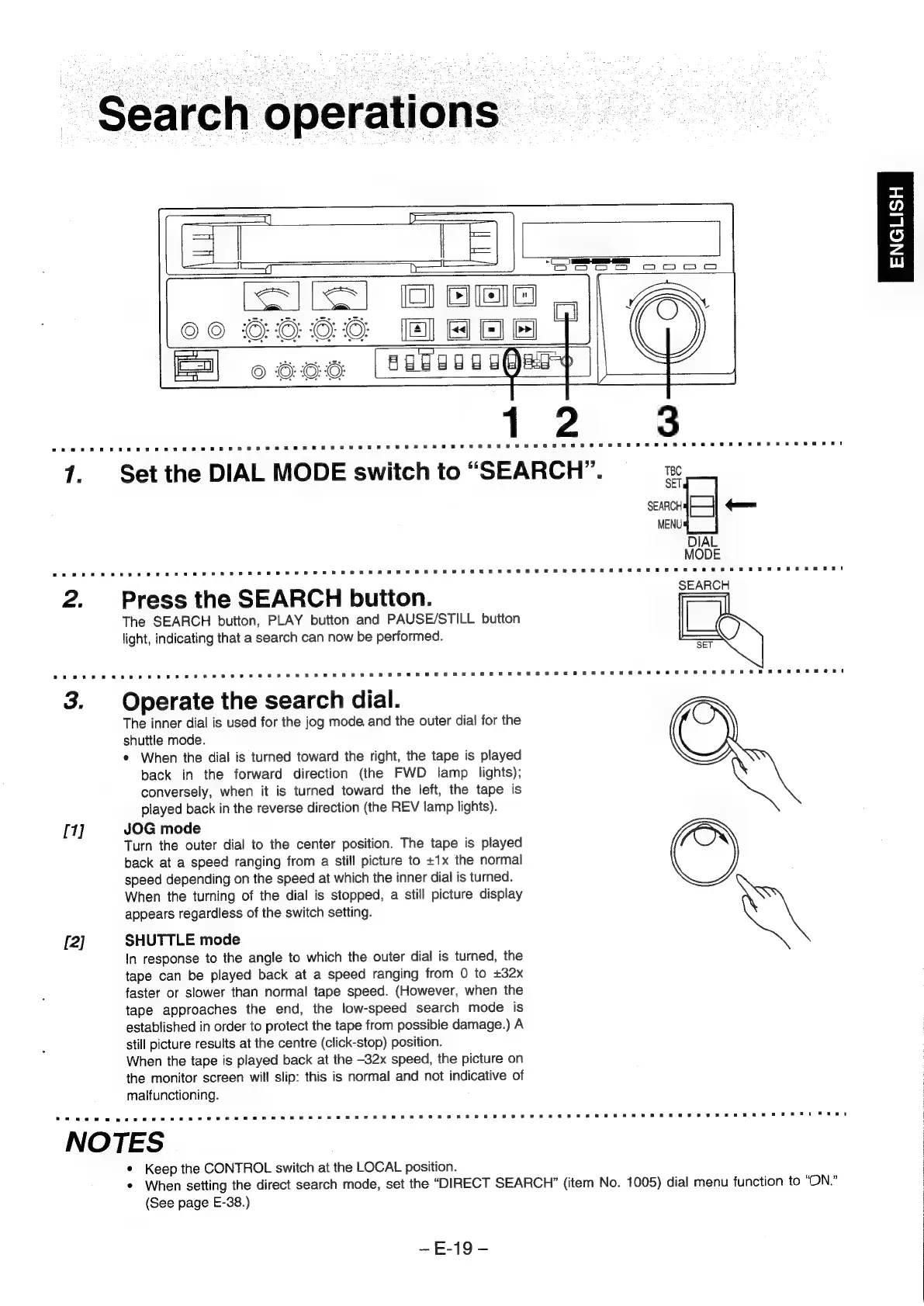
1.
Set
the
DIAL
MODE
switch
to
“SEARCH”.
TBC
SET
SEARCH
==
MENU
DIAL
MODE
SEARCH
2.
Press
the
SEARCH
button.
The
SEARCH
button,
PLAY
button
and
PAUSE/STILL
button
light,
indicating
that
a
search
can
now
be
performed.
3.
Operate
the
search
dial.
The
inner
dial
is
used
for
the
jog
mode.
and
the
outer
dial
for
the
shuttle
mode.
*
When
the
dial
is
turned
toward
the
right,
the
tape
is
played
back
in
the
forward
direction
(the
FWD
lamp
lights);
conversely,
when
it
is
turned
toward
the
left,
the
tape
is
played
back
in
the
reverse
direction
(the
REV
lamp
lights).
[1]
JOG
mode
Turn
the
outer
dial
to
the
center
position.
The
tape
is
played
back
at
a
speed
ranging
from
a
still
picture
to
+1x
the
normal
speed
depending
on
the
speed
at
which
the
inner
dial
is
turned.
When
the
turning
of
the
dial
is
stopped,
a
still
picture
display
appears
regardless
of
the
switch
setting.
[2]
SHUTTLE
mode
In
response
to
the
angle
to
which
the
outer
dial
is
turned,
the
tape
can
be
played
back
at
a
speed
ranging
from
0
to
+32x
faster
or
slower
than
normal
tape
speed.
(However,
when
the
tape
approaches
the
end,
the
low-speed
search
mode
is
established
in
order
to
protect
the
tape
from
possible
damage.)
A
still
picture
results
at
the
centre
(click-stop)
position.
When
the
tape
is
played
back
at
the
-32x
speed,
the
picture
on
the
monitor
screen
will
slip:
this
is
normal
and
not
indicative
of
malfunctioning.
NOTES
*
Keep
the
CONTROL
switch
at
the
LOCAL
position.
*
When
setting
the
direct
search
mode,
set
the
“DIRECT
SEARCH”
(item
No.
1005)
dial
menu
function
to
“ON.”
(See
page
E-38.)
-~E-19-
ENGLISH