EasyManua.ls Logo

Panasonic AG-8700E - Page 30

Panasonic AG-8700E
66 pages
Print Icon
To Next Page IconTo Next Page
To Previous Page IconTo Previous Page
Loading...
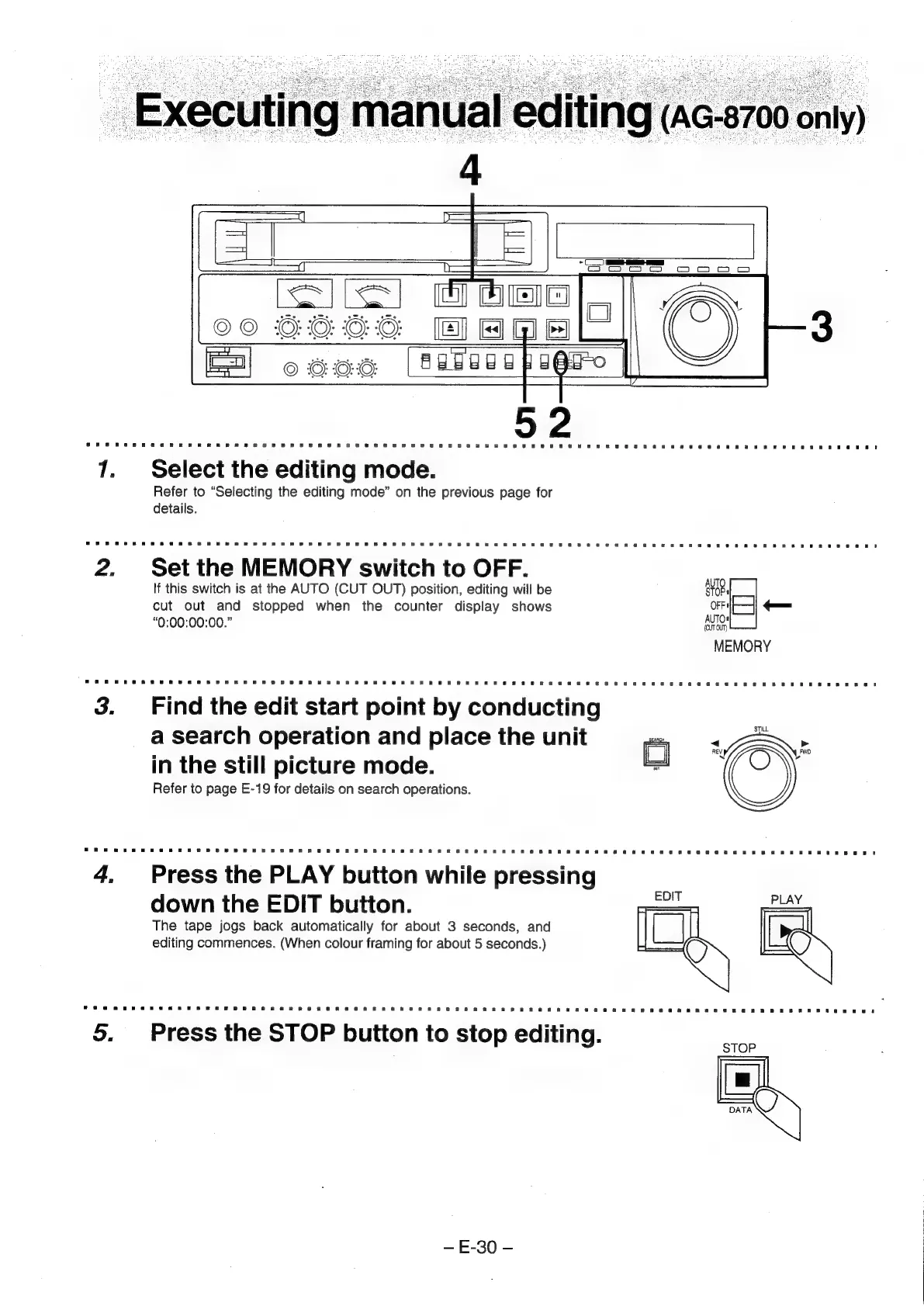
Executing
manual
editing
(aG-8700
only)
Select
the
editing
mode.
Refer
to
“Selecting
the
editing
mode”
on
the
previous
page
for
details.
Set
the
MEMORY
switch
to
OFF.
If
this
switch
is
at
the
AUTO
(CUT
OUT)
position,
editing
will
be
cut
out
and
stopped
when
the
counter
display
shows
“0:00:00:00.”
Find
the
edit
start
point
by
conducting
a
search
operation
and
place
the
unit
in
the
still
picture
mode.
Refer
to
page
E-19
for
details
on
search
operations.
Press
the
PLAY
button
while
pressing
down
the
EDIT
button.
The
tape
jogs
back
automatically
for
about
3
seconds,
and
editing
commences.
(When
colour
framing
for
about
5
seconds.)
Press
the
STOP
button
to
stop
editing.
E-30
-