EasyManua.ls Logo

Panasonic AG-8700E - Page 38

Panasonic AG-8700E
66 pages
Print Icon
To Next Page IconTo Next Page
To Previous Page IconTo Previous Page
Loading...
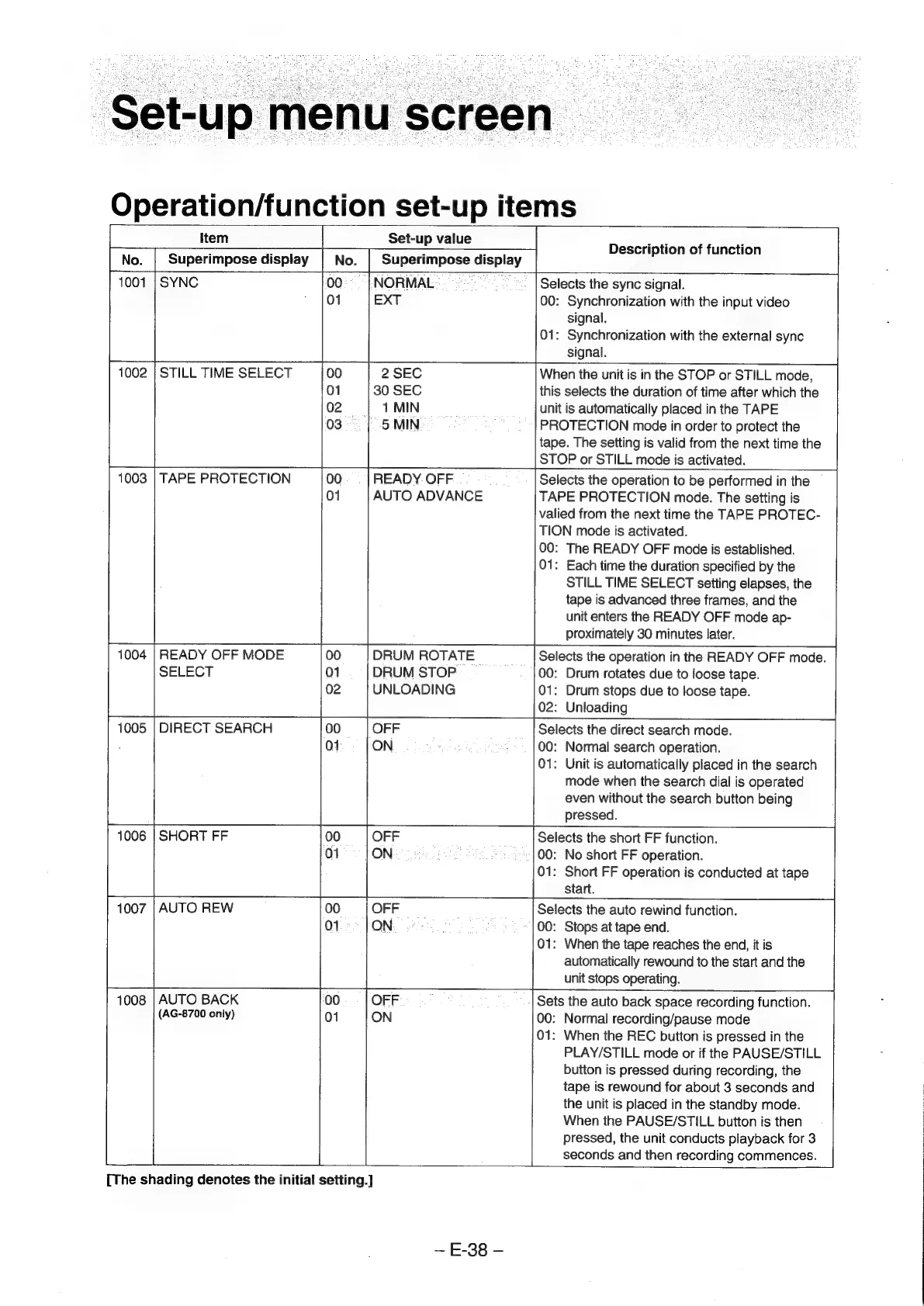
‘Set-up
menu
screen
Operation/function
set-up
items
Item
No.
Superimpose
display
1001
|
SYNC
STILL
TIME
SELECT
|
4
MIN
03
|
5
MIN
1003
|
TAPE
PROTECTION
1004
|
READY
OFF
MODE
SELECT
01
1005
|
DIRECT
SEARCH
ot
ON
1006
|
SHORT
FF
00
OFF
Set-up
value
30
SEC
Description
of
function
Selects
the
sync
signal.
00:
Synchronization
with
the
input
video
signal.
01:
Synchronization
with
the
external
sync
signal.
When
the
unit
is
in
the
STOP
or
STILL
mode,
|
this
selects
the
duration
of
time
after
which
the
unit
is
automatically
placed
in
the
TAPE
PROTECTION
mode
in
order
to
protect
the
tape.
The
setting
is
valid
from
the
next
time
the
STOP
or
STILL
mode
is
activated.
00
READY
OFF
01
AUTO
ADVANCE
DRUM
ROTATE
DRUM
STOP
02
UNLOADING
Selects
the
operation
to
be
performed
in
the
~
TAPE
PROTECTION
mode.
The
setting
is
valied
from
the
next
time
the
TAPE
PROTEC-
TION
mode
is
activated.
00:
The
READY
OFF
mode
is
established.
01:
Each
time
the
duration
specified
by
the
STILL
TIME
SELECT
setting
elapses,
the
tape
is
advanced
three
frames,
and
the
unit
enters
the
READY
OFF
mode
ap-
proximately
30
minutes
later.
Selects
the
operation
in
the
READY
OFF
mode.
00:
Drum
rotates
due
to
loose
tape.
01:
Drum
stops
due
to
loose
tape.
02:
Unloading
Selects
the
direct
search
mode.
00:
Normal
search
operation.
01:
Unit
is
automatically
placed
in
the
search
mode
when
the
search
dial
is
operated
even
without
the
search
button
being
pressed.
Selects
the
short
FF
function.
00:
No
short
FF
operation.
01:
Short
FF
operation
is
conducted
at
tape
start.
AUTO
REW
00
OFF
01
ON
1008
|
AUTO
BACK
00
OFF.
(AG-8700
only)
01
ON
pounce
Selects
the
auto
rewind
function.
00:
Stops
at
tape
end.
01:
When
the
tape
reaches
the
end,
it
is
automatically
rewound
to
the
start
and
the
unit
stops
operating.
Sets
the
auto
back
space
recording
function.
00:
Normal
recording/pause
mode
01:
When
the
REC
button
is
pressed
in
the
PLAY/STILL
mode
or
if
the
PAUSE/STILL
button
is
pressed
during
recording,
the
tape
is
rewound
for
about
3
seconds
and
the
unit
is
placed
in
the
standby
mode.
When
the
PAUSE/STILL
button
is
then
pressed,
the
unit
conducts
playback
for
3
seconds
and
then
recording
commences.
[The
shading
denotes
the
initial
setting.]
~
E-38
-