EasyManua.ls Logo

Panasonic AG-8700E - Page 46

Panasonic AG-8700E
66 pages
Print Icon
To Next Page IconTo Next Page
To Previous Page IconTo Previous Page
Loading...
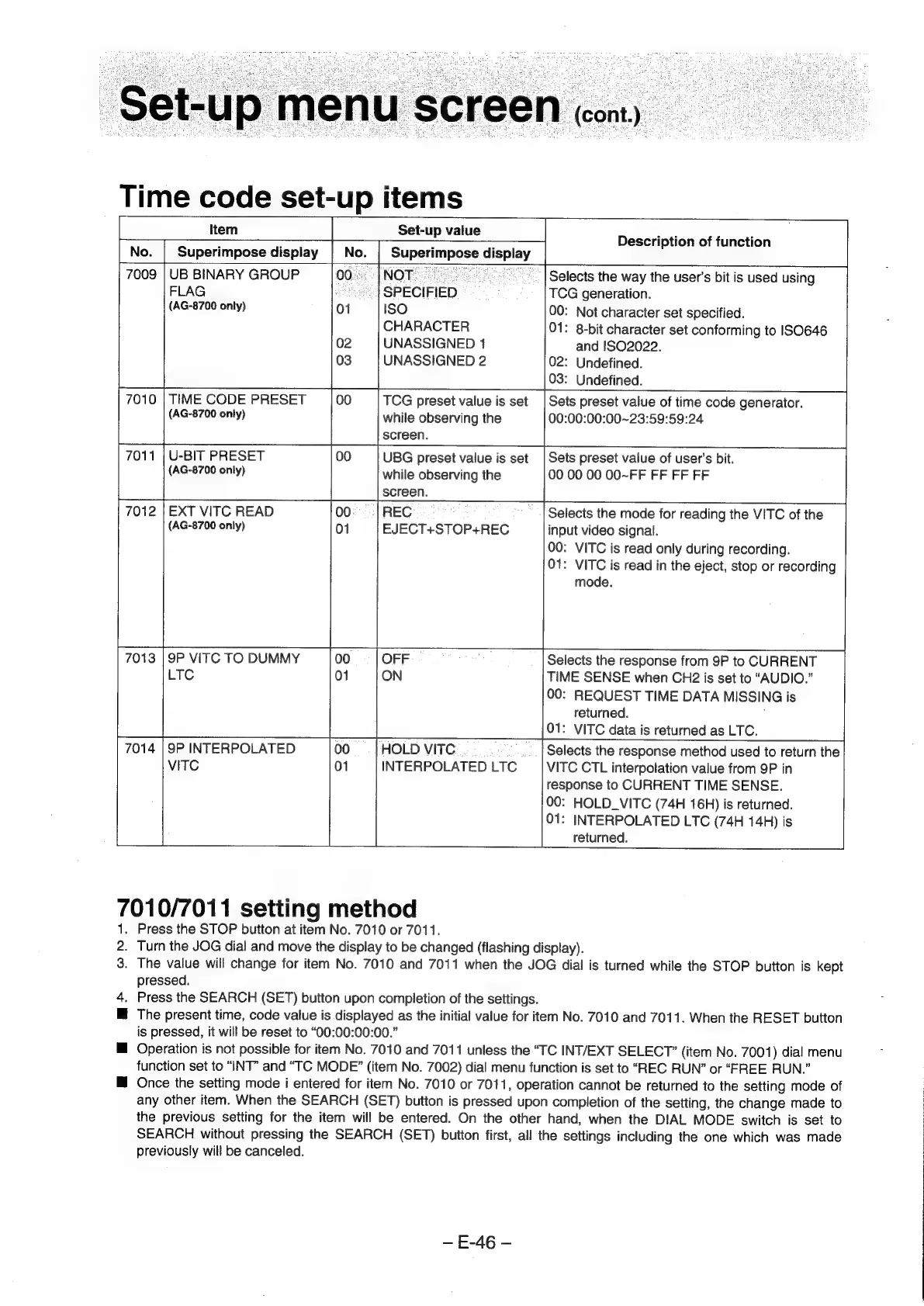
7009
|
UB
BINARY
GROUP
00...
|NOT...
7010
|
TIME
CODE
PRESET
00
|
setup
value
Description
of
function
lel
i
et
Selects
the
way
the
user’s
bit
is
used
using
FLAG
seh
SPECIFIED
TCG
generation.
(AG-8700
only)
01
ISO
00:
Not
character
set
specified.
CHARACTER
01:
8-bit
character
set
conforming
to
ISO646
02
UNASSIGNED
1
and
!S02022.
03
UNASSIGNED
2
02:
Undefined.
03:
Undefined.
TCG
preset
value
is
set
(AG-8700
only)
U-BIT
PRESET
(AG-8700
only)
while
observing
the
screen.
Sets
preset
value
of
time
code
generator.
00:00:00:00~23:59:59:24
UBG
preset
value
is
set
while
observing
the
Sets
preset
value
of
user's
bit.
00
00
00
00~FF
FF
FF
FF
screen.
REC
EJECT+STOP+REC
EXT
VITC
READ
(AG-8700
only)
01
Selects
the
mode
for
reading
the
VITC
of
the
input
video
signal.
00:
VITC
is
read
only
during
recording.
01:
VITC
is
read
in
the
eject,
stop
or
recording
mode.
gP
VITC
TO
DUMMY
LTC
01
ON
Selects
the
response
from
9P
to
CURRENT
TIME
SENSE
when
CH2
is
set
to
“AUDIO.”
00:
REQUEST
TIME
DATA
MISSING
i
is
returned.
:
VITC
data
is
returned
as
LTC.
...|
Selects
the
response
method
used
to
return
the
VITC
CTL
interpolation
value
from
9P
in
response
to
CURRENT
TIME
SENSE.
00:
HOLD_VITC
(74H
16H)
is
returned.
01:
INTERPOLATED
LTC
(74H
14H)
is
returned.
9P
INTERPOLATED
VITC
01
HOLD
VITC
.
INTERPOLATED
LTC
701
0/7011
setting
method
.
Press
the
STOP
button
at
item
No.
7010
or
7011.
5
Turn
the
JOG
dial
and
move
the
display
to
be
changed
(flashing
display).
3.
The
value
will
change
for
item
No.
7010
and
7011
when
the
JOG
dial
is
turned
while
the
STOP
button
is
kept
pressed.
4.
Press
the
SEARCH
(SET)
button
upon
completion
of
the
settings.
M@
The
present
time,
code
value
is
displayed
as
the
initial
value
for
item
No.
7010
and
7011.
When
the
RESET
button
is
pressed,
it
will
be
reset
to
“00:00:00:00.”
H@
Operation
is
not
possible
for
item
No.
7010
and
7011
unless
the
“TC
INT/EXT
SELECT”
(item
No.
7001)
dial
menu
function
set
to
“INT”
and
“TC
MODE?”
(item
No.
7002)
dial
menu
function
is
set
to
“REC
RUN?”
or
“EREE
RUN.”
M
Once
the
setting
mode
i
entered
for
item
No.
7010
or
7011,
operation
cannot
be
returned
to
the
setting
mode
of
any
other
item.
When
the
SEARCH
(SET)
button
is
pressed
upon
completion
of
the
setting,
the
change
made
to
the
previous
setting
for
the
item
will
be
entered.
On
the
other
hand,
when
the
DIAL
MODE
switch
is
set
to
SEARCH
without
pressing
the
SEARCH
(SET)
button
first,
all
the
settings
including
the
one
which
was
made
previously
will
be
canceled.
E-46
-