EasyManua.ls Logo

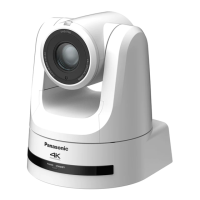
Panasonic AW-UE70 - User Manual

Panasonic AW-UE70
144 pages
Print Icon
To Next Page IconTo Next Page
Loading...
Operating Instructions
<Operations and Settings>
4K Integrated Camera
How the Operating Instructions are configured
<Basics>:
The <Basics> describes the procedure for basic operation and installation. Before installing this unit, be
sure to take the time to read through <Basics> to ensure that the unit will be installed correctly.
<Operations and Settings> (this manual):
This <Operations and Settings> describes how to operate the unit and how to establish its settings.
Model No.
AW‑UE70WP
Model No.
AW‑UE70KP
Model No.
AW‑UE70WE
Model No.
AW‑UE70KE
ENGLISH
SQT1079
F0915TY0

Table of Contents

Questions and Answers

  • T
    Taylor MaldonadoAug 20, 2025
    Why Panasonic Security Camera has no power?
    • T
      tjenningsAug 20, 2025
      The AC adapter might not be securely connected to the AC outlet, or the power plug of the AC adapter might not be properly connected. Ensure the network cable for the PoE+ (IEEE802.3at compliant) compatible power supply device and the unit are properly connected. If using power supply devices with multiple PoE+ terminals, the total power limit might be exceeded. Check the operating instructions for the PoE+ power supply device.
  • J
    Joseph MartinAug 22, 2025
    What to do if Panasonic AW-UE70 cannot be operated (common to wireless remote control, controller)?
    • M
      Maria FrazierAug 22, 2025
      First, check if the power is on. If the unit’s status display lamp is off or lit orange, power is not being supplied. Also, verify if the limiter functions have been set and if the correct unit to be operated has been selected.
  • B
    Benjamin SmithAug 25, 2025
    Why Panasonic AW-UE70 has no access is possible from the web browser?
    • W
      wmartinezAug 25, 2025
      Ensure a LAN cable of category 5 or above is connected to the LAN connector for IP control. Check if the [LINK] LED of the LAN connector for IP control is lit; if not, there may be a problem with the LAN connection or the network. Verify the power is on and a valid IP address has been set in the unit. Also, confirm that the correct IP address is being accessed and that 554 has not been set as the HTTP port number. Finally, check if access is being performed in HTTPS mode.
  • J
    Joshua ThomasAug 26, 2025
    What to do if Panasonic AW-UE70 Security Camera pictures are too light or too dark?
    • A
      austinjohnsonAug 26, 2025
      Adjust light intensity using the ND filters. You can either select the auto setting for the iris or manually adjust the iris. Also, set “Auto Shutter Limit” to “Off.”
  • J
    james67Aug 28, 2025
    What to do if Panasonic AW-UE70 Security Camera cannot operate using the wireless remote control?
    • R
      rmcclureAug 28, 2025
      Check if the remote control’s batteries have run down or are installed with reversed polarities. If the status display lamp doesn't blink when operating the remote near the signal light-sensing area, replace the batteries. Ensure the IR ID setting is correct. Also, check for any nearby fluorescent lights or plasma monitors that might be interfering with the wireless remote control signal light-sensing area.
  • S
    Samantha MeadowsAug 30, 2025
    What to do if Panasonic AW-UE70 Security Camera has something wrong with the coloring of the pictures?
    • A
      Anthony GallegosAug 30, 2025
      Activate the ATW (Auto tracking white adjustment) function. If the proper colors are still not reproduced, proceed with the white balance adjustment.
  • A
    andrew82Sep 1, 2025
    What to do if Panasonic Security Camera has no pictures are displayed or the pictures are disturbed?
    • A
      Alexis BakerSep 1, 2025
      Make sure the unit has been connected properly to the other connected devices. If the system switches the picture when the unit to be operated is selected, ensure the correct unit has been selected. Check that the video signal setting is correct and that external sync signals supported by the set video signal format are being input.
  • D
    Dana GregorySep 3, 2025
    What to do if Panasonic AW-UE70 has no auto focusing?
    • A
      Angela MartinSep 3, 2025
      Verify that the focus is not set to manual. If it is difficult to focus in auto mode, switch to the manual setting and adjust the focus manually.
  • D
    Danielle CooperSep 4, 2025
    What to do if Panasonic AW-UE70 cannot operate using the controller?
    • E
      Erik ArroyoSep 5, 2025
      Ensure the unit is properly connected to the controller. Refer to the controller's operating instructions for guidance. Note that the user authorization must be set to OFF when the AW-RP50, AW-RP120, and AK-HRP200 remote camera controllers are connected in a network. Check that all cameras in the daisy-chain connection are turned on. It may be necessary to upgrade the version of the controller so that the controller will support the unit.
  • B
    Betty WagnerSep 7, 2025
    Why Panasonic AW-UE70 status display lamp flashes red continuously?
    • J
      Jaclyn WatkinsSep 7, 2025
      The PoE+ power supply conditions may not meet the specifications. Check the power supply device.

Panasonic AW-UE70 Specifications

General IconGeneral
TypeIP security camera
PTZ controlYes
Placement supportedIndoor
Connectivity technologyWired
FocusMotorized/Manual
Digital zoom12 x
Optical zoom20 x
Number of lenses1
Focal length range4.08 - 81.6 mm
Maximum aperture number3.6
Minimum aperture number1.8
Closest focusing distance0.1 m
Pan range-175 - 175 °
White balanceATW, Auto, Manual
Pan preset speed300 °/sec
Tilt angle range-30 - 90 °
Camera shutter typeElectronic
Camera shutter speed1/60 - 1/2000; 1/30 - 1/2000, 1/50 - 1/2000, 1/25 - 1/2000; 1/100, 1/250, 1/500, 1/1000, 1/2000, 1/4000, 1/10000, 1/120 s
Minimum illumination0.35 lx
DC output current1.3 A
DC output voltage12
Power source typeDC, PoE
Storage temperature (T-T)-20 - 50 °C
Operating temperature (T-T)0 - 40 °C
Operating relative humidity (H-H)20 - 90 %
Form factorDome
Mounting typeCeiling/wall
Product colorWhite
Built-in HDDNo
Compatible memory cardsMicroSD (TransFlash)
Streaming methodMulticast, Unicast
Networking standardsIEEE 802.3at
Supported network protocolsTCP/IP, UDP/IP, HTTP, HTTPS, RTSP, RTP, RTP/RTCP, FTP, DHCPv6, DNS, NTP, ICMPv6(MLD), RTSPoverTCP, RTSPoverHTTP, SSL(TLS)
Sensor typeMOS
Optical sensor size1/2.3 \
Total megapixels- MP
Maximum resolution3840 x 2160 pixels
Supported video modes720p, 1080i, 1080p, 2160p
Video compression formatsH.264, M-JPEG, MP4, MPEG4
Supported graphics resolutions640 x 360, 1280 x 720 (HD 720), 1920 x 1080 (HD 1080), 3840 x 2160
Audio formats supportedPCM
Weight and Dimensions IconWeight and Dimensions
Depth179 mm
Width160 mm
Height186 mm
Weight1500 g
Cable length1.5 m

Related product manuals