Operating Instructions
25
1.5 Viewing Still Images on Your Mobile Phone
You can view still images over the Internet from a compatible mobile phone.
Enter "http://IP address (or URL):Port Number/mobile
" on a mobile phone and
press [OK].
• When the port number is set to 80 (default), it is not required.
• When an authentication window is displayed, enter the administrator's or the
general user's user name and password.
• A still image is displayed. (Video [Motion JPEG] cannot be displayed.)
E.g. http://XXX.XXX.XXX.XXX:50000/mobile
(or XXXXX.viewnetcam.com:50000/mobile)
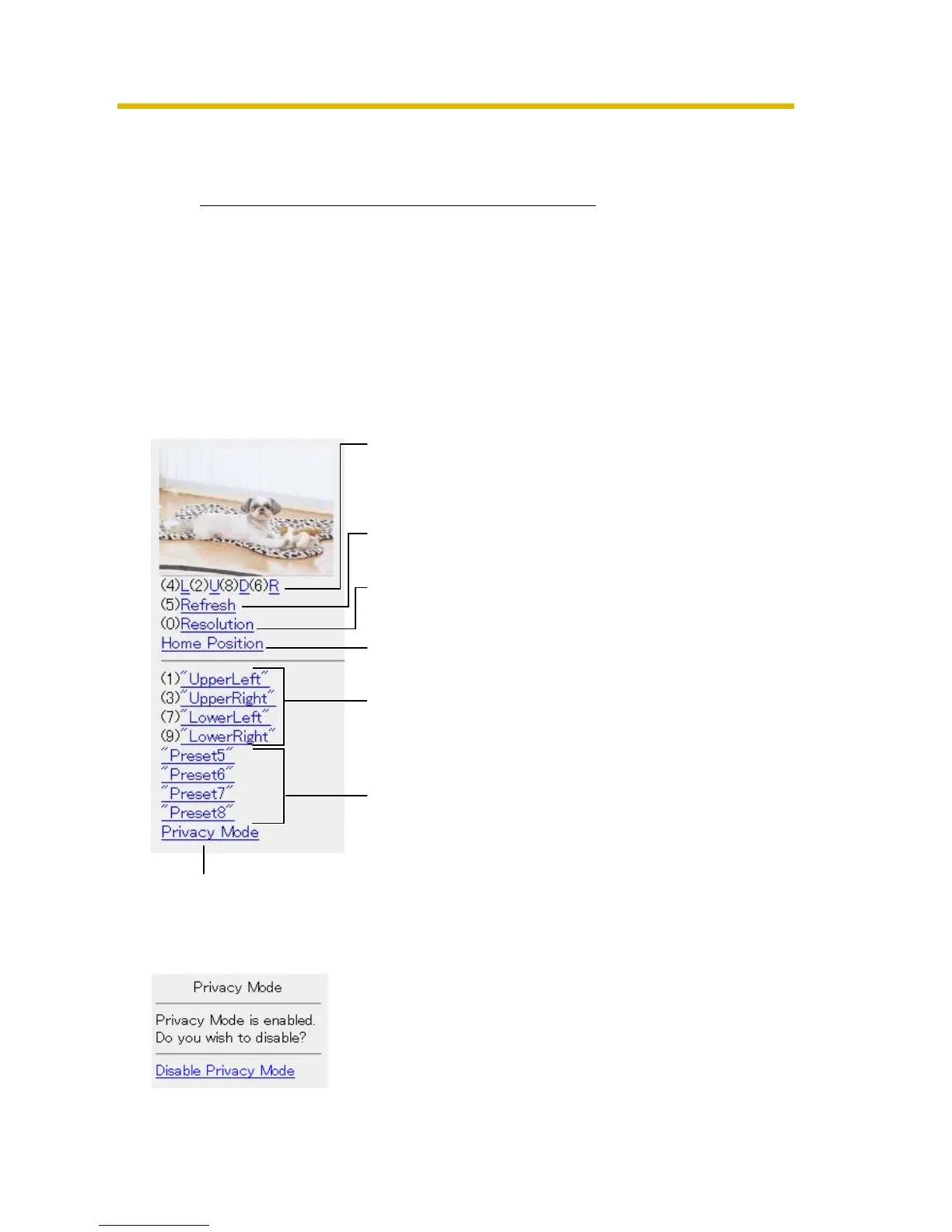
Pressing 2, 4, 6 or 8 on the mobile phones allows
you to pan or tilt the camera in four directions:
Left, Up, Down or Right.
Pressing 5 will refresh the image.
160 x 120 resolution is displayed at the first
access. Pressing 0 switches the resolution to 320
x 240.
Executing [Home Position] moves the lens to the
home position.
Pressing 1, 3, 7 or 9 on the keypad allows you to
use the first four registered preset buttons.
Registered presets 5—8 are available by
activating the link on the mobile phone page.
If you execute [Privacy Mode] here, the camera switches to privacy mode. To
disable it, access the camera again and execute [Disable Privacy Mode] (see
page 73).











 To Next Page