Radio (AM/FM)
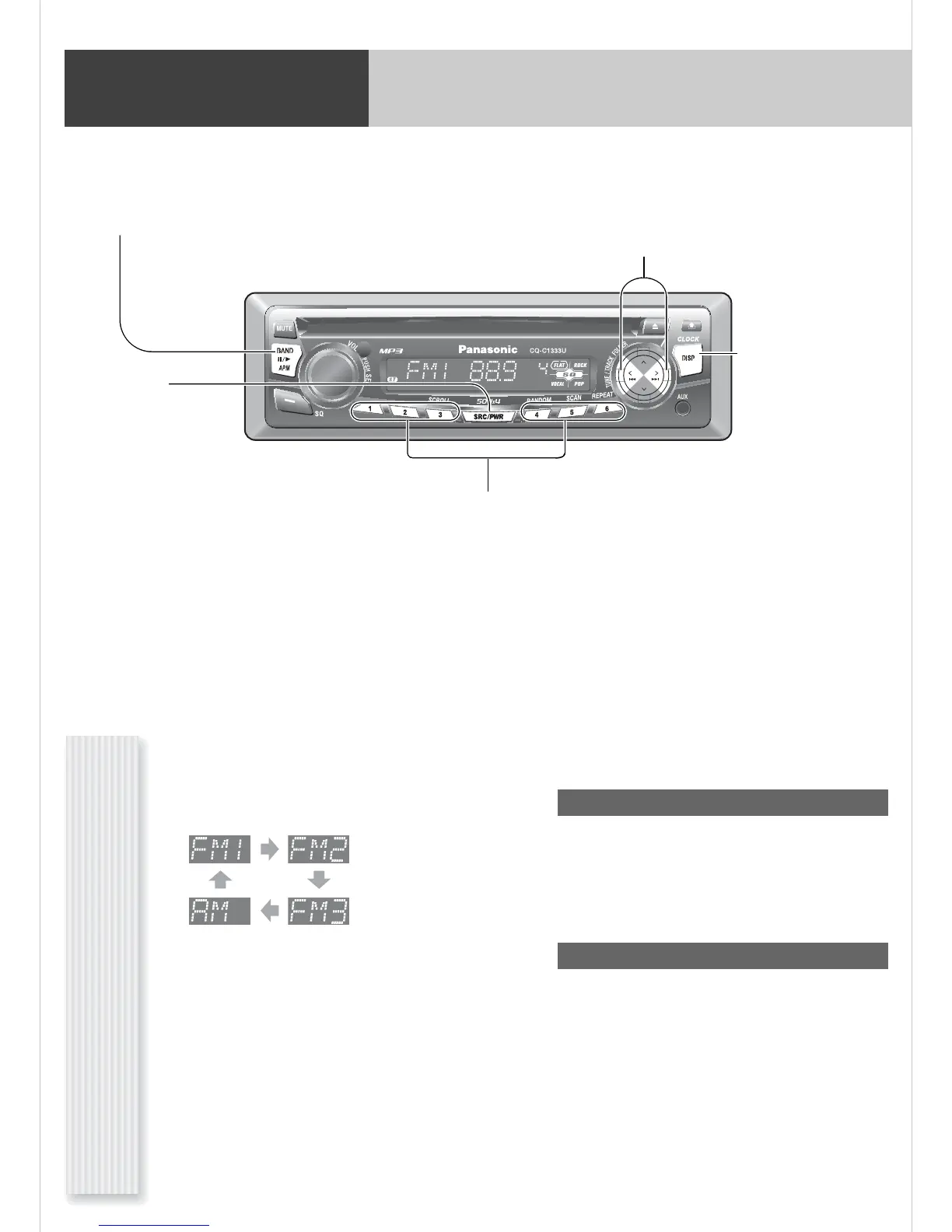
[TUNE ]] [TUNE []
down/up the frequency. (Hold it
down for more than 0.5 seconds
and release it for seek tuning.)
[BAND]
selects a band in the radio source.
[APM] (
Auto Preset Memory)
executes APM in the radio source. (Hold it
down for more than 2 seconds.)
[DISP] (Display)
switches the information on
the display.
[SRC] (Source)
selects a source.
Preset buttons [1] to [6]
selects a preset station in the radio source,
and presets the current station. (Hold it down
for more than 2 seconds.)
Operation Flow
1
Press [SRC] to select the radio source.
2
Press [BAND] to select a band.
3
Select a station.
Frequency adjustment
[TUNE]]: Lower
[TUNE[]: Higher
Note: Hold down either of them for more than 0.5 sec-
onds and release it for seek tuning.
Preset station selection
Press the corresponding preset button from
[1] to [6] to tune in a preset station.




 To Next Page