Preparation
1
Set your car's ignition switch to the ACC or
ON position.
2
Press [SRC] (PWR: Power).
The 12-hour system is used for the clock.
1
Press [DISP] (CLOCK).
(clock display)
2
Hold down [DISP] (CLOCK) for more than 2
seconds.
Hours blinks
3
Adjust the hour.
Hours set
[[]: sets the hour ahead.
[]]: sets the hour back.
4
Press [DISP] (CLOCK).
Minutes blinks
5
Adjust the minute.
Minutes set
[[]: sets the minute ahead.
[]]: sets the minute back.
6
Press [DISP] (CLOCK).
Complete
Notes:
¡ “ADJUST” is displayed before adjusting the clock.
¡ Hold down []] or [[] to change numbers rapidly.
Clock Display at Power Off
Press [DISP] to change the display.
Clock Setting
Display off
Clock display
Battery
Installation
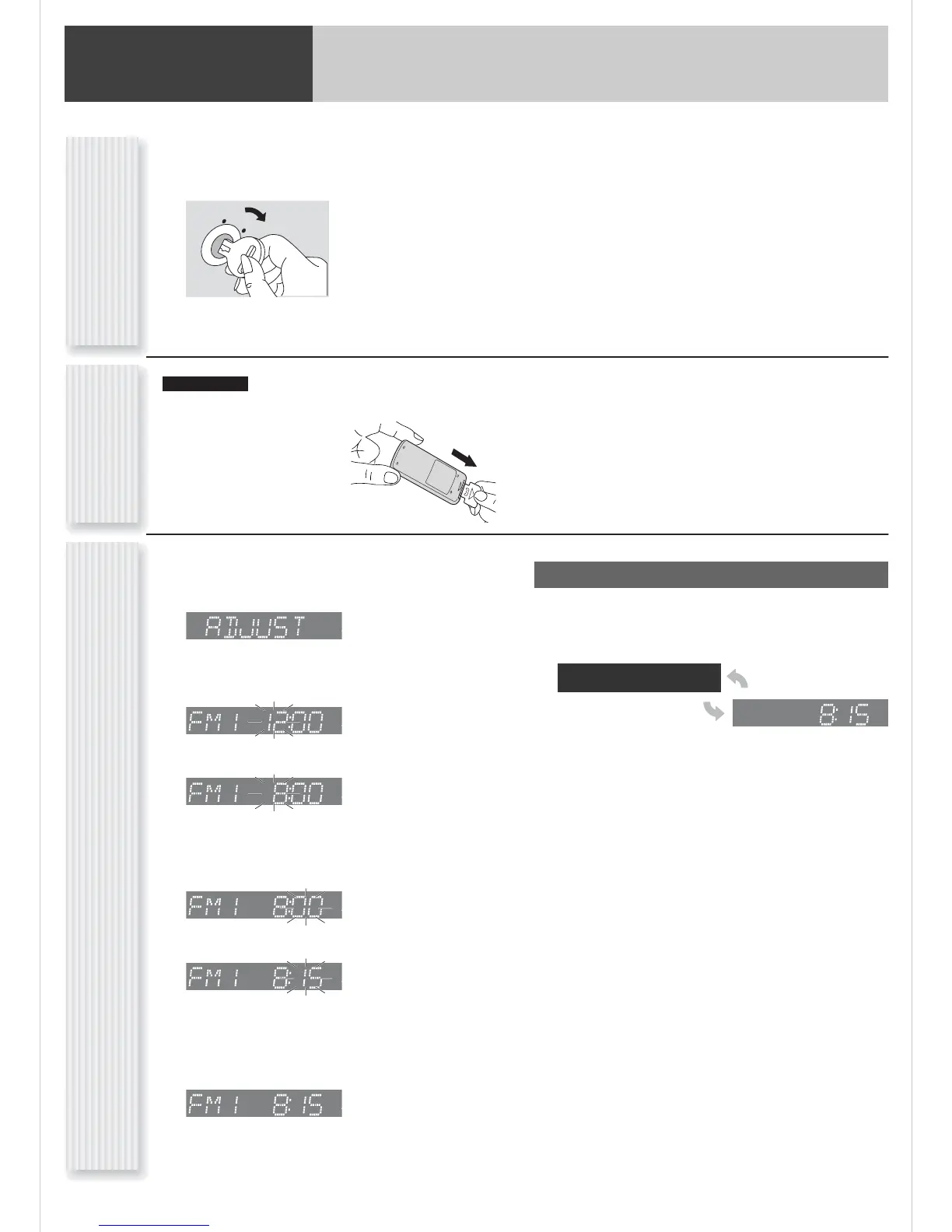
Pull the insulation film out from the backside of the remote
control gently.
nly
Note: Battery Information:
Battery Type: Panasonic lithium battery (CR2025) (Included in
the remote control)
Battery Life: Approximately 6 months under normal use (at
room temperature)
CQ-C1333U
First Time Power On




 To Next Page