11
10
E
N
G
L
I
S
H
CQ-C3433U/C3403U/C3333U/C3303U
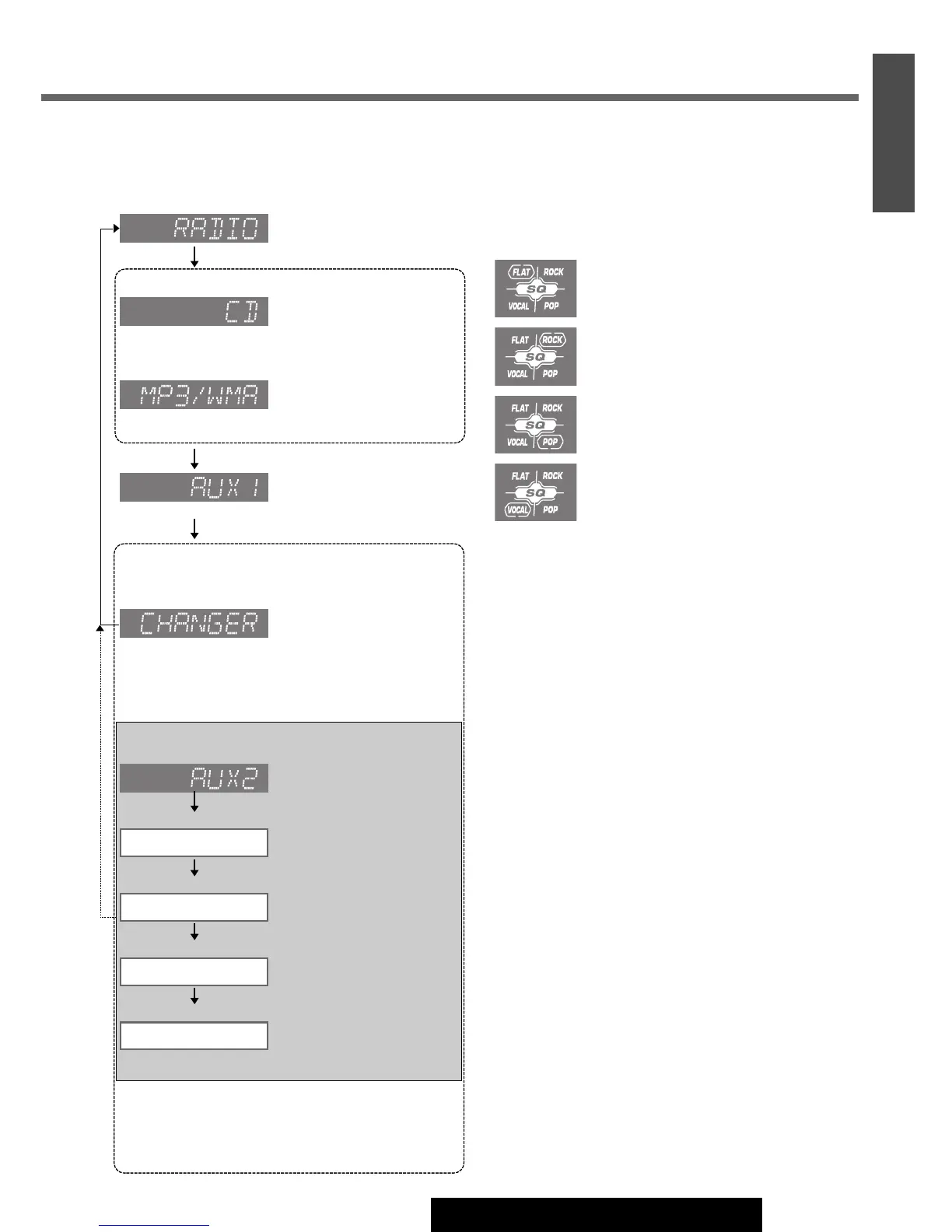
SQ (Sound Quality)
SQ is a function that can call up various sound types at the
touch of button in accordance with your listening music
type.
Press
[SQ] to select the sound type as follows:
Press
[D] (DISP) to return to the regular mode.
Note:
¡ Settings of SQ, bass/treble and volume are influenced
one another. If such an influence causes distortion to
the audio signal, readjust bass/treble or volume.
(
a Page 20)
(VOCAL) clear sound:
emphasizes middle tone and slightly
emphasizes treble.
(POP) wide-ranged and deep sound:
slightly emphasizes bass and treble.
(ROCK) speedy and heavy sound:
exaggerates bass and treble.
(FLAT) flat frequency response:
does not emphasize any part. (Default)
Source
Press
[SRC/PWR]
to change the source.
Radio
CD Player
MP3/WMA Player
AUX1
An optional unit (ex. CD changer)
(if you connect it to System-up Connector of this unit
directly)
Some optional units
(if you use the Expansion Module (CY-EM100U))
Note:
¡For information about connectable devices, refer to
the
System Upgrade Guidebook or the instruction
manual for each device.
(Sound source connected to the
port 4 of Expansion Module
a
System Upgrade Guidebook
)
Port 4
(Sound source connected to the
port 3 of Expansion Module
a
System Upgrade Guidebook
)
Port 3
(Sound source connected to the
port 2 of Expansion Module
a
System Upgrade Guidebook
)
Port 2
(Sound source connected to the
port 1 of Expansion Module
a
System Upgrade Guidebook
)
Port 1
(Sound source connecting to the AUX
input terminal of Expansion Module
a
System Upgrade Guidebook
)
OR
(Sound source connected to
the System-up Connector of
this unit directly
a System
Upgrade Guidebook
)
(Sound source connecting to
the AUX input terminal
a Page
22, Installation Instructions)
(When an MP3/WMA data disc
is in the player
a
Page 16)
OR
(
a
Page 15)
(
a
Page 12)
(when connected)
(when connected)
(when connected)
(when connected)




 To Next Page