MAtN Menu Feature Chart
Main
Menu
Feature
Chart (Cont)
Menu
Description
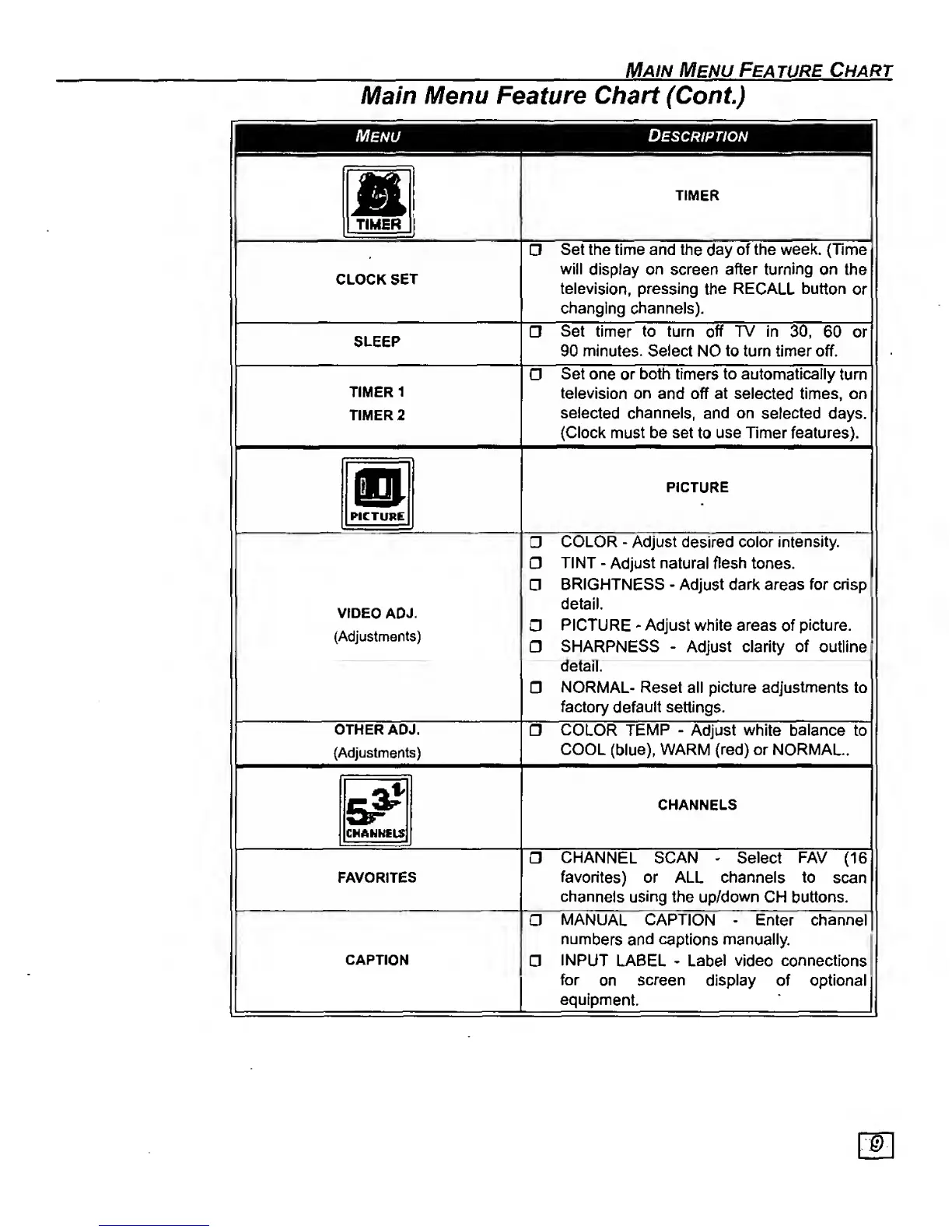
TIMER
i
TIMER
CLOCK SET
Set the time and the
day
of the
week. {Time
will
display on screen
after turning
on the
television, pressing
the RECALL
button
or
changing
channels).
SLEEP
Set timer to turn off TV In
30, 60 or
90 minutes. Select NO to turn timer off.
TIMER
1
TIMER 2
Set one
or
both timers to automatically
turn
television on
and off at selected times, on
selected
channels,
and
on
selected
days.
(Clock
must
be set
to
use Timer features).
o
PICTURE
PICTURE
VrOEO
ADJ.
(Adjustments)
COLOR
-
Adjust desired
color
intensity.
TINT
-
Adjust natural flesh
tones.
BRIGHTNESS
-
Adjust dark areas for crisp
detail.
PICTURE
-
Adjust white areas
of
picture.
SHARPNESS
-
Adjust clarity
of
outline
detail.
NORMAL- Reset
all
picture adjustments
to
factory
default settings.
OTHER ADJ.
(Adjustments)
COLOR TEMP
-
Adjust
white balance
to
COOL
(blue).
WARM (red) or NORMAL.
CMANISLS
CHANNELS
FAVORITES
CHANNEL SCAN
-
Select FAV
(16
favorites) or ALL channels to
scan
channels using
the
up/down
CM buttons.
CAPTION
MANUAL CAPTION
-
Enter
channel
numbers and captions manually.
a
INPUT
LABEL
•
Label video connections
for
on
screen
display
of optional
equipment





 To Next Page