Optional
Equipment
Connections
Optional Equipment Connections
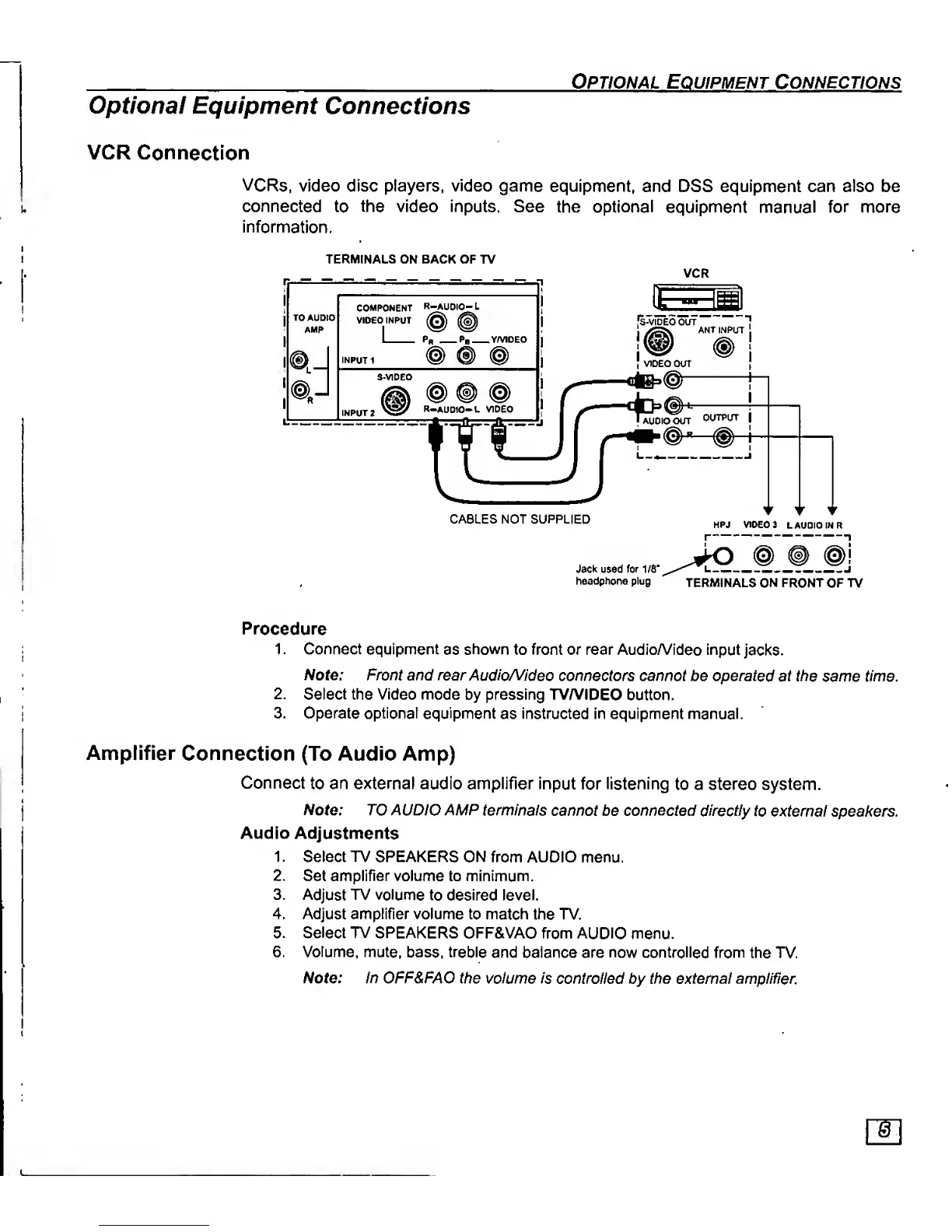
VCR Connection
VCRs,
video disc players, video game
equipment, and DSS equipment can also be
connected
to
the
video Inputs.
See the optional
equipment manual
for more
Information.
TERMINALS ON BACK OF TV
1>J
®
J
COMPONENT
R-AUDIO- L
VIDEO INPUT
I
Ph Pb
Y/VIDEO
@ ® @
R-AUD10-L
VIDEO
IT
CABLES NOT SUPPLIED
VCR
HPJ VIDEO 3
L AUDIO IN
R
Jack used for MS"
headphone plug
TERMINALS
ON FRONT
OF TV
Procedure
1
.
Connect equipment
as
shown
to front or rear AudioA/ideo input
jacks.
IVofe.' Front and rear
Audio/Video
connectors cannot be operated
at
the
same time.
2.
Select the
Video
mode by pressing TV/VIDEO
button.
3. Operate optional
equipment
as instructed in equipment
manual.
Amplifier
Connection
(To Audio Amp)
Connect
to
an external
audio
amplifier input for
listening
to a stereo system.
Note:
TO
A
UDIO
AMP
terminals
cannot be connected directly
to external speakers.
Audio
Adjustments
1
.
Select TV SPEAKERS
ON
from AUDIO menu.
2. Set amplifier volume to minimum.
3. Adjust TV
volume
to desired level.
4. Adjust amplifier volume
to
match
the TV.
5. Select
TV SPEAKERS OFF&VAO from
AUDIO
menu.
6. Volume, mute,
bass,
treble
and balance are now controlled from
the TV.
Note: In OFF&FAO the
volume
is controlled by the external amplifier.



 To Next Page