Special
Features
LOCK
MODE
To
use
LOCK
options:
ENTER CODE
FIRST
-
Use the numeric Iteypad
to
enter
a four-digit
secret
code.
After
entenng your
secret
code
for the
first time, the
onscreen display
will change
to
CHANGE
CODE.
Note:
Use a code that is easy to
remember or record it in a safe place.
In MODE
submenu
select:
LOCK
SET to choose:
•
OFF
-
To
turn lock
function off.
•
ALL
-
To lock
all channels and video
inputs.
•
CHANNEL
-
To lock up to four
channels of
your
choice.
•
GAME
-
To lock channels 3,
4
and
video inputs.
BLOCK PROGRAMS^
-
To use
Block Programs Ratings.
CHANGE CODE
-
Use
numeric keypad to
change your four-digit secret code.
Wore: If in
CHANGE
CODEyou enter a
different
code
from the one used previously,
the new code
becomes the
controlling code.
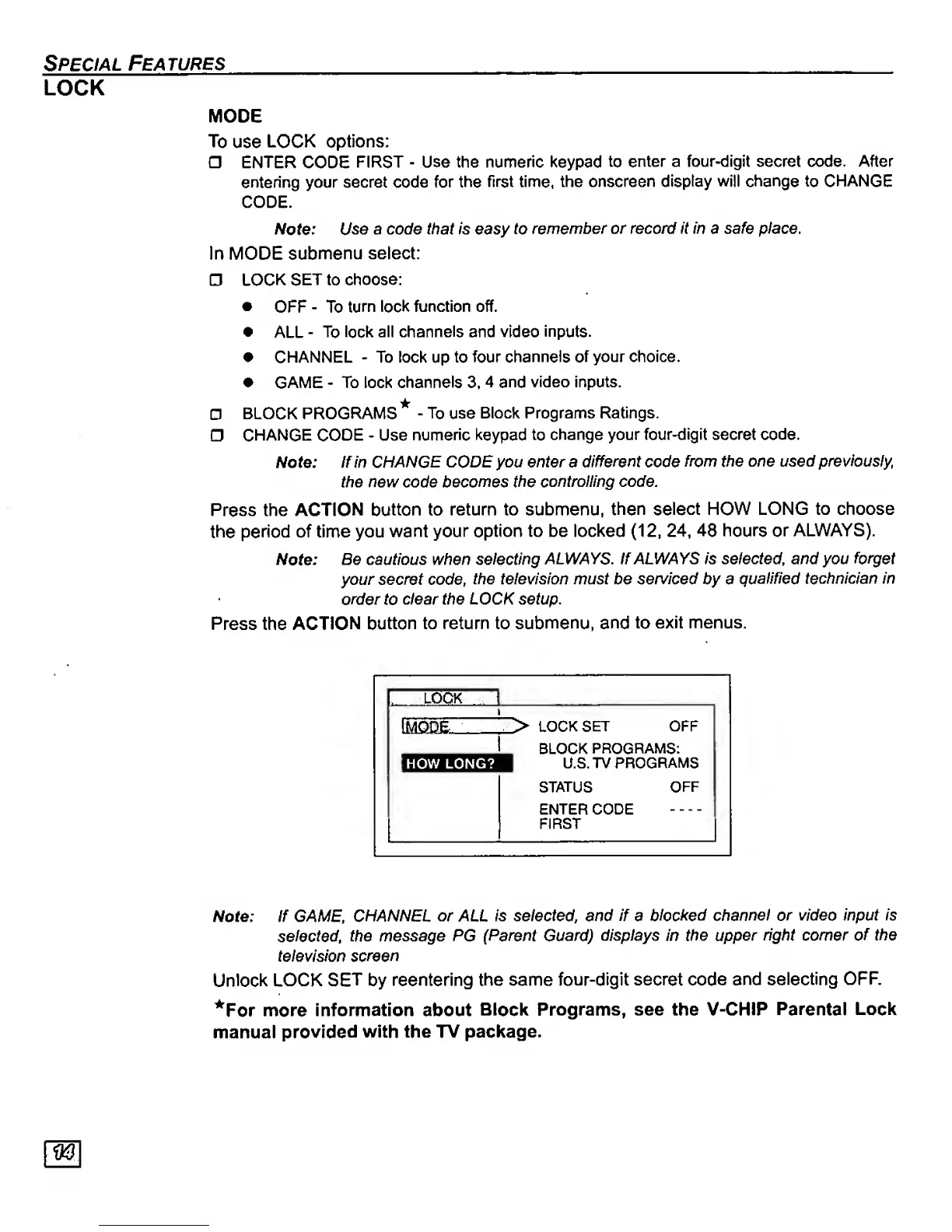
Press the ACTION button to
return to submenu,
then select
HOW LONG to choose
the
period
of time you
want your
option to be locked
(12,
24,
48 hours or
ALWAYS).
Note:
Be cautious when selecting
ALWAYS. If ALWAYS is selected, and you
forget
your secret code,
the television must be
serviced
by a
quallHed technician in
order
to
clear the LOCK setup.
Press the
ACTION button
to return to
submenu, and to
exit menus.
. LOOK \
i&icase
.
>
LOCK
SET OFF
BLOCK
PROGRAMS:
how long?
1
U.S. TV
PROGRAMS
STATUS
OFF
ENTER CODE
FIRST
Note: If GAI^E,
CHANNEL or ALL Is selected, and
if
a
blocked
channel or video input is
selected,
the message PG
(Parent Guard)
displays in Vie upper right comer
of the
television
screen
Unlock
LOCK
SET
by
reentering the same four-digit secret code
and selecting
OFF.
^For
more
information about
Block Programs, see the V-CHIP
Parental
Lock
manual
provided
with the TV package.






 To Next Page