EasyManua.ls Logo

Panasonic CU-2473KR - Remote Control Name and Functions; Operation Mode Selection Button; Room Temperature Setting Button; Indoor Fan Speed Selection Button

Panasonic CU-2473KR
22 pages
Print Icon
To Next Page IconTo Next Page
To Previous Page IconTo Previous Page
Loading...
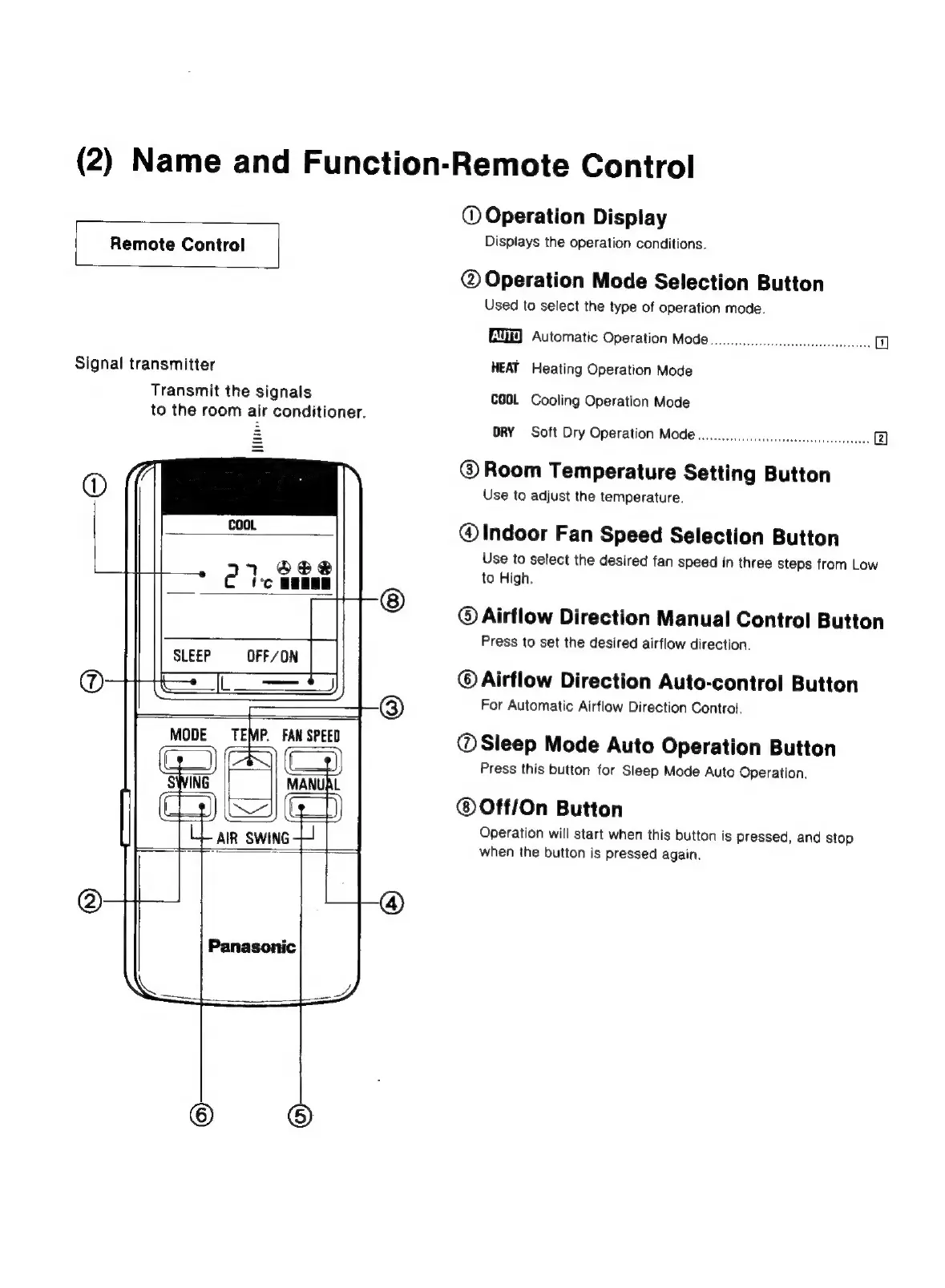
(2)
Name
and
Function-Remote
Control
Remote
Control
Signal
transmitter
Transmit
the
signals
to
the
room
air
conditioner.
Wit
SLEEP
OFF/ON
MODE
TEMP.
FAN
SPEED
AIR
SWING
Panasonic
©
Operation
Display
Displays
the
operation
conditions.
@
Operation
Mode
Selection
Button
Used
to
select
the
type
of
operation
mode.
EMGD)
Automatic
Operation
Mode
oo...
cccccccccsccceeeeeeeccc
7
HEAT
Heating
Operation
Mode
COGL
Cooling
Operation
Mode
ORY
Soft
Dry
Operation
Mode
wo...
ccceccccscccsesseseeseecce.
(2)
@
Room
Temperature
Setting
Button
Use
to
adjust
the
temperature.
@
Indoor
Fan
Speed
Selection
Button
Use
to
select
the
desired
fan
speed
in
three
steps
from
Low
to
High.
©
Airflow
Direction
Manual
Control
Button
Press
to
set
the
desired
airflow
direction.
©
Airflow
Direction
Auto-control
Button
For
Automatic
Airflow
Direction
Control.
@
Sleep
Mode
Auto
Operation
Button
Press
this
button
for
Sleep
Mode
Auto
Operation.
®Off/On
Button
Operation
will
start
when
this
button
is
pressed,
and
stop
when
the
button
is
pressed
again.

Related product manuals