EasyManua.ls Logo

Panasonic CU-2473KR - Remote Control Time Setting and Cautions; Setting the Current Time

Panasonic CU-2473KR
22 pages
Print Icon
To Next Page IconTo Next Page
To Previous Page IconTo Previous Page
Loading...
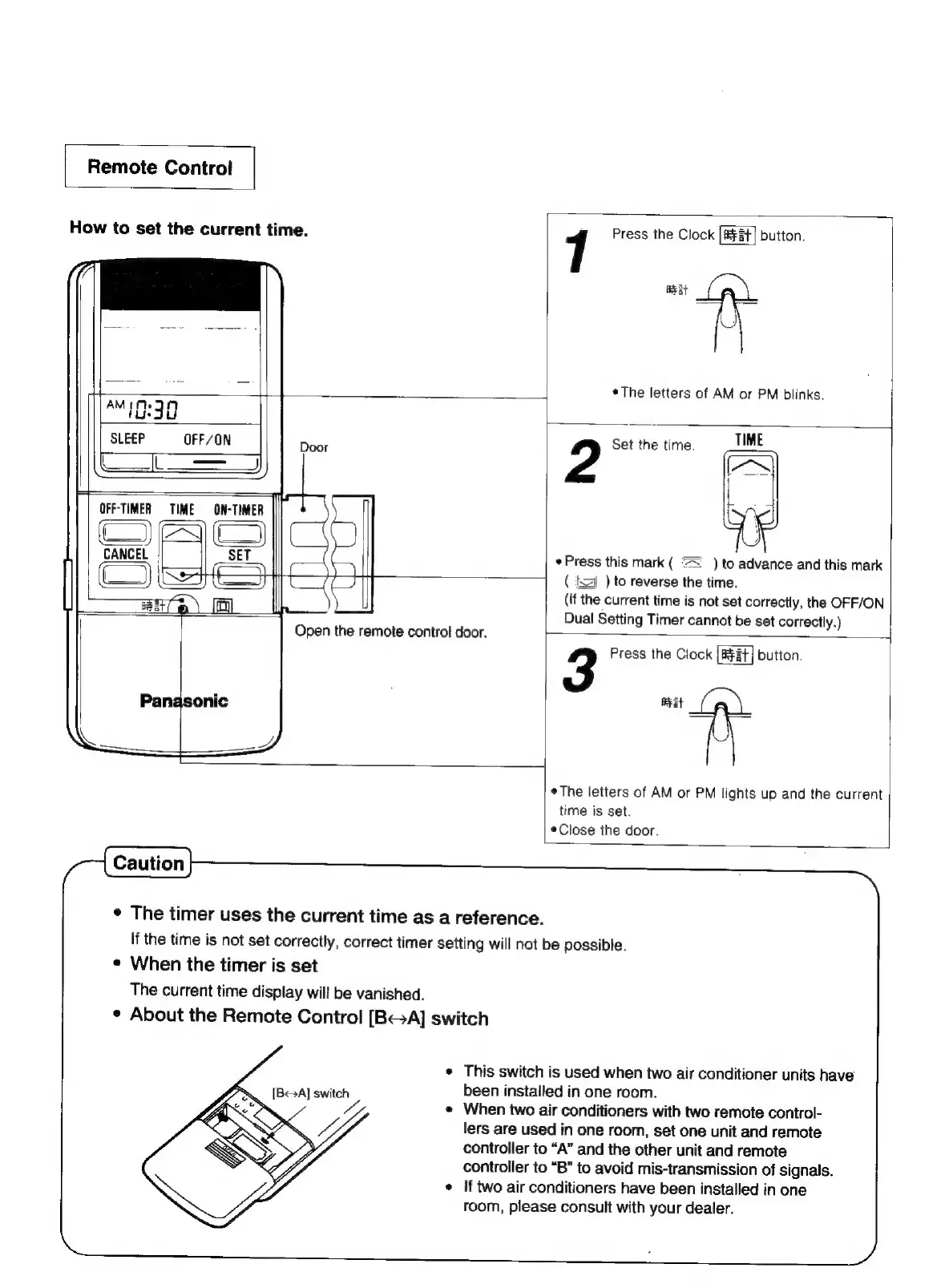
Remote
Control
How
to
set
the
current
time.
"10:30
7
Press
the
Clock
|#¥st|
button.
eat
¢The
letters
of
AM
or
PM
blinks.
SLEEP
OFF/ON
a
aa
Door
OFF-TIMER
§=TIME
—ON-TIMER
)}
|
CANCEL
P
2
Set
the
time.
TIME
¢
Press
this
mark
(
=
)
to
advance
and
this
mark
(J
Open
the
remote
control
door.
¢
The
timer
uses
the
current
time
as
a
reference.
¢
When
the
timer
is
set
The
current
time
display
will
be
vanished.
¢
About
the
Remote
Control
[BGA]
switch
NY
(
tj
)
to
reverse
the
time.
(if
the
current
time
is
not
set
correctly,
the
OFF/ON
Dual
Setting
Timer
cannot
be
set
correctly.)
3
Press
the
Clock
bution.
Beat
¢The
letters
of
AM
or
PM
lights
up
and
the
current
time
is
set.
*Close
the
door.
If
the
time
is
not set
correctly,
correct
timer
setting
will
not
be
possible.
¢
This
switch
is
used
when
two
air
conditioner
units
have
[BA]
switch
been
installed
in
one
room.
WA
vy
«
When
two
air
conditioners
with
two
remote
control-
<>
>
WA
lers
are
used
in
one
room,
set
one
unit
and
remote
$
controller
to
“A”
and
the
other
unit
and
remote
tj
controller
to
“B”
to
avoid
mis-transmission
of
signals.
¢
If
two
air
conditioners
have
been
installed
in
one
room,
please
consult
with
your
dealer.

Related product manuals