30
(EN)
Energy Saving
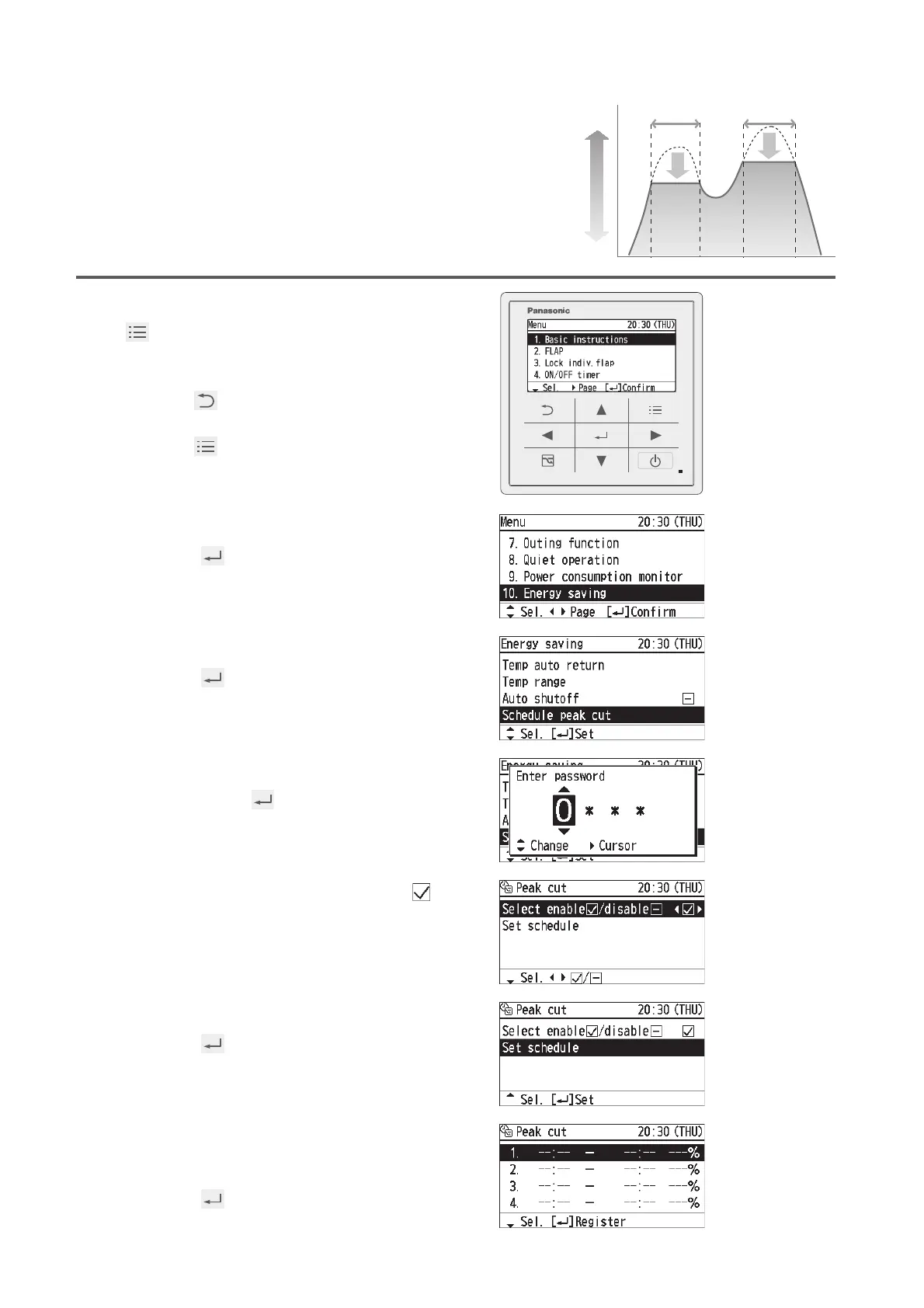
Schedule peak cut
This reduces the operation capacity for
the speciÞ ed time period.
1
Display the menu screen.
To return to the last screen
Press .
To return to the top screen
Press 2 times.
2
Select [Energy saving].
Ÿ ź ĺ
3
Select [Schedule peak cut].
Ÿ ź ĺ
4
Enter the password.
Ÿ ź ĺ Ź ĺ
(Repeat)
5
Set [Select enable/disable] to [ ].
Ÿ ź ĺ Ż Ź
6
Select [Set schedule].
Ÿ ź ĺ
7
Change the setting.
Select the Þ eld to register.
Ÿ ź ĺ
Large
Small
11:00 13:00 16:00 19:00
Time zone to reduce the operation
capacity
Operation
capacity







 To Next Page