- 29 -
Preparation
• The [PATTERN] setting is fixed to [ ] in the Intelligent auto mode and the clipboard mode.
• Refer to P74 for details.
• Press the shutter button halfway or turn the camera off and on to cancel [POWER SAVE].
• [POWER SAVE] is set to [5MIN.] in the Intelligent auto mode and the clipboard mode.
• [POWER SAVE] is fixed to [2MIN.] when [AUTO LCD OFF] is set to [15SEC.] or [30SEC.].
• The status indicator lights while the LCD monitor is turned off. Press any button to turn on the
LCD monitor again.
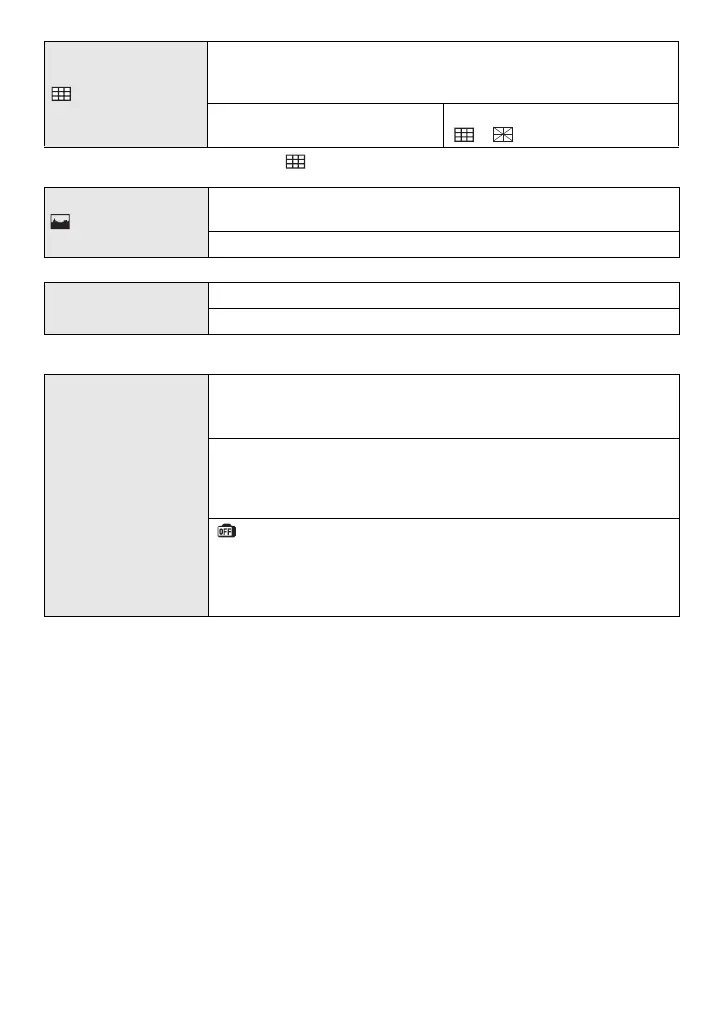
[GUIDE LINE]
Set the pattern of the guide lines displayed when taking pictures.
You can also set whether or not to have the recording information
displayed when the guide lines are displayed. (P49)
[REC. INFO.]:
[OFF]/[ON]
[PATTERN]:
[]/[]
[HISTOGRAM]
This allows you to set either to display or not display the
histogram. (P50)
[OFF]/[ON]
— [TRAVEL DATE]
Set the departure date and the return date of the vacation.
[OFF]/[SET]
q [ECONOMY]
You can conserve the battery life by setting these menus.
Also, it will turn off the LCD monitor automatically when not in use
to prevent discharge of the battery.
p [POWER SAVE]:
The camera is automatically turned off if the camera has not been
used for the time selected on the setting.
[OFF]/[2MIN.]/[5MIN.]/[10MIN.]
[AUTO LCD OFF]:
When taking pictures, the LCD monitor is automatically turned off
if the camera has not been used for the time selected on the
setting.
[OFF]/[15SEC.]/[30SEC.]














 To Next Page