Before Use
- 4 -
∫ Care of the camera
•
Do not strongly shake or bump the camera by dropping it etc.
This unit may malfunction, recording pictures may no longer be possible or the lens or the LCD
monitor may be damaged.
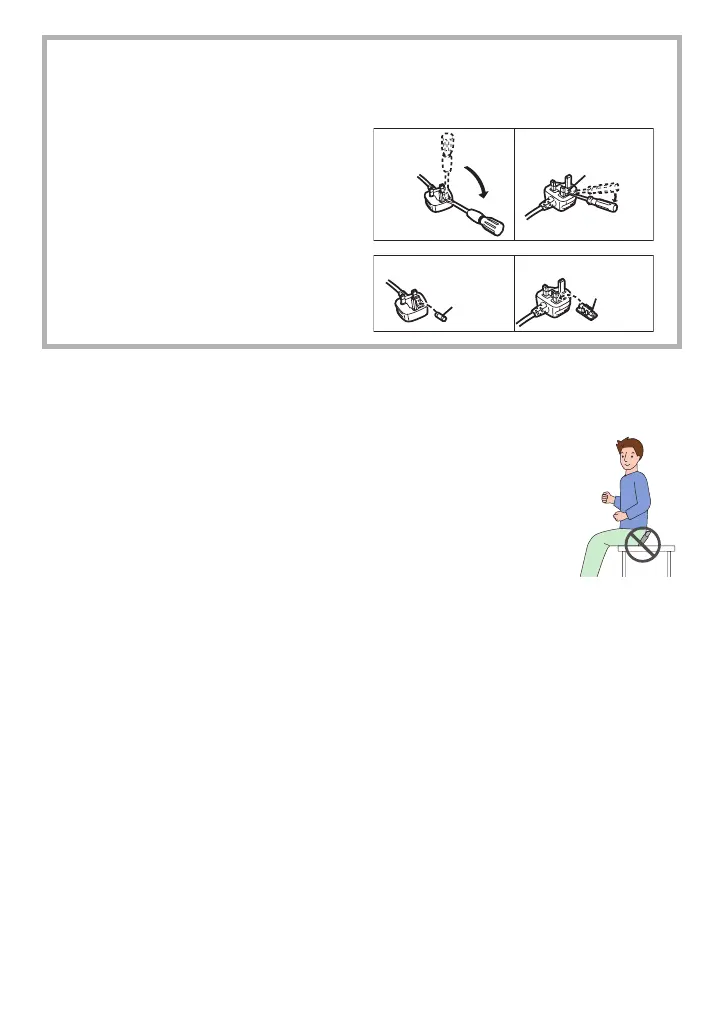
• We strongly recommend you do not leave the camera in your trousers pocket
when you sit down or forcefully insert it into a full or tight bag etc.
Damage to the LCD monitor or personal injury may result.
• Be particularly careful in the following places as they may cause this
unit to malfunction.
– Places with a lot of sand or dust.
– Places where water can come into contact with this unit such as when using
it on a rainy day or on a beach.
• Do not touch the lens or the sockets with dirty hands. Also, be careful
not to allow liquids, sand and other foreign matter to get into the space
around the lens, buttons etc.
• If water or seawater splashes on the camera, use a dry cloth to wipe the camera body
carefully.
∫ How to replace the Fuse
The location of the fuse differ according to the type of AC cable (figures A and B).
Confirm the AC cable fitted and follow the instructions below.
Illustrations may differ from actual AC cable.
1 Open the fuse cover with a
screwdriver.
2 Replace the fuse and close or attach
the fuse cover.
Fuse cover
Figure A Figure B
Figure A Figure B
Fuse
(5 ampere)
Fuse
(5 ampere)













 To Next Page