- 53 -
Advanced (Recording pictures)
∫ About the digital red-eye correction
When the flash is used with the Red-eye reduction ([ ], [ ], [ ]) selected, it will
automatically detect and correct the red-eye in the image data.
¢ It may not be able to correct the red-eye depending on the recording conditions.
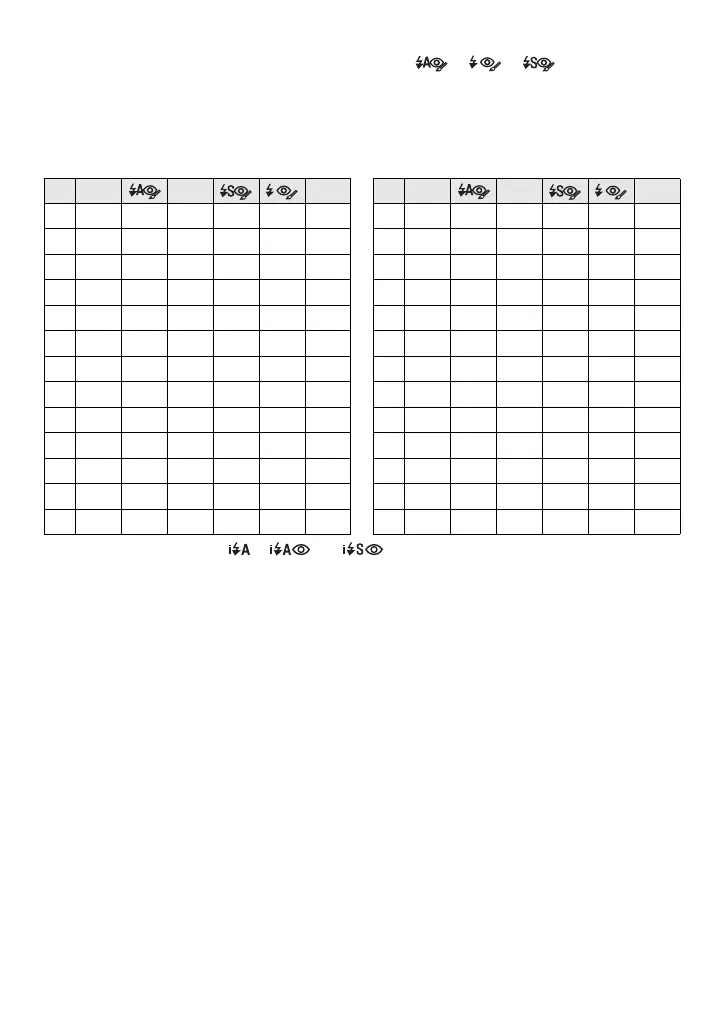
∫ Available flash settings by recording mode
The available flash settings depend on the recording mode.
(±: Available, —: Not available, ¥: Scene mode initial setting)
¢ When [‡] is selected, [ ], [ ] or [ ] is set depending on the type of subject and
brightness.
• The flash setting may change if the recording mode is changed. Set the flash setting again if
necessary.
• The flash setting is memorised even if the camera is turned off. However, the scene mode flash
setting is reset to the initial setting when the scene mode is changed.
‡ ‰ Œ ‡ ‰ Œ
·
±±±±— ±
:
±¥±——±
ñ
±
¢
————±
;
±¥±——±
¨
± — ± ——±
í
± — ± ——¥
*
±¥±——±
ï
—————¥
+
±
¥
± ——±
9
± — ± ——¥
0
±¥±——±
ô
—————¥
,
—————
¥
5
—————¥
-
¥ — ± ——±
4
—————¥
.
———¥ —
±
6
——¥ ——±
/
—————
¥
8
¥ — ± ——±
1
± — ± ——
¥
7
—————¥
2
———¥±±
<
± — ± ——¥
3
———±±¥
n
—————±













 To Next Page