Application (View)
Using the [Playback] menu
SQW0206
- 182 -
■
[MULTI]
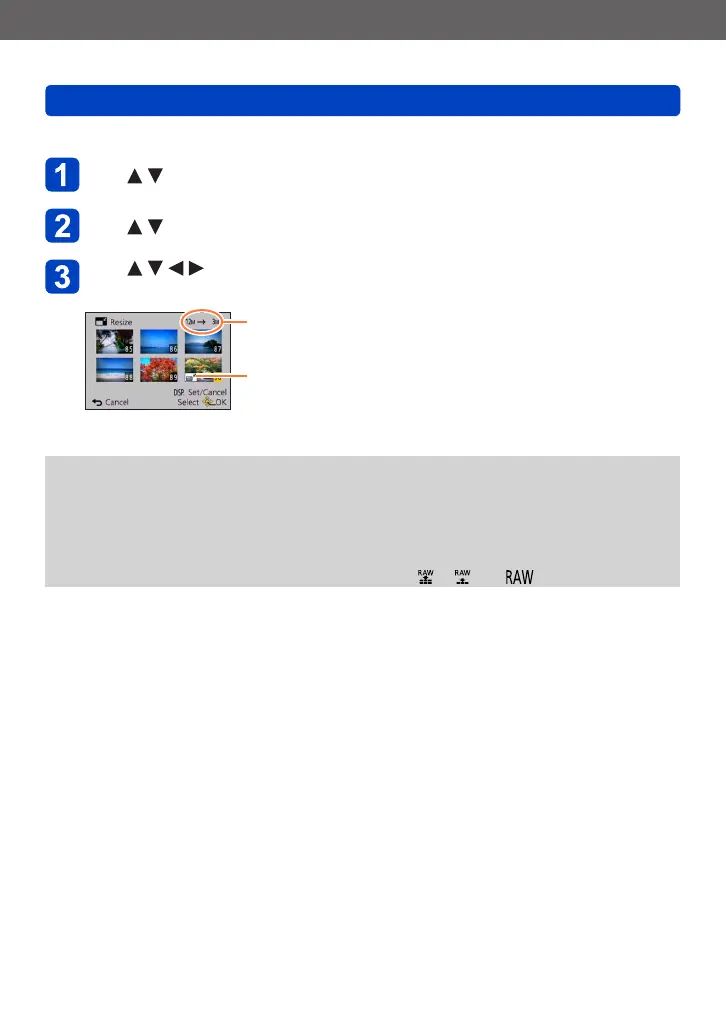
Use to select [MULTI] and press [MENU/SET]
Use to select size and press [MENU/SET]
Use to select a still picture and press [DISP.] button
(up to 100 pictures)
Number of pixels before/after
resizing
Resize setting
• To cancel
→ Press [DISP.] button again.
• To execute
→ Press [MENU/SET].
• Confirmation screen is displayed. If you select [Yes], the operation is executed.
●
Picture quality is reduced after resizing.
●
Cannot resize the following pictures.
• Motion pictures
• 3D still pictures
• Panorama pictures
• Still pictures that date or other texts had already been stamped
• Still pictures recorded with the [Quality] setting [ ], [ ] or [ ]






 To Next Page