Wi-Fi/NFC
Operating the camera using a smartphone/tablet
SQW0206
- 208 -
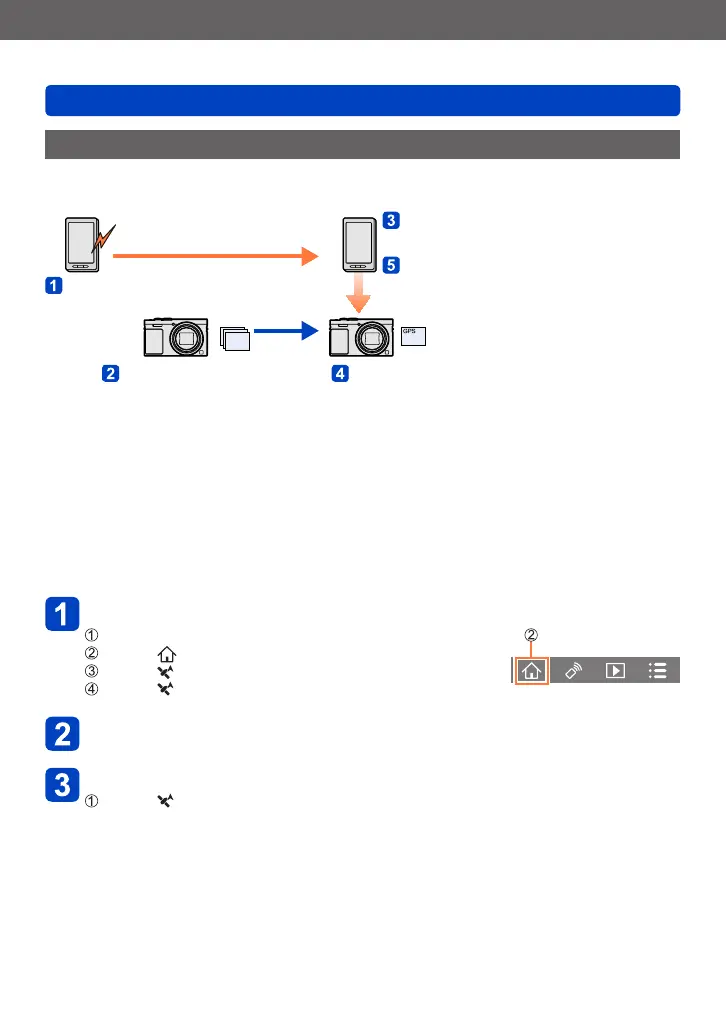
Adding location information to a picture in the camera that is being played back
You can use the NFC function to write location information obtained with your smartphone
to a picture that is being played back.
GPS
Starts location information
recording
Ends location information
recording
Sending and writing location
information using the NFC function
Start the recording Play back a picture to which you want to
write location information
• Location information that is different from the information acquired during recording may
be written. Take care regarding the following matters.
– Set [Home] of [World Time] of the camera to your home area.
– Once a smartphone starts recording the location information, do not change the
[Home] setting of [World Time] of the camera.
• The location information cannot be written to pictures recorded without setting [Clock
Set].
■
Recording location information and taking pictures
Start recording the location information on your smartphone
Start “Image App”
Select [ ]
Select [ ]
Select [ Start geotagging]
Take pictures using the camera
End recording of the location information on your smartphone
Select [ Stop geotagging] to end recording of location information
(Continued on the next page)









 To Next Page