Wi-Fi/NFC
Wi-Fi
®
Function and NFC Function
SQW0206
- 190 -
■
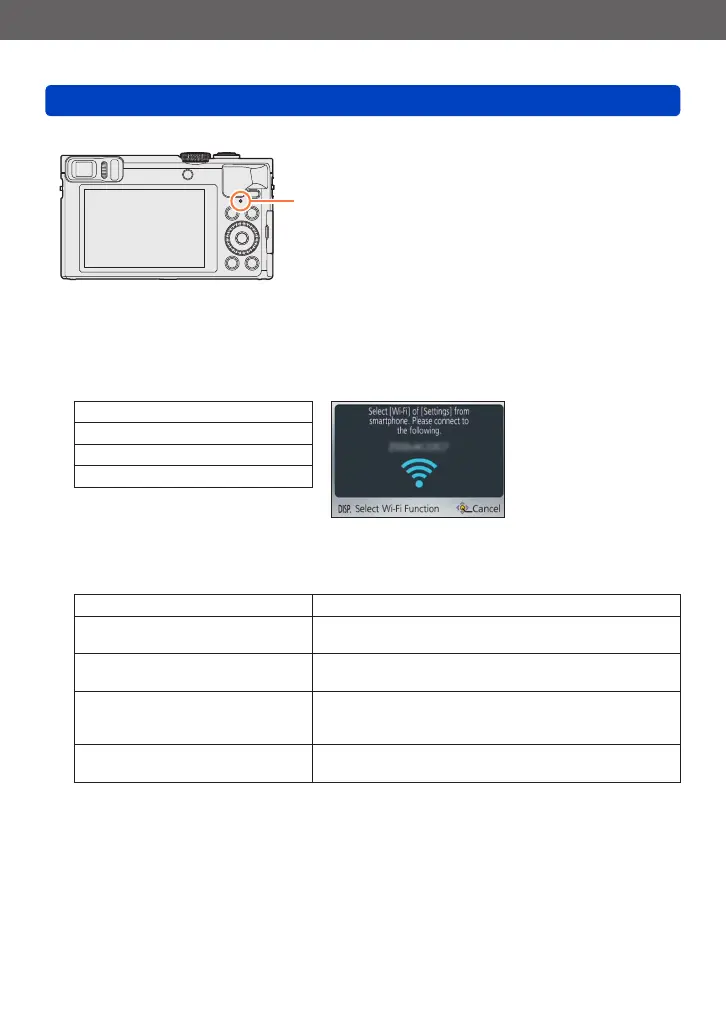
About the Wi-Fi connection lamp
Wi-Fi connection lamp
Lit blue: When the Wi-Fi function is ON
Blinking blue: When sending data
■
About the [Wi-Fi] button
●
If you press the [Wi-Fi] button before a Wi-Fi connection is established, you can
connect a smartphone/tablet directly to this unit. (→194)
At this time, if you press the [DISP.] button, you can perform the following operations.
[New Connection]
[History Connection] (→254)
[Favorite Connection] (→254)
[Wi-Fi Setup] (→259)
●
Pressing the [Wi-Fi] button during a Wi-Fi connection enables the following operation.
When connected using [Remote Shooting & View], a guide explaining how to
terminate the Wi-Fi connection is displayed.
[Terminate the Connection] Terminates the Wi-Fi connection.
[Change the Destination]
Terminates the Wi-Fi connection, and allows you to select
a different Wi-Fi connection.
[Change Settings for Sending
Images]
*
For details (→258).
[Register the Current Destination to
Favorite]
Registering the current connection destination or the
connection method, you can easily connect with the
same connection method next time.
[Network Address]
Displays the MAC address and IP address of this unit.
(→260)
*
This item will not be displayed if the destination for [Playback on TV] or [Send Images Stored in the
Camera] is set to [Printer].









 To Next Page