Wi-Fi/NFC
Operating the camera using a smartphone/tablet
SQW0206
- 196 -
<Using an Android device>
Start “Image App” (→193)
Select [ ]
Select the SSID displayed on this unit
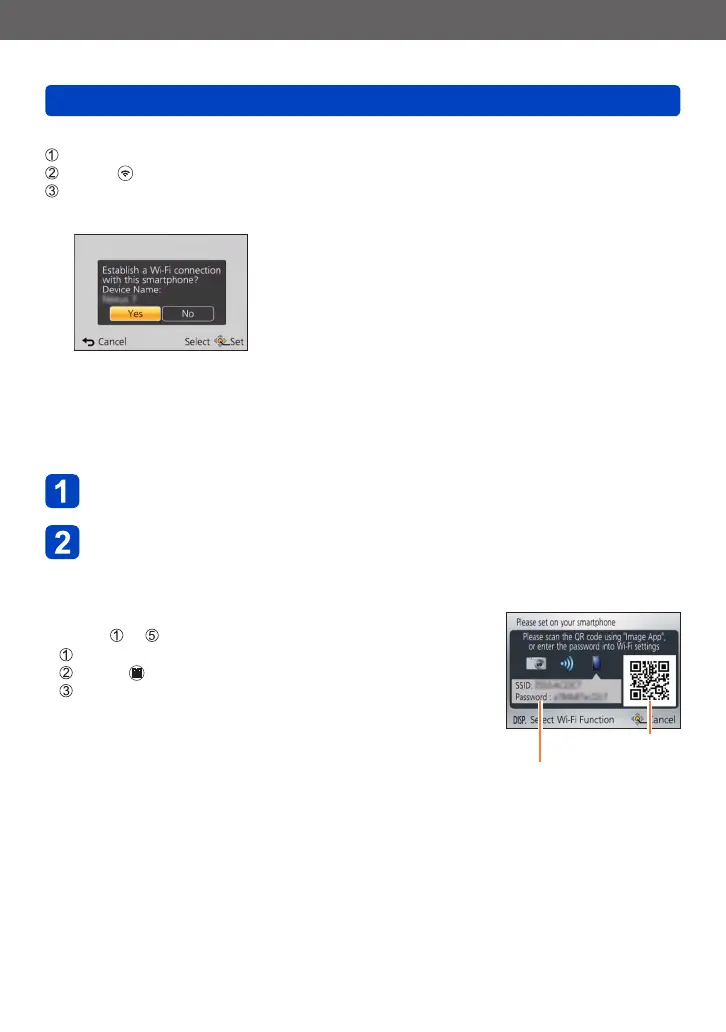
• When the connection confirmation screen appears on this unit, select [Yes] and press
[MENU/SET]. (Only when making a connection for the first time.)
■
Setting a password
When [Wi-Fi Password] is set to [ON] (→259), you can strengthen security by using
manual input or a QR code for password authentication.
When [Wi-Fi Password] is set to [ON], operate the smartphone as indicated below.
Press [Wi-Fi] button
Operate the smartphone
<Using an iOS device>
●
When reading a QR Code to connect
(Steps to are not necessary when reconnecting.)
Start “Image App” (→193)
Select [ ] → [OK]
Read the QR Code displayed on this unit with “Image App”
SSID and Password
QR Code
(Continued on the next page)










 To Next Page